You tap the chevron on the second card in a list and the details open. Then the list refreshes, a new item arrives at the top, and the details are now open on a different card. Or you mark one item as a favorite, scroll, and the filled heart appears on its neighbor instead. The component looks correct in isolation, so the bug seems to come from nowhere.
The short answer: each value in a repeated row needs exactly one owner, and every row needs an identity that comes from its record rather than from its position in the list. Keep display-only state such as "expanded" inside the component, store anything that must survive a refresh on the record itself, keep single page-wide choices in page state, and pass the record's reference through every action instead of a list index.
The examples below use a synthetic demonstration: a Firestore collection called demo_tasks with the fields title, notes, isFavorite and sortOrder, and a FlutterFlow component called TaskCard. The FlutterFlow steps and the Dart sample follow the current FlutterFlow and Flutter documentation. They were not run in a FlutterFlow project for this article, so the test at the end is the procedure you still need to execute.
Why does one row's state appear on another row?
Without a key, Flutter matches the widgets of a rebuilt list to the existing ones by their type and their position, and any state held by those widgets stays at that position. The Flutter documentation for ValueKey describes the exact case: when a list is reversed, "Flutter matches widgets by position", so state held by stateful widgets "can be reused for a different piece of data".
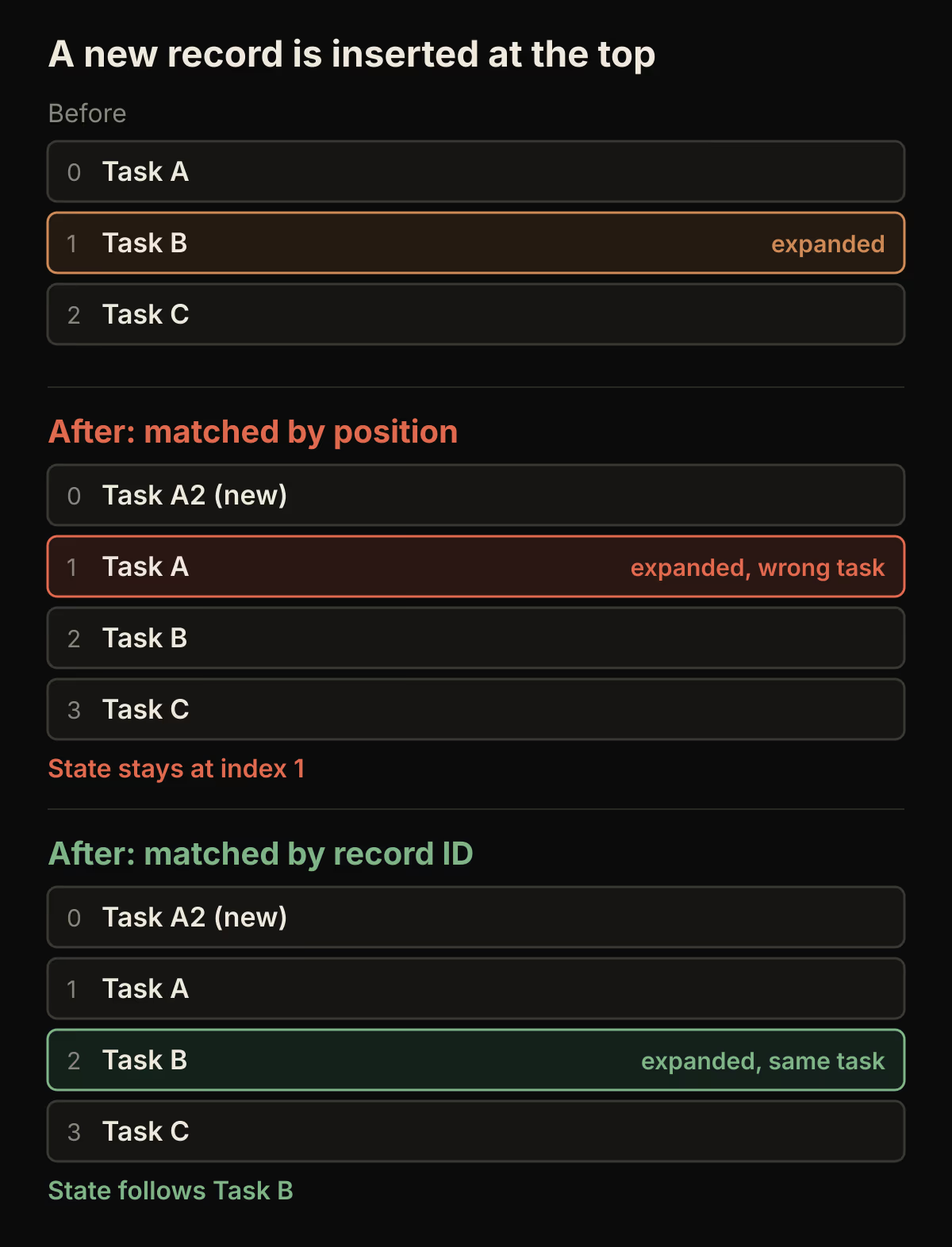
In the diagram, Task B is expanded before the refresh. A new Task A2 is inserted at the top, so Task B moves from index 1 to index 2. When matching uses position, the state for index 1 is kept and now appears on Task A, which is the bug users report. When matching uses the record ID, the state follows Task B.
The general rule is documented on the Key class: a new widget only updates an existing element when its key is the same, keys must be unique among siblings, and attaching the wrong State object to an unkeyed stateful widget "can often be solved by using an appropriate Key". The ValueKey page recommends a value that is "stable and unique for each item, such as an identifier from the data model". A Firestore document ID fits that description. A list index does not, because it changes whenever a row is inserted, removed or reordered.
Give each value one owner
Before you build anything, list every value the card shows or changes and decide where it lives. In the demo there are three, and each belongs to a different scope.
| Value | Owner | Where it lives | Expected after a refresh |
|---|---|---|---|
| Is this card expanded? | The TaskCard instance | Component state isExpanded, default false | May reset to collapsed; must never move to another card |
| Is this task a favorite? | The task record | Firestore field isFavorite on that document | Same value, on the same task |
| Which task is open in the side panel? | The page | Page state selectedTaskRef (one document reference) | Same task, or an empty panel if it was deleted |
FlutterFlow documents that component state variables are only accessible within the current component's scope and can only be changed through actions. That makes component state a good home for a display flag that only one card cares about. It is a poor home for anything the user expects to keep, because the same page documents that a component's On Initialization actions run again when a hidden component is shown, and that each dynamically generated instance runs them when it is created. A recreated instance starts from its default.
The favorite belongs on the record. The user is stating something about the task, other screens may show it, and it has to be there tomorrow. The selected task belongs to the page because only one can be selected at a time. Store its document reference rather than its index, so a reorder does not change which task the panel shows.
Why a single App State flag opens every row
A global variable has one value for the whole app, so every card that reads it shows the same answer. FlutterFlow describes App State as variables that can be accessed and modified across all pages and components, and recommends page or component state instead for temporary data that does not affect the overall state of the application.
With one boolean App State variable such as isCardExpanded, every card reads the same value, so expanding one card expands all of them. A common workaround is an App State list of expanded indexes. That avoids the shared value, but it stores identity by position again, so it fails after the same insert or reorder. If you truly need expansion to survive navigation, store a list of task IDs instead, and remove an ID when its task is deleted.
Build the card so actions name the record
The component should receive the whole record, keep its own display state, and send the record's reference with every change. In FlutterFlow, the setup looks like this:
- Create the
demo_taskscollection with the four fields above and add five or six documents with clearly synthetic titles such as "Demo task 1". GivesortOrderdistinct numbers so you can reorder rows later by editing them. - On the page, add a ListView and a Firestore query on
demo_tasks, ordered bysortOrder. Turn on Listen For Changes, which FlutterFlow's query documentation describes as updating displayed documents when their data changes. Generate dynamic children from the query result. - Create the
TaskCardcomponent with one parameter,task, of type Document fordemo_tasks. Bind the title, notes and heart icon to that parameter, not to page variables. - Add the component state
isExpandedas a boolean with the defaultfalse. On the chevron's tap, use Update Component State to set it to its opposite, with the update type Rebuild Current Component so the tap does not rebuild the whole page. - On the heart's tap, run the Firestore Update Document action with the reference of
taskand setisFavoriteto the opposite of the current value. FlutterFlow's Firestore actions identify the document to update by its reference, which acts as a pointer to that exact document. - If the parent needs to react, for example to set
selectedTaskRef, add an action parameter to the component that takes a document reference. In the card, call it with Execute Callback and passtask's reference. FlutterFlow's callback documentation shows the same pattern: the child passes a value into the callback and the parent reads it from the callback parameters.
The important part is what you leave out. Neither the card nor the callback receives the list index, and no page or App State variable holds a per-row value. Every change names the document it belongs to, so a reorder between the tap and the write cannot redirect it to another row.
Check how your exported code keys the rows
FlutterFlow's page model documentation says that for dynamic lists of components, the page model keeps a Map<String, FlutterFlowModel> to manage the state of each component instance. It does not say which string identifies an instance, and the generated code can change between releases, so read your own export rather than relying on an article.
Open the code view or download the project and find the ListView that builds TaskCard. Check two things. First, whether the item widget has a key, and what value it uses. Second, which string is used to look up each card's model in that map. If either is derived from the item's index, component state is tied to positions and will move after an insert, removal or reorder. If both use the document ID, state follows the record. In both cases the favorite stays correct, because it is stored on the document and read from it.
When the generated list does not give you the identity you need and you move the list into a custom widget, the plain Flutter fix is small. This sample shows the pattern for a list of DemoTask objects with an id taken from the document ID, where TaskCard is your own stateful widget:
ListView.builder(
  itemCount: tasks.length,
  itemBuilder: (context, index) {
    final task = tasks[index];
    return TaskCard(
      key: ValueKey(task.id),
      task: task,
      onSelected: () => onTaskSelected(task.id),
    );
  },
  findChildIndexCallback: (Key key) {
    final id = (key as ValueKey<String>).value;
    final index = tasks.indexWhere((t) => t.id == id);
    return index >= 0 ? index : null;
  },
)
The ValueKey ties each card's state to its task. The ListView.builder documentation adds that findChildIndexCallback needs to be implemented if the order of children may change later, because without it a child may not map to its existing render object, which "may result in state-loss". If you let users drag rows, Flutter's ReorderableListView requires that "all list items must have a key". For deciding when a list like this should leave the visual builder at all, see when to drop from FlutterFlow custom code to pure Flutter.
Run the identity test before you trust the list
A list that looks correct with static data proves little. The test needs to change positions while state is set, which is the condition that exposes position-based identity. Run it on a build of the app with at least five demo documents.
| Step | Action | Expected result |
|---|---|---|
| 1 | Expand task 2 and task 4. Mark task 3 as a favorite. | Only tasks 2 and 4 are expanded. Only task 3 shows a filled heart. |
| 2 | Collapse task 2. | Task 4 stays expanded. No other card changes. |
| 3 | In the Firebase console, give task 4 the lowest sortOrder so it moves to the top. | Task 4 appears first. Its expansion is either still open or reset to collapsed, but no other card opens. Task 3 keeps its heart. |
| 4 | Add a new document with the lowest sortOrder so it appears first. | The new task is collapsed and has no heart. Existing cards keep their own state. |
| 5 | Leave the page and return. | Favorites are unchanged. Expansion may reset, but never onto a different card. |
| 6 | Expand task 5, then delete task 1 in the console. | Task 5 stays expanded, and the card that moves into task 1's old position does not inherit any state. If task 1 was selected, the side panel shows an empty state instead of another task. |
Step 3 and step 6 are the ones that catch index-based identity. If the expanded state lands on a neighbor in either step, check the key and model lookup described in the previous section. If the heart lands on a neighbor, the favorite is being read from something other than the document, often an App State list indexed by position.
Record the device, the build, and the result of each step. "Expansion reset after refresh" is an acceptable outcome for display state. "Expansion moved to another task" is a defect.
Where this pattern stops
This article covers ownership and identity for one repeated component. It does not compare state management packages, and it does not claim how FlutterFlow's generated list code keys rows in your version, because the documentation does not state it. The FlutterFlow menu names above match the current documentation, but some of those pages were last updated well before the current editor release, so labels may differ slightly in your project. Writes to isFavorite still need Firestore Security Rules that allow only the right user to change that document. Nothing here was executed in a live project.
Start with step 3 of the test on your own list: set one card's state, move that card to the top, and watch where the state goes. If it stays at the old position, you have found the identity problem before your users do. If the same list also has filters, the related article on clearing FlutterFlow filters without stale results covers the query side of the same page.