
A search field that loads a Firestore collection and filters it in Dart works with ten test products. With a real catalog, every search session reads every document the app downloads, and any draft or private item the query can read lands on a phone whose user was never meant to browse it. The opposite mistake is quieter: a "contains" search built from string comparisons that only ever matches the start of a field.
The short answer is to pick the backend by the kind of search the screen needs. Exact lookups and starts-with matching run as ordinary Firestore queries on a normalized field. Matching words anywhere in the text needs a text index, either Firestore's own text search on an Enterprise edition database or a dedicated search service fed from Firestore. In every case the client asks for a bounded result and opens the chosen record through a normal read that Security Rules check.
The examples use a synthetic catalog collection called catalog with fields such as name, sku, visibility and nameNormalized. The product names and counts are demonstration data. The Dart snippets are reference code checked against the current API documentation; they were not run against a live project for this article, so run the checks at the end before you ship.
Where does the matching happen?
Matching should happen on the server, against an index, before any document reaches the phone. Filtering on the device means the device first downloaded everything it filtered.
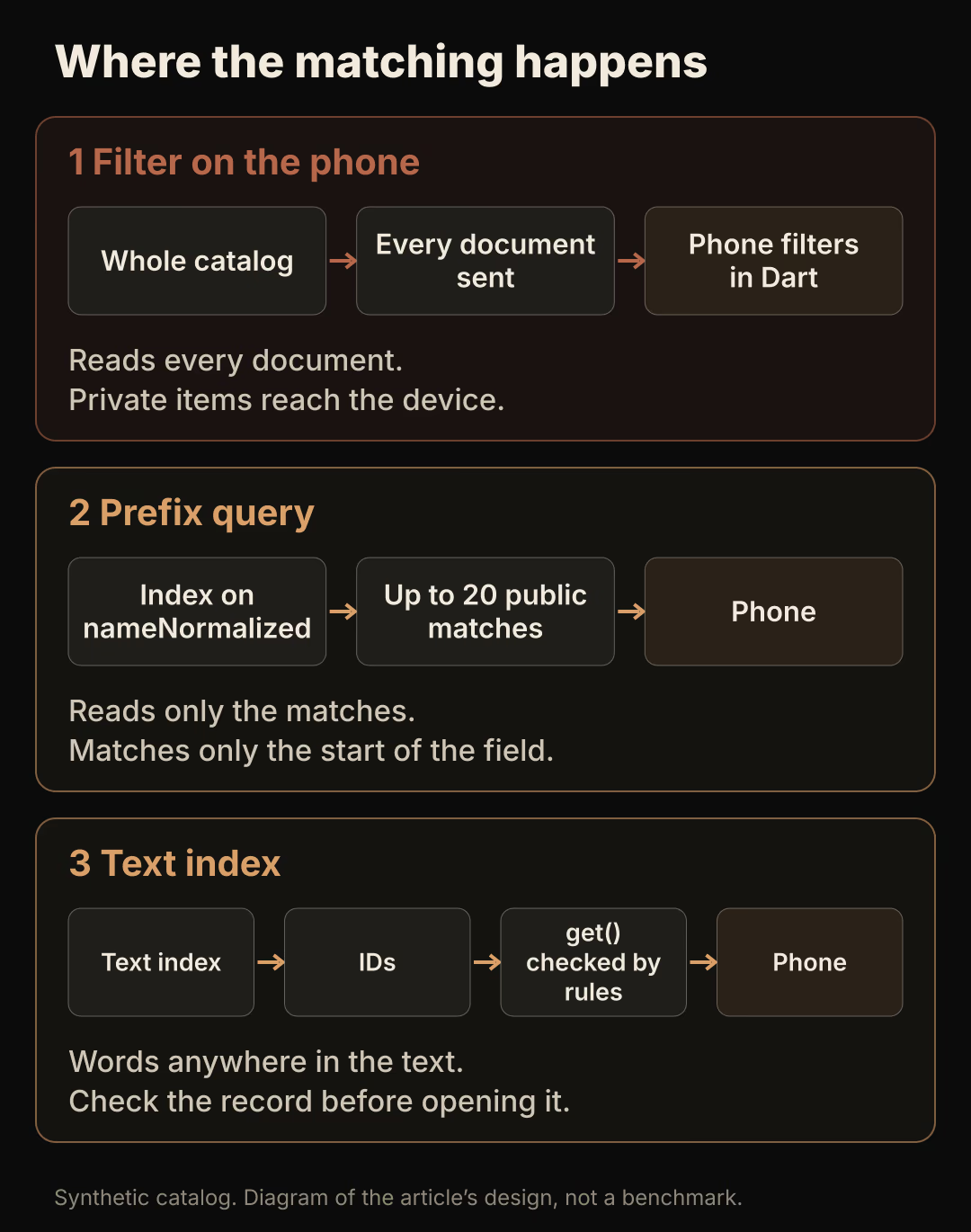
The first path is the one to remove. Firestore's pricing page charges for the documents read to satisfy a query, so downloading an illustrative 5,000-product catalog to filter it locally costs at least 5,000 document reads on a Standard edition database, every time the app loads it without a cache. Enterprise edition bills read units in 4 KiB tranches instead, which still grows with every document scanned. The second and third paths read only the matches you ask for, plus index reads.
FlutterFlow users meet the same trade-off. Its Simple Search action searches data already present on the device, and the documentation advises using it only for smaller collections because it "can be slow and/or expensive" otherwise. For larger collections FlutterFlow points to its Algolia integration. The Firestore range query and the Pipeline search below need custom Dart code.
Which kind of search does the screen need?
| What the user types | What should match | Native option | Main limit |
|---|---|---|---|
| A SKU or order code | The exact value | where('sku', isEqualTo: code) | Exact match only |
| The first letters of a name | Names that start with the input | Range query on a normalized field | Matches the start of the field only |
| The start of any word in the name | Items with a word that starts with the input | arrayContains on a stored token list | One array-contains clause per disjunction |
| Several words, anywhere in the text | Relevant items, ideally ranked | Enterprise text search, or an external index | Text search was in preview in April 2026; an external index is a copy |
The first three rows use operators from Firestore's query documentation: ==, <, <=, >, >=, !=, array-contains, array-contains-any, in and not-in. None of them tests whether a field contains a substring, so a request such as "find lamp anywhere in the name" belongs in the last row.
Normalize the text before you store it
Case and accents break prefix matching unless both the stored field and the typed query go through the same normalization. Firestore orders strings by UTF-8 encoded byte order, so Č and c are unrelated values to a range query.
Write a nameNormalized field whenever the product is created or renamed, and normalize the input with the same function:
const _folded = {
  'à': 'a', 'á': 'a', 'â': 'a', 'ä': 'a', 'ã': 'a', 'å': 'a',
  'č': 'c', 'ć': 'c', 'ç': 'c', 'đ': 'd',
  'è': 'e', 'é': 'e', 'ê': 'e', 'ë': 'e',
  'ì': 'i', 'í': 'i', 'î': 'i', 'ï': 'i', 'ñ': 'n',
  'ò': 'o', 'ó': 'o', 'ô': 'o', 'ö': 'o', 'õ': 'o',
  'š': 's', 'ù': 'u', 'ú': 'u', 'û': 'u', 'ü': 'u', 'ž': 'z',
};

String normalizeForSearch(String input) {
  final mapped = input
      .toLowerCase()
      .split('')
      .map((char) => _folded[char] ?? char)
      .join();
  return mapped
      // Drop combining accent marks (decomposed input such as e + U+0301).
      .replaceAll(RegExp(r'[\u0300-\u036f]'), '')
      // Anything else outside a-z and 0-9 becomes a single space.
      .replaceAll(RegExp(r'[^a-z0-9]+'), ' ')
      .trim();
}
The folding table covers the characters in the demo catalog. Extend it for the languages your users write in. If the same text can be written by a Cloud Function and by the app, keep one implementation or one shared test fixture, because a single differing character makes a stored value unreachable.
Run a prefix query with a hard limit
A prefix search is a range on the normalized field: everything greater than or equal to the term and lower than the term with its last character incremented.
String _upperBound(String term) =>
    term.substring(0, term.length - 1) +
    String.fromCharCode(term.codeUnitAt(term.length - 1) + 1);

Query<Map<String, dynamic>> catalogPrefixQuery(String input) {
  final term = normalizeForSearch(input);
  return FirebaseFirestore.instance
      .collection('catalog')
      .where('visibility', isEqualTo: 'public')
      .where('nameNormalized', isGreaterThanOrEqualTo: term)
      .where('nameNormalized', isLessThan: _upperBound(term))
      .orderBy('nameNormalized')
      .limit(20);
}
Because normalization leaves only a to z, digits and inner spaces, incrementing the last character gives an exact upper bound. Call the function only for a non-empty term; the controller below skips anything shorter than two characters.
The visibility filter has two jobs. It keeps drafts out of the results, and it lets the query pass a rule such as allow list: if resource.data.visibility == 'public';. Firestore's guide to securing queries explains that "security rules are not filters": a query that could return a document the user may not read fails as a whole. The query docs also note that combining an equality filter with a range filter needs a composite index.
To match the start of any word, store a nameTokens array of word prefixes (for "desk lamp steel": de, des, desk, la, lam and so on) and query where('nameTokens', arrayContains: term). The query docs allow at most one array-contains clause per disjunction, so this handles one typed word at a time and adds index entries for every token. Several words in any order is the point where a text index pays off.
Search full text with Firestore Enterprise
Firestore now has native text search, but only on an Enterprise edition database with a text index on the searched fields. The text search guide states that "Text search requires a Firestore Enterprise edition database" and that the operation "searches only in the fields indexed with a text index". Firebase's April 2026 announcement made Pipeline operations generally available and kept full-text search in public preview, so check the current release notes before you depend on it.
Flutter can call it. The cloud_firestore changelog lists Pipeline support in 6.3.0 and search in Pipelines in 6.6.0, and the API reference documents FirebaseFirestore.pipeline(), Pipeline.search(SearchStage) and SearchStage.withQuery:
final searchDb = FirebaseFirestore.instanceFor(
  app: Firebase.app(),
  databaseId: 'catalog-enterprise', // your Enterprise database ID
);

Future<List<String>> searchCatalogIds(String input) async {
  final snapshot = await searchDb
      .pipeline()
      .collection('catalogSearch')
      .search(SearchStage.withQuery(input, limit: 20))
      .execute();

  return [
    for (final result in snapshot.result)
      if (result.document != null) result.document!.id,
  ];
}
The query string follows the text search syntax: space-separated terms are combined with AND, a quoted phrase must match exactly, and a leading hyphen excludes a term. Results are sorted by creation time, newest first, unless you sort by score, which the guide says requires more computation. Pass the raw input here rather than nameNormalized, and test accented and partial terms yourself. The guide does not document accent folding or prefix matching, so treat both as unknown until your test database shows the behavior.
Two limits shape the design. Pipeline results, according to the Pipeline API reference, are request and response only: they do not use or update the local cache and have no realtime listeners, so search needs a network connection. And the Security Rules page for Pipelines says rules recognize only comparison and logical filters such as eq, lt, and and or. It does not mention the search stage, and the SearchStage reference requires search to be the first stage after the source. That is why the example searches catalogSearch, a collection containing only public, searchable fields that any signed-in user may list, rather than the full catalog.
Use an external index when you need search features
A dedicated search service makes sense when you need behavior that Firestore text search does not document, such as faceted filters or ranking rules you tune yourself, or when the data cannot sit in a broadly readable collection. The cost is a second copy of the data that must follow the source.
The Algolia extension shows the usual sync contract. Its listing says it indexes a record when a document is added, propagates updates, removes the record when the document is deleted, and indexes only the configured fields. It requires the Blaze plan. Before adopting any extension, note that Firebase has deprecated the Extensions service and will shut it down on March 31, 2027. Installed extensions keep running after that date, but they can no longer be updated, reconfigured or uninstalled through the console or CLI. New projects should write the sync as their own Cloud Function or use the migration path Firebase documents.
Per-user visibility needs a server decision. With Algolia, the user-restricted access guide tells you to "generate a secured API key on the backend with filters (users can't alter these filters)". The alternative is a callable function that runs the search with server credentials and returns only IDs the caller may open.
Keep the index in step with the source record

Any index that is a copy can briefly point at something that no longer exists, or at something the user can no longer read. A deleted product, an item moved back to draft and a renamed product all take a sync cycle to disappear from an external index or from catalogSearch.
Write the sync so that the source document's state decides the search entry. When visibility stops being public or the document is deleted, delete the search entry. When the document changes, overwrite the entry with the current searchable fields. Keep the search document ID equal to the source document ID so the hit always leads back to one record.
Then treat a hit as a suggestion and read the real record before showing it:
Future<DocumentSnapshot<Map<String, dynamic>>?> openHit(String id) async {
  try {
    final snap = await FirebaseFirestore.instance
        .collection('catalog')
        .doc(id)
        .get();
    return snap.exists ? snap : null; // deleted since it was indexed
  } on FirebaseException catch (e) {
    if (e.code == 'permission-denied') return null; // no longer readable
    rethrow;
  }
}
A null result shows "This item is no longer available" and refreshes the result list. With a rule that reads resource.data.visibility, a deleted document can also surface as permission-denied, so handle both cases the same way.
Debounce input and ignore stale responses
Searching on every keystroke sends a query per character, and responses can arrive out of order: the result for "la" may land after the result for "lamp". Wait for a pause, then keep only the newest response.
class CatalogSearchController {
  CatalogSearchController(this._search, this._show);

  final Future<List<String>> Function(String input) _search;
  final void Function(List<String> ids) _show;
  Timer? _debounce;
  int _latest = 0;

  void onChanged(String input) {
    _debounce?.cancel();
    final request = ++_latest;
    if (normalizeForSearch(input).length < 2) {
      _show(const []);
      return;
    }
    _debounce = Timer(const Duration(milliseconds: 300), () async {
      final ids = await _search(input);
      if (request == _latest) _show(ids);
    });
  }

  void dispose() => _debounce?.cancel();
}
A Dart Future cannot be cancelled, so the request counter discards an older response instead. Clearing the field also increments the counter, which stops a late result from refilling an empty search box. The 300 ms delay is a starting point to tune with real users.
Offline behavior differs by path. The prefix query runs against cached documents when the device is offline; the offline data guide says such queries "will initially run only against the cached documents", so results are incomplete. Pipeline search and external services need the network. Show an offline message rather than an empty list that looks like "no matches".
Test the search before release
| Check | How to run it | Expected result |
|---|---|---|
| Accented input | Store "Čelik lampa", search celik and ČELIK | The prefix query finds it via nameNormalized; record what text search returns |
| Partial term | Search cel, then lampa | The prefix query finds cel; the second word needs word tokens or a text index |
| Deleted record | Delete an indexed item, search and tap the hit before sync finishes | "No longer available", then the hit disappears after sync |
| Unauthorized record | Create a draft item and search its name as a normal user | Not in results; a direct get is denied |
| No full download | Log snapshot.docs.length and inspect every search query in code | Every query has a filter and limit(20); no unbounded get() on catalog |
| Out-of-order replies | Type quickly on a throttled network | The list always matches the current text |
If an unbounded read turns up, search the codebase for .collection('catalog').get() and for widgets that load a full stream only to filter it. Each one is a place where the device downloads the catalog before the user has typed anything useful.
Start by listing what users actually type into the field for a week or from support requests. If almost every query is a code or the first letters of a name, the range query is enough. If people type several words, plan the text index and its sync before you add more client-side filtering.
For the wider backend choices behind this, see how Flutter and Firebase fit a SaaS mobile app. If your users search while offline in the field, read how to design an offline-first Flutter field tool before deciding which data to cache.