
A user fills in a report, attaches a photo and taps Submit. The report document is written to Firestore, the photo upload fails, and the screen says "Something went wrong." The user taps Submit again and now there are two reports, one of them without a photo. In the opposite version of the same bug, the flow ends with a "Team notified" snackbar even though the step before it only opened an email app.
Both problems come from treating a FlutterFlow action chain as one operation that either fully succeeds or fully fails. It is a sequence of separate writes to separate systems. The fix is to give the submission an ID before the first write, make every step safe to repeat, store how far the submission got, show a message that matches the saved state, and hand the team notification to a server function that retries on its own.
The code below is a proposed reference implementation with synthetic data: a field report with a title, a body and one photo. The Cloud Function type-checks against firebase-functions 7.4.0. The retry protocol ran as an in-memory simulation with injected failures, restarts and duplicate events. The Dart custom actions were not compiled, and nothing here ran inside a FlutterFlow project or against a real Firebase backend. The test list near the end is what you should run in yours.
Find out which step actually committed
Before changing the flow, open the Firebase console and look at what the failed submission left behind. The record of what happened is in Firestore and Storage, not in the snackbar.
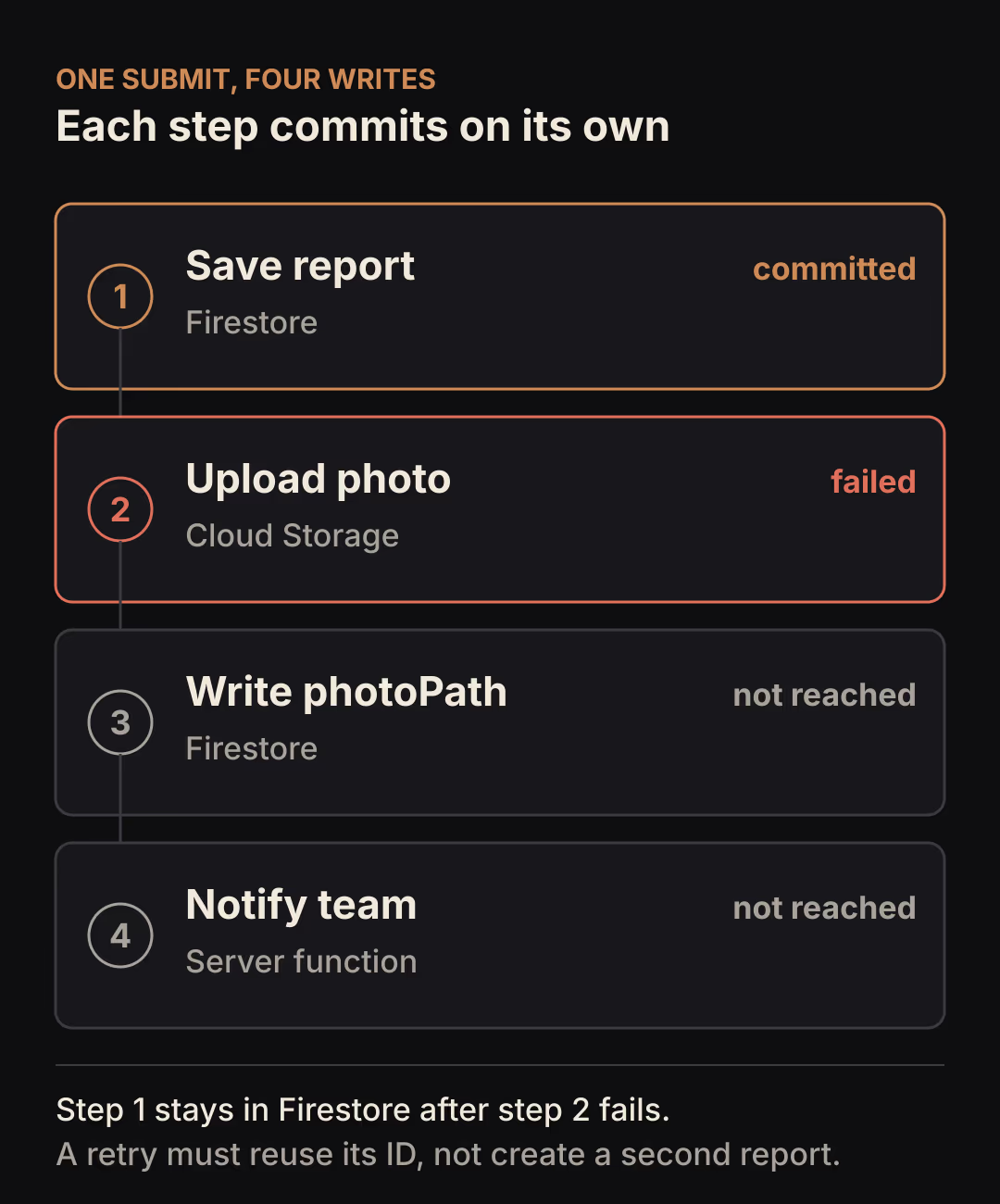
Each step in the diagram is a separate write, so each can succeed or fail on its own. When the upload fails, the report written one step earlier stays in Firestore. Nothing in the chain removes it, and nothing should remove it automatically, for reasons covered further down.
| What you see | What to check | Likely cause |
|---|---|---|
| Two reports with the same title, one without a photo | Do both documents have auto-generated IDs? | The retry ran Create Document again and got a new ID |
| Report exists, error message shown | Is there a file under the report's Storage path? | Upload failed after the document was committed |
| Photo in Storage, report has no photo field | Did the step that writes the photo path run? | Failure between upload and the follow-up update |
| "Team notified" shown, nobody received anything | What does the notify step actually do? | A client-side step that cannot confirm delivery |
| Retry after an app restart starts from scratch | Is any progress stored outside page state? | Progress lived in a page variable that reset |
Why an action chain is not a transaction
FlutterFlow's Action Flow Editor documentation says synchronous actions run "one after another, with each action waiting for the previous one to complete." Waiting for the previous step is ordering. It does not undo earlier steps when a later one fails. The same page does not describe what happens at runtime when an action throws, so check what your build shows before you rely on any particular behavior.
FlutterFlow does have an atomic option for one part of this. Its Firestore actions page describes Batch Firestore Writes, where "either all the operations within the batch will succeed or none of them will be applied." That guarantee covers Firestore document writes. A file upload goes to Cloud Storage and an email goes to a mail provider, so neither can join the batch. Firebase's transactions guide adds a second limit that matters on phones: "Transactions will fail when the client is offline," while batched writes still execute offline.
So the question to design for is "which steps have committed, and what happens on the next attempt?" Answer it once per step and the rest of the design follows.
Give the submission an ID before the first write
A retry creates a duplicate because Create Document generates a new ID each time it runs. Firestore's add data guide notes that .add(...) and .doc().set(...) "are equivalent" in the backend: both produce a fresh auto-generated identifier. Two taps, two IDs, two documents.
The same guide shows the alternative. Calling doc() on a collection creates a reference with an auto-generated ID without writing anything, so you can generate the ID first and use it later. Generate it once per logical submission, store it, and reuse it on every attempt:
// Custom action: newSubmissionId, returns String.
import 'package:cloud_firestore/cloud_firestore.dart';

Future<String> newSubmissionId() async {
  // Generates an ID locally. Nothing is written to Firestore yet.
  return FirebaseFirestore.instance.collection('submissions').doc().id;
}
FlutterFlow's Create Document action has a Custom ID toggle for using your own ID. Its documentation does not say whether running it again with an existing ID overwrites the document or fails, so I write the first save with a custom action where the behavior is documented. With set(), "if the document does not exist, it will be created," and if it exists its contents are overwritten unless you merge:
// Custom action: saveSubmission(submissionId, ownerUid, title, body).
import 'package:cloud_firestore/cloud_firestore.dart';

Future saveSubmission(
  String submissionId,
  String ownerUid,
  String title,
  String body,
) async {
  await FirebaseFirestore.instance
      .collection('submissions')
      .doc(submissionId)
      .set({
    'ownerUid': ownerUid,
    'title': title,
    'body': body,
  }, SetOptions(merge: true));
}
merge: true means a repeated save rewrites the same three fields and leaves later fields such as photoPath alone. Your security rules must allow the owner to update the document as well as create it, or the second attempt will be rejected.
Make every step safe to run twice
A step is safe to retry when running it a second time leaves the same end state as running it once. Check each step against that rule and decide what the user can do when it fails.
| Step | Committed in | Safe to run again? | Required? | When it fails |
|---|---|---|---|---|
Save report (set with your ID) | Firestore | Yes, same document is rewritten | Yes | Show "Not saved", keep the form, offer Try again |
Upload photo to submissions/{id}/photo.jpg | Cloud Storage | Yes, the same object name is replaced | Your choice | Show "Saved, photo missing", offer Retry photo |
Write photoPath to the report | Firestore | Yes, same value | Only with a photo | Retry; the file is already uploaded |
Write submittedAt | Firestore | Yes, see the server section | Yes | Show "Saved, not submitted", offer Submit |
| Notify the team | Server function | Only with a claim and idempotency key | Yes | The server retries; the app shows "pending" |
The upload row depends on a fixed path. Google Cloud Storage's objects documentation says replacing a stored object "happens atomically" and that "until the new upload completes, the old version of the object is served to readers." Uploading to the same name twice therefore leaves one file. FlutterFlow's built-in Upload/Save Media action gives you the uploaded file URL but does not document the Firebase path it uses. A retry with that action may add a second file and leave the first one orphaned. That costs storage and is not a duplicate report, but if you want one object per report, select the file with the action's local (widget state) option and upload it yourself:
// Custom action: uploadSubmissionPhoto(submissionId, photo), returns String.
// Check the generated parameter type in your project; FlutterFlow passes
// an uploaded local file as FFUploadedFile.
import 'package:firebase_storage/firebase_storage.dart';

Future<String> uploadSubmissionPhoto(
  String submissionId,
  FFUploadedFile photo,
) async {
  final path = 'submissions/$submissionId/photo.jpg';
  await FirebaseStorage.instance
      .ref(path)
      .putData(photo.bytes!, SettableMetadata(contentType: 'image/jpeg'));
  return path;
}
The photoPath and submittedAt writes can stay as FlutterFlow's built-in Update Document action, because updating a known document reference with the same value is harmless.
Resume after a restart instead of starting over
A retry can only resume if the app remembers which submission it was working on. Page state and widget state reset when the app restarts. FlutterFlow's App State documentation describes the Persisted option as saving the variable to disk "so that it can be loaded when the app is restarted."

The bookmark in that picture is the idea: the app keeps a marker for where the submission stopped, so the next attempt opens at that page instead of the first one. Two persisted App State variables are enough:
pendingSubmissionId(String): empty when no submission is in progress.pendingStep(Integer): how many steps have finished, from 0 to 4.
The Submit button's action flow then reads as a series of conditions:
- If
pendingSubmissionIdis empty, callnewSubmissionId, store the result and setpendingStepto 0. - If
pendingStepis below 1, callsaveSubmission, then setpendingStepto 1. - If
pendingStepis below 2, calluploadSubmissionPhotowith the selected photo, then setpendingStepto 2. - If
pendingStepis below 3, update the report'sphotoPathtosubmissions/<id>/photo.jpg, built frompendingSubmissionId, then setpendingStepto 3. Building the path from the ID rather than from the upload action's output means this step still works after a restart. - If
pendingStepis below 4, updatesubmittedAtwith the current time, then setpendingStepto 4. - Clear
pendingSubmissionId, resetpendingStepand show the submitted message.
If your form allows a report without a photo, skip steps 3 and 4 when none is selected and set pendingStep to 3 directly.
The step counter is written after each step succeeds. If the app is killed between a successful step and the counter update, that step runs again on the next attempt, which is why every step above has to be safe to repeat. The counter only saves work; the idempotent steps are what prevent duplicates.
One limit: the selected photo lives in widget state and does not survive a restart. When the app reopens with pendingStep below 2, ask the user to pick the photo again. The report text is already in Firestore, so they do not retype it.
Show the message that matches the saved state
After a partial failure, the honest message says what was saved and what is still missing. "Something went wrong" invites a full retry. "Submitted" hides a missing photo.
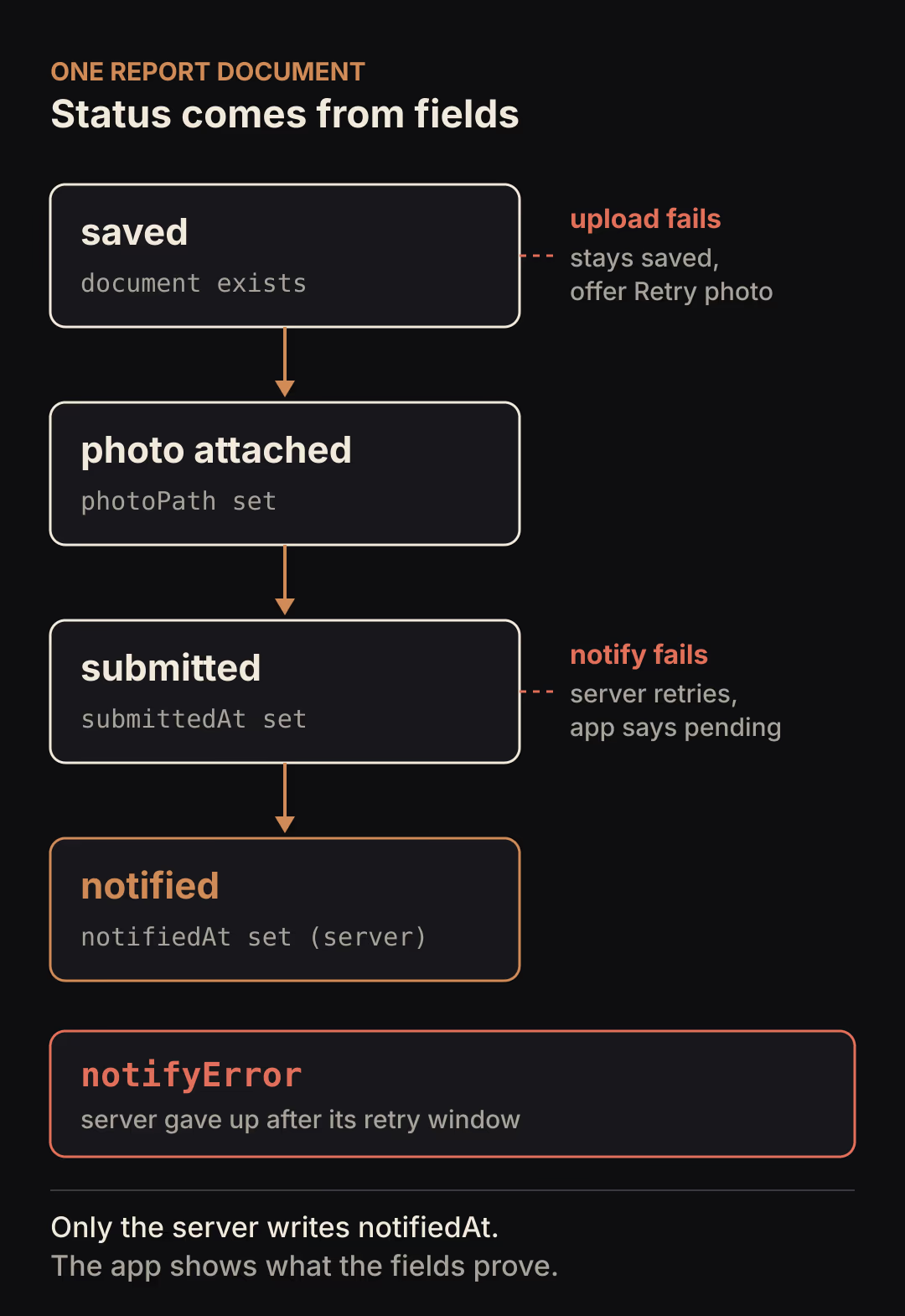
The status comes from fields on the document rather than one overwritten enum, so a late retry cannot move a report backwards. A report with submittedAt and no notifiedAt is submitted, whatever else the client writes afterwards.
| Fields present | Status | Message to show |
|---|---|---|
| No document | Not saved | "Report not saved. Check your connection and try again." |
Document, no photoPath | Saved | "Report saved. The photo did not upload." with Retry photo |
photoPath, no submittedAt | Photo attached | "Report saved with photo. Tap Submit to send it for review." |
submittedAt, no notifiedAt | Submitted | "Report submitted. The team will be notified." |
notifiedAt | Notified | "Team notified." |
notifyError | Needs attention | "Report submitted. Notifying the team failed; it is listed for review." |
Check the rows from the bottom up and use the first one that matches, so a report submitted without a photo shows as submitted. Only show the last two rows when the app reads those fields from the document. The app never writes notifiedAt itself, so it cannot claim the team was told before the server has done it. Before you promise "listed for review", make sure someone actually reviews reports in that state.
Move the team notification to the server
FlutterFlow's Send Email utility action "opens an email app with a prefilled recipient, subject, and message," and the user must send it. The app cannot confirm that the email left the device, so a "Team notified" message after it is a guess.
Send the notification from a Cloud Function that runs when the report becomes submitted. Firebase's retry documentation explains why the default is not enough: "if a function invocation terminates with an error, the function is not invoked again and the event is dropped." With retry: true, 2nd gen functions retry for up to 24 hours, execution is at least once, and the docs say retried functions "must be idempotent." The Firestore triggers guide adds that a single event "may result in multiple function invocations" and warns that writing to the document that triggered the function can cause an infinite loop.
The function below handles those three points. It acts only on the transition into submitted, claims the work in a transaction with a short lease, and passes a key derived from the report ID to the provider:
import { onDocumentWritten } from "firebase-functions/v2/firestore";
import { initializeApp } from "firebase-admin/app";
import { getFirestore, FieldValue, Timestamp } from "firebase-admin/firestore";

initializeApp();
const db = getFirestore();
const LEASE_MS = 2 * 60 * 1000;
const GIVE_UP_MS = 60 * 60 * 1000;

// Placeholder: replace with your email or chat provider call.
// Pass the key to the provider if it supports idempotency keys.
declare function notifyTeam(submissionId: string, idempotencyKey: string): Promise<void>;

export const notifyOnSubmit = onDocumentWritten(
  { document: "submissions/{submissionId}", retry: true },
  async (event) => {
    const before = event.data?.before.data();
    const after = event.data?.after.data();
    // Act only on the transition into "submitted". Later writes, including
    // this function's own updates, are ignored.
    if (before?.submittedAt || !after?.submittedAt) return;

    const ref = db.doc(`submissions/${event.params.submissionId}`);

    if (Date.now() - Date.parse(event.time) > GIVE_UP_MS) {
      await ref.update({ notifyError: "gave-up-after-retries" });
      return; // end condition, so a permanent failure does not retry for 24 hours
    }

    const claimed = await db.runTransaction(async (tx) => {
      const snap = await tx.get(ref);
      const data = snap.data();
      if (!data || data.notifiedAt) return false;
      const until = data.notifyClaimUntil as Timestamp | undefined;
      if (until && until.toMillis() > Date.now()) {
        throw new Error("another invocation holds the claim; retry later");
      }
      tx.update(ref, {
        notifyClaimUntil: Timestamp.fromMillis(Date.now() + LEASE_MS),
      });
      return true;
    });
    if (!claimed) return;

    // Throwing here lets Cloud Functions retry the event.
    await notifyTeam(ref.id, `submission-${ref.id}`);
    await ref.update({ notifiedAt: FieldValue.serverTimestamp() });
  },
);
Firebase recommends the event ID as the idempotency key for external APIs. Here the key is the report ID instead, because the business rule is one notification per report, and a later submittedAt rewrite would arrive as a different event. If two invocations of the same event overlap, the second one finds an active claim and throws, so Cloud Functions retries it after the lease would have expired. The one-hour give-up follows the docs' advice to set an end condition; choose a window that fits how long your provider can be down.
One gap remains. If the function crashes after the provider accepts the message and before notifiedAt is written, the retry sends again. A provider that honors idempotency keys drops that copy. One that does not will deliver it twice. If you need stronger handling than that, the webhook reliability guide covers deduplication on the receiving side.
Why deleting the document is not a safe rollback
Deleting the report when the upload fails looks like a clean undo, but it often makes things worse. The delete is a write and can fail for the same network reason the upload did. With offline persistence enabled, Firestore queues writes and syncs them later, so the delete may land long after the user has moved on. If a server trigger already ran on the saved document, deleting it does not recall what the trigger did. And the user loses text they typed, which is the one part that saved correctly.
Compensation is reasonable for something your own code created and nothing else has read yet, such as removing an orphaned photo that no report points to. That kind of cleanup belongs in a scheduled server job that checks references before deleting, not in a failure branch on the client. For the report itself, keep it, show its real status, and let the user either finish it or discard it on purpose.
Test each failure on purpose
The acceptance check for this design is: fail each step separately, retry after an app restart, and confirm there is exactly one report, at most one photo object and no message that claims more than the document shows. Run it on a test project with synthetic data:
- Fail the save. Turn on airplane mode before tapping Submit, or deny writes to
submissionsin your test rules. Expect "Report not saved", then restore access and retry. One document exists. - Fail the upload. Deny writes to
submissions/{id}/in your Storage rules. Expect "Report saved. The photo did not upload." Restore the rule, tap Retry photo, and confirm one object at the fixed path. - Kill the app between steps. Add a temporary Debug Log before the
photoPathupdate, force quit after it prints, reopen and submit. Expect the flow to continue with thephotoPathupdate for the samependingSubmissionId, without asking for the photo again. - Fail the notification. Make
notifyTeamthrow once. Expect "Report submitted. The team will be notified." until the retry succeeds andnotifiedAtappears. - Duplicate the trigger. In the emulator, run the function twice for the same event. Expect one provider call and one
notifiedAt. - Check the counts. Query
submissionsfor your test title and list the report's Storage folder. One document, one photo.
The simulation behind this article ran 100 combinations of those failures, crash points, duplicate events and a failed first provider call. Every combination ended with one report, one stored photo and one logical notification, and no run showed "Team notified" before the server wrote notifiedAt. That checks the protocol's logic only. Firestore, Storage, FlutterFlow's generated code and your provider can each behave differently, which is why the list above runs against real services.
What this design does not cover
- Offline-first submission. Firestore can queue the
set()while offline, but this flow treats offline as "not saved yet". Supporting offline submission needs its own handling of when a write counts as committed. - Multiple photos. Give each one a fixed path, such as
photos/0.jpg, and track them as a list. The single-photo version keeps the example short. - When to drop into code. If more of the flow moves into custom actions, the guide on when to leave FlutterFlow custom code for pure Flutter helps decide where that line is. For a widget-based upload picker, see what a FlutterFlow custom widget must get right.
- Form validation. Run it before step 1 so a submission only starts with valid input; the FlutterFlow form state guide covers that part.
Pick the submit flow in your app that touches the most systems and write down, for each action, where it commits and what happens if it runs twice. Any row where the answer is "a second copy" is the first one to fix.