This is the line that loses the notification:
if (isQuietHours(user, now)) {
  await ref.update({ status: "sent" }); // nothing was sent
  return;
}
The code skips the push because the user is asleep, then writes the same status a real send would write. Nothing ever looks at that row again. No retry picks it up after 07:00, the alert history shows it as handled, and support has no way to tell a skipped message from one that FCM accepted.
The fix is to record quiet hours as a deferral with a wake time, keep it separate from a delivery attempt, and only write an "accepted" state when Firebase Cloud Messaging returns a message ID. A worker that runs every minute picks up rows whose time has come, claims each one with a short lease so two workers cannot both own it, sends it, and records what FCM actually said. The user's in-app history is written when the event happens, so it is complete even when a push never arrives.
Everything below is a proposed reference implementation for Cloud Functions in TypeScript, using synthetic users and messages. The outbox and quiet-hours code ran against the Firestore emulator with a fake FCM sender; the real FCM call, the deployed scheduler and the Flutter screen were not executed, and the article says where each boundary is.
Diagnose the lost notification first
Before changing code, confirm which failure you have. Search your outbox or alert collection for rows created during quiet hours and compare them with what the send path writes.
| What you see | What to check | Likely cause |
|---|---|---|
Row says sent, but no FCM message ID is stored | Does the quiet-hours branch write the same status as a send? | Deferral recorded as delivery |
Row created at night, still pending at noon | Is anything querying for deferred rows after the window ends? | No wake time, or no job that reads it |
| Notification arrives at 06:00 for some users and 08:00 for others | Which time zone does the check use? | Server zone or one fixed zone instead of the recipient's |
| Users get two banners for one event | Can two workers or two runs send the same row? | No claim step, or retries without an ID |
| A "table is ready" push arrives the next morning | Does the message have an expiry? | Deferral without a time limit |
If the first row matches, the rest of this guide applies directly. The other rows are failures the same design closes once the first one is fixed.
Give each meaning of "sent" its own state
Four different events tend to share one sent flag: the app decided to wait, the worker tried to send, FCM accepted the request, and the device showed something. The server can observe the first three. It cannot observe the fourth from the send call.
FCM's Admin SDK documentation says a successful send returns a message ID in the form projects/{project_id}/messages/{message_id}. Firebase's delivery reporting guide describes the matching BigQuery event, MESSAGE_ACCEPTED, as the message being "received by the FCM server and the request is valid". Delivery to the app's FCM SDK on the device is a separate MESSAGE_DELIVERED event in that export, and the guide notes it is not propagated by default. So the outbox stops at "accepted".
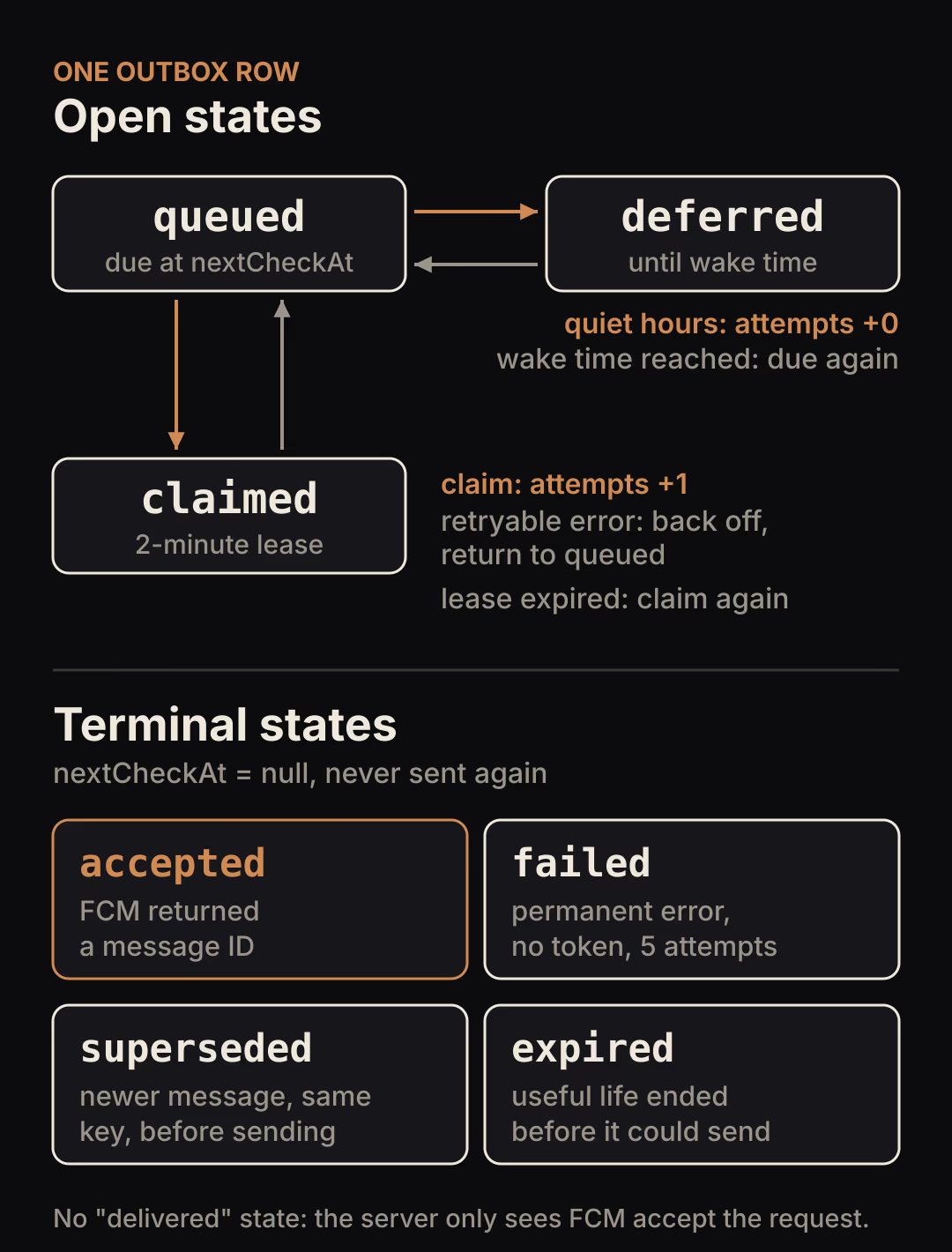
Read the diagram from the top. Only the claim step increases attempts, so a message that waited through quiet hours still has its full retry budget at 07:00. The four terminal states each answer a different support question.
| State | Meaning | Who writes it |
|---|---|---|
queued | Ready to be checked now or at nextCheckAt | enqueue, or finish after a retryable error |
deferred | User policy says wait until deferredUntil | claim, when quiet hours apply |
claimed | One worker holds a lease and may be sending | claim |
accepted | FCM returned a message ID | finish |
failed | Permanent FCM error, no token, or too many attempts | claim or finish |
superseded | A newer message about the same thing replaced it before sending | enqueue |
expired | The message stopped being useful before it could be sent | claim |
There is deliberately no delivered or read state. If the product needs read status, take it from the in-app history, where the app itself records that the user opened the item.
Compute the wake time in the recipient's time zone
Quiet hours belong to the recipient, so store their time zone as an IANA identifier such as Europe/Sarajevo together with the window. On the device, Dart's DateTime.timeZoneName is "provided by the operating system and may be an abbreviation or a full name", so it is a poor key for server calculations. Let the user pick the zone in settings, or use a plugin that returns the IANA name, and validate it on save.
On the server, Intl.DateTimeFormat accepts any IANA time zone name and throws a RangeError for invalid options, which gives you the validation for free:
export type QuietHours = {
  timeZone: string; // IANA ID chosen by the user, e.g. "Europe/Sarajevo"
  start: string;    // "22:00" local wall-clock time
  end: string;      // "07:00"
};

const formatters = new Map<string, Intl.DateTimeFormat>();

function localMinutes(at: Date, timeZone: string): number {
  let f = formatters.get(timeZone);
  if (!f) {
    // Throws RangeError for an unknown time zone: validate when the user saves it.
    f = new Intl.DateTimeFormat("en-GB", {
      timeZone, hourCycle: "h23", hour: "2-digit", minute: "2-digit",
    });
    formatters.set(timeZone, f);
  }
  const parts = f.formatToParts(at);
  const hour = Number(parts.find((p) => p.type === "hour")!.value);
  const minute = Number(parts.find((p) => p.type === "minute")!.value);
  return hour * 60 + minute;
}

const toMinutes = (hhmm: string) => {
  const [h, m] = hhmm.split(":").map(Number);
  return h * 60 + m;
};

export function isQuiet(at: Date, q: QuietHours): boolean {
  const now = localMinutes(at, q.timeZone);
  const start = toMinutes(q.start);
  const end = toMinutes(q.end);
  if (start === end) return false;
  return start < end
    ? now >= start && now < end        // same-day window, 13:00-15:00
    : now >= start || now < end;       // overnight window, 22:00-07:00
}

// First instant at or after `at` that is outside the quiet window.
// Walking real instants minute by minute means a local time skipped by a
// DST change is never selected, and a repeated hour resolves to its first pass.
export function nextAllowed(at: Date, q: QuietHours): Date {
  if (!isQuiet(at, q)) return at;
  let t = Math.ceil(at.getTime() / 60_000) * 60_000;
  for (let i = 0; i <= 26 * 60; i++, t += 60_000) {
    if (!isQuiet(new Date(t), q)) return new Date(t);
  }
  throw new Error("Quiet window does not end within 26 hours");
}
The minute walk avoids building local timestamps by hand, which is where daylight saving bugs usually come from. Each step is a real instant, so when clocks jump from 02:00 to 03:00 the skipped local minutes never appear, and when 02:00 to 03:00 repeats in autumn the first matching minute wins. It costs one formatter call per remaining minute of the window, so about 540 calls for a message created at the start of a nine-hour night. That is acceptable for a sweep that handles a bounded batch per minute; cache the result in deferredUntil rather than recomputing it on every run.
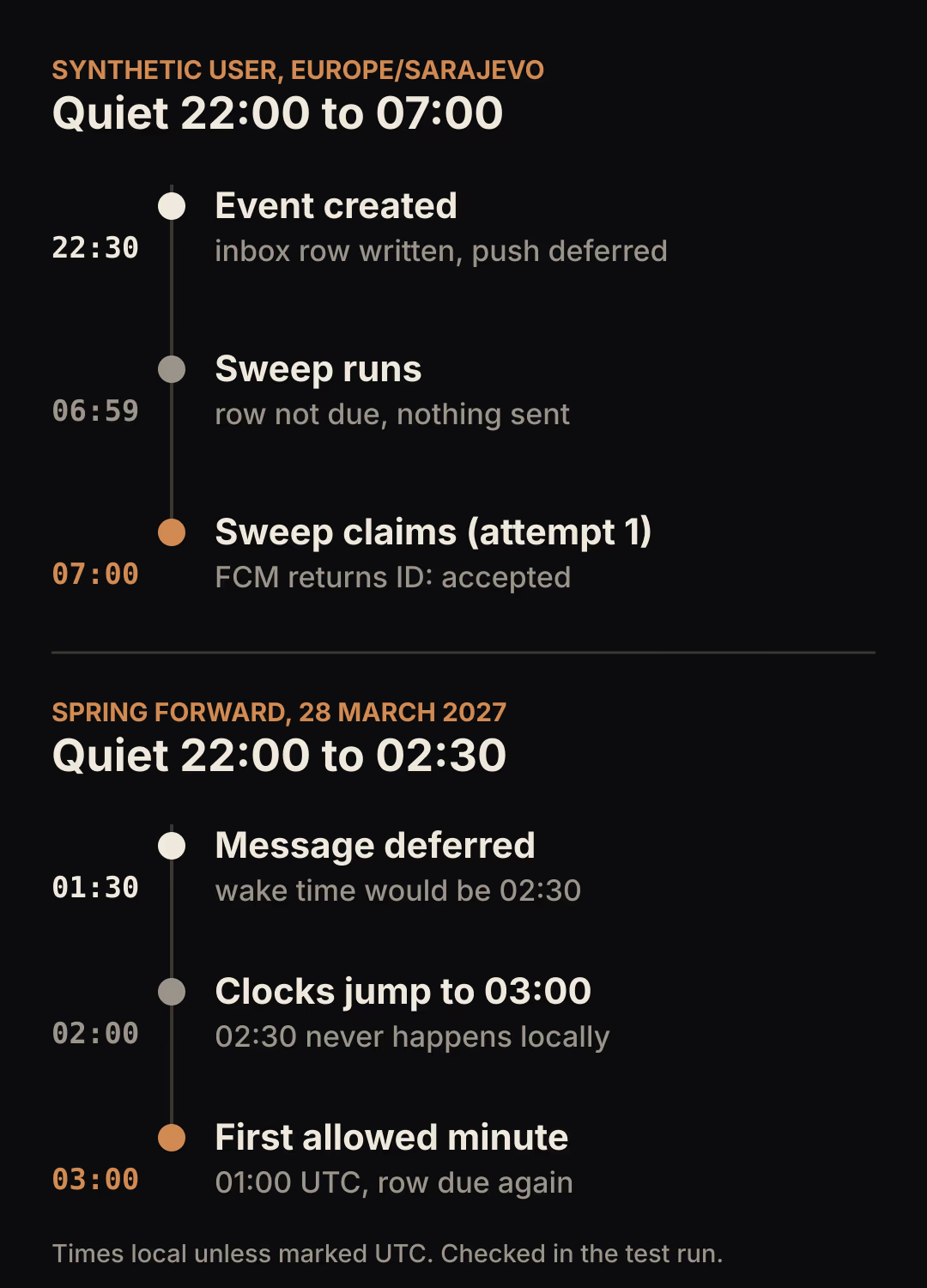
The timeline shows the times the emulator run checked. These are the daylight saving cases worth keeping as tests in your own project:
| Case | Input (UTC) | Wake time returned |
|---|---|---|
| Overnight window, Sarajevo, winter | 21:30 (22:30 local) | 06:00 UTC, which is 07:00 local |
| End time 02:30 skipped by spring forward, 28 March 2027 | 00:30 (01:30 local) | 01:00 UTC, which is 03:00 local |
| End time 02:30 repeated by fall back, 25 October 2026 | 23:30 the day before | 00:30 UTC, the first 02:30 |
| New York, night the clocks go back, 1 November 2026 | 03:00 (23:00 local) | 12:00 UTC, nine real hours later |
| New York, night the clocks go forward, 14 March 2027 | 03:00 (22:00 local) | 11:00 UTC, eight real hours later |
Do not encode quiet hours in the scheduler's cron expression. The job runs on a fixed UTC interval for everyone, and the per-user decision happens inside it. The price alerts article explains why a cron schedule tied to one zone misbehaves around daylight saving changes.
Write the history row before any push
The outbox row and the user's inbox row are created in one transaction when the event happens. The push becomes a nudge toward something that already exists in the app.
export async function enqueue(
  db: Firestore,
  n: { id: string; userId: string; title: string; body: string;
       supersedeKey?: string; ttlMinutes: number },
  now: Date,
) {
  const outbox = db.collection("outbox");
  await db.runTransaction(async (tx) => {
    // Reads first: an older, unsent message for the same thing is replaced.
    const older = n.supersedeKey
      ? await tx.get(outbox
          .where("userId", "==", n.userId)
          .where("supersedeKey", "==", n.supersedeKey)
          .where("state", "in", ["queued", "deferred"]))
      : null;
    for (const doc of older?.docs ?? []) {
      tx.update(doc.ref, { state: "superseded", supersededBy: n.id, nextCheckAt: null });
    }
    // create() fails if the id exists, so a retried trigger cannot enqueue twice.
    tx.create(outbox.doc(n.id), {
      userId: n.userId, title: n.title, body: n.body,
      supersedeKey: n.supersedeKey ?? null,
      state: "queued", attempts: 0,
      createdAt: ts(now),
      expiresAt: ts(new Date(now.getTime() + n.ttlMinutes * 60_000)),
      nextCheckAt: ts(now),
    });
    // The in-app history is written with the outbox row, not after a push.
    tx.create(db.doc(`users/${n.userId}/inbox/${n.id}`), {
      title: n.title, body: n.body, createdAt: ts(now), read: false,
    });
  });
}
Three choices in this function prevent later bugs. The notification ID comes from the caller, so a Firestore trigger can pass its event ID: Cloud Functions provides at-least-once execution for event-driven functions, and a second create() with the same ID fails instead of queueing a copy. The supersedeKey lets "Delivered" replace a still-waiting "Out for delivery" for the same order, while a message another worker is already sending is left alone. The expiry is set at creation, because only the producer knows how long the message stays useful.
The supersede query filters on three fields. The test run below did not exercise production index requirements, so run the query once against a deployed project and create any index Firestore asks for.
The same history collection is what the SaaS notification system guide calls the in-app inbox. This article only covers how the push channel feeds it.
Claim with a lease, then decide
The claim step is where quiet hours are evaluated, because a user can change their settings between enqueue and send. It runs in a transaction, reads the outbox row and the user profile, and writes exactly one decision.
const LEASE_MS = 2 * 60_000;
const MAX_ATTEMPTS = 5;

export async function claim(
  db: Firestore, id: string, workerId: string, now: Date,
): Promise<Claim | null> {
  const ref = db.collection("outbox").doc(id);
  return db.runTransaction(async (tx) => {
    const snap = await tx.get(ref);
    const d = snap.data();
    if (!d || !d.nextCheckAt || d.nextCheckAt.toMillis() > now.getTime()) {
      return null; // terminal, or another worker already moved it forward
    }
    const user = (await tx.get(db.doc(`users/${d.userId}`))).data() ?? {};
    const expiresAt: Date = d.expiresAt.toDate();

    if (now >= expiresAt) {
      tx.update(ref, { state: "expired", nextCheckAt: null });
      return null;
    }
    if (d.attempts >= MAX_ATTEMPTS) {
      tx.update(ref, { state: "failed", lastError: "max-attempts", nextCheckAt: null });
      return null;
    }
    const quiet: QuietHours | undefined = user.quietHours;
    if (quiet && isQuiet(now, quiet)) {
      const wake = nextAllowed(now, quiet);
      // A policy deferral is not a delivery attempt: attempts stays the same.
      tx.update(ref, wake >= expiresAt
        ? { state: "expired", nextCheckAt: null }
        : { state: "deferred", deferredUntil: ts(wake), nextCheckAt: ts(wake) });
      return null;
    }
    if (!user.fcmToken) {
      tx.update(ref, { state: "failed", lastError: "no-token", nextCheckAt: null });
      return null;
    }
    const leaseUntil = new Date(now.getTime() + LEASE_MS);
    tx.update(ref, {
      state: "claimed", leaseOwner: workerId,
      leaseUntil: ts(leaseUntil), nextCheckAt: ts(leaseUntil), // an expired lease is due again
      attempts: d.attempts + 1,
    });
    return { id, token: user.fcmToken, title: d.title, body: d.body, expiresAt };
  });
}
The send happens outside this transaction. Firestore's transaction documentation warns that "transaction functions can run multiple times" when there is contention, so an FCM call inside the function could fire once per retry.
Setting nextCheckAt to the lease end is what makes a worker restart safe. If the worker that claimed a row dies, the row becomes due again two minutes later and the next sweep claims it with a new lease and a second attempt. Choose a lease comfortably longer than one send takes, including the HTTP timeout you configure.
A row that is deferred keeps its wake time even if the user turns quiet hours off later. If that matters for your product, reset nextCheckAt to now on deferred rows for that user when they save new settings.
Send with an expiry and a stable tag
The message carries the outbox ID in its data payload and as the Android notification tag. FCM's message reference describes tag as an "identifier used to replace existing notifications in the notification drawer", which limits the damage of the duplicate described below.
export function buildMessage(c: Claim, now: Date): Message {
  const ttlMs = Math.max(0, c.expiresAt.getTime() - now.getTime());
  return {
    token: c.token,
    notification: { title: c.title, body: c.body },
    data: { notificationId: c.id },                  // lets the app de-duplicate
    android: { ttl: ttlMs, notification: { tag: c.id } },
    apns: { headers: { "apns-expiration": String(Math.floor(c.expiresAt.getTime() / 1000)) } },
  };
}
The remaining lifetime goes to FCM as well, so a message that waited in your outbox does not then wait up to four more weeks on FCM's side. Firebase documents a lifespan of 0 to 2,419,200 seconds (28 days), and a message sent without one lasts up to four weeks, and the REST reference says the backend sets a 30-day default for apns-expiration. The Admin SDK's android.ttl field is in milliseconds, unlike the REST field, so check the type definition of the version you install.
Record only what FCM told you
After the send, a second transaction writes the outcome, but only if this worker still holds the lease.
const PERMANENT = new Set([
  "messaging/registration-token-not-registered",
  "messaging/invalid-registration-token",
  "messaging/invalid-argument",
  "messaging/mismatched-credential",
  "messaging/third-party-auth-error",
]);

export async function finish(
  db: Firestore, id: string, workerId: string, result: SendResult, now: Date,
): Promise<State | "lease-lost"> {
  const ref = db.collection("outbox").doc(id);
  return db.runTransaction(async (tx) => {
    const d = (await tx.get(ref)).data();
    if (!d || d.state !== "claimed" || d.leaseOwner !== workerId) {
      return "lease-lost"; // another worker owns it now; do not overwrite its result
    }
    if ("messageId" in result) {
      // FCM accepted the request. This is not delivery, display or a read.
      tx.update(ref, { state: "accepted", fcmMessageId: result.messageId,
                       acceptedAt: ts(now), nextCheckAt: null, leaseOwner: null });
      return "accepted";
    }
    if (PERMANENT.has(result.errorCode)) {
      tx.update(ref, { state: "failed", lastError: result.errorCode,
                       nextCheckAt: null, leaseOwner: null });
      return "failed";
    }
    // Retryable: exponential backoff from one minute, capped at one hour, with jitter.
    const delay = Math.min(60 * 60_000, 60_000 * 2 ** (d.attempts - 1));
    const retryAt = new Date(now.getTime() + delay + Math.random() * 10_000);
    tx.update(ref, { state: "queued", lastError: result.errorCode,
                     nextCheckAt: ts(retryAt), leaseOwner: null });
    return "queued";
  });
}
The split between permanent and retryable errors follows FCM's error code reference. The Admin SDK reports these with its own messaging/... codes:
| FCM error | Admin SDK code | Outbox action |
|---|---|---|
UNREGISTERED | messaging/registration-token-not-registered | failed; remove the token, as the reference instructs |
INVALID_ARGUMENT | messaging/invalid-argument | failed; fix the payload before any retry |
SENDER_ID_MISMATCH | messaging/mismatched-credential | failed; configuration problem |
THIRD_PARTY_AUTH_ERROR | messaging/third-party-auth-error | failed; check APNs or web push credentials |
UNAVAILABLE | messaging/server-unavailable | queued with backoff |
INTERNAL | messaging/internal-error | queued with backoff |
QUOTA_EXCEEDED | messaging/message-rate-exceeded and related codes | queued; the reference asks for exponential backoff, starting at one minute or more for overall and topic limits |
For UNAVAILABLE, the reference also asks you to honor a Retry-After header when one is present. This sketch does not read it, so add that if you see sustained 503 responses.
The sweep that runs every minute
The worker queries due rows, then claims, sends and finishes them one at a time.
export async function sweep(
  db: Firestore,
  send: (m: Message) => Promise<string>,
  workerId: string,
  now: Date,
) {
  // Terminal rows store nextCheckAt: null, and claim() refuses them either way.
  const due = await db.collection("outbox")
    .where("nextCheckAt", "<=", ts(now))
    .orderBy("nextCheckAt").limit(100).get();

  for (const doc of due.docs) {
    const c = await claim(db, doc.id, workerId, now);
    if (!c) continue;
    let result: SendResult;
    try {
      result = { messageId: await send(buildMessage(c, now)) };
    } catch (e: any) {
      result = { errorCode: e?.code ?? "unknown" };
    }
    await finish(db, c.id, workerId, result, now);
  }
}
import { onSchedule } from "firebase-functions/scheduler";
import { getFirestore } from "firebase-admin/firestore";
import { getMessaging } from "firebase-admin/messaging";
import { initializeApp } from "firebase-admin/app";
import { randomUUID } from "node:crypto";
import { sweep } from "./outbox.ts";

initializeApp();

export const notificationOutbox = onSchedule("every 1 minutes", async () => {
  await sweep(getFirestore(), (m) => getMessaging().send(m), randomUUID(), new Date());
});
Firebase's scheduled functions guide warns that a scheduled function may be triggered more than once and that a new run can start while the previous one is still executing. The claim transaction exists for exactly that case. A one-minute schedule also means a deferred message goes out up to about a minute after the wake time.
If you prefer one task per message, Cloud Tasks can schedule each send at its wake time. Its own documentation says duplicate executions do occur and that tasks can be delayed by a few minutes, so the same claim and lease logic would still be needed.
The duplicate you cannot rule out
One failure remains after all of this. If a worker sends the message, FCM accepts it, and the worker dies before finish() commits, the lease expires and another worker sends it again. Nothing in this design lets FCM recognize the second request as a repeat of the first, so the outbox guarantees at least one attempt and cannot guarantee exactly one.

The image stands for what the emulator run produced in that scenario: two sends that carry the same notificationId. On Android the shared tag means the second banner replaces the first in the notification drawer. In the app, treat the inbox document as the record and use notificationId to avoid showing an in-app banner twice. The duplicate cannot be removed from the server side; the two IDs only make it harmless on the client.
The risk is limited to the time between FCM's response and the finish() commit. Keep the scenario in your test suite so a later refactor cannot widen that window unnoticed, for example by moving other work between the send and the commit.
Show the history in Flutter
The Flutter side reads the inbox, which already contains every message regardless of what happened to the push:
final inbox = FirebaseFirestore.instance
    .collection('users')
    .doc(uid)
    .collection('inbox')
    .orderBy('createdAt', descending: true)
    .limit(50)
    .snapshots();
This matters more than it looks. FlutterFire's receive messages guide says notification messages that arrive while the app is in the foreground "won't display a visible notification by default", and that on Android, if the user force-quits the app from device settings, it "must be manually reopened for messages to start working". A user who missed the banner still finds the item in the list. This Dart snippet was not run as part of the test; it is the standard Firestore query shape, so adjust it to your own collection names. The Flutter and Firebase SaaS stack overview covers the surrounding app structure.
Keep the deferral on the server. Holding a message on the device until morning would depend on background execution that the operating system controls, and the same FlutterFire guide warns that if background handler tasks run longer than 30 seconds, the device may kill the process. The guide to Flutter background work and isolates covers those limits in more detail.
FlutterFlow's built-in push notifications can schedule a send, but its documentation says the selected date and time "follow your timezone", meaning the sender's. It does not describe per-recipient quiet hours, so this outbox runs as your own Cloud Function next to FlutterFlow's deployed functions, and the FlutterFlow app only reads the inbox collection.
What the emulator run showed
The outbox code ran with firebase-admin 13.10.0 against the Firestore emulator (v1.19.8) on Node 22, with a fake sender in place of getMessaging().send() and simulated clock values passed as now. All scenarios passed:
| Scenario | Result |
|---|---|
| Message at 22:30 local, quiet 22:00 to 07:00 | deferred, attempts 0, wake 07:00 local |
| Sweep at 06:59 local | Nothing sent |
| Sweep at 07:00 local | Sent once, accepted with the fake message ID, attempts 1 |
| Worker claims, then dies before sending | No re-claim at +1 minute; another worker sends once at +2 minutes; the late finish() from the dead worker is rejected |
Worker dies after FCM accepts, before finish() | Sent twice with the same notificationId (documented limit) |
| Two sweeps at the same moment over three rows | Three sends in total, attempts 1 on each row |
messaging/server-unavailable | queued with a 63-second backoff, accepted on the next attempt |
messaging/registration-token-not-registered | failed, no message ID, never retried |
| "Delivered" arrives while "Out for delivery" is deferred | First row superseded, only the second pushed at 07:00 |
| 60-minute message created at 23:00 local | expired instead of waking the user at 07:00 |
| Same notification ID enqueued twice | Second create() rejected |
| Daylight saving cases from the table above | All five wake times as listed |
Not tested: a real FCM project and device, the deployed scheduler, production Firestore's concurrency mode and index requirements, iOS presentation, and the Flutter inbox screen. The emulator confirms the state logic and the transaction behavior it emulates; it does not prove delivery.
Limits of this design
- It records FCM acceptance. It does not know whether the device displayed the banner or whether the user saw it.
- One token per user keeps the example short. With several devices, store tokens in a subcollection and record an outcome per token, because one can fail while another is accepted.
- Firebase's collapsible message guide says Android stores at most 100 messages without collapsing and that "if the limit is reached, all stored messages are discarded". Supersede keys reduce the volume you send to an offline device; they do not change that limit.
- Email and SMS fallbacks are out of scope. If you add them, give each channel its own outbox row and state, so a push failure does not overwrite an email result.
Start with the quiet-hours branch in your current send path. If it writes anything other than a wake time, replace that write with deferred and a nextCheckAt, then run the "message at 22:30" and "sweep at 07:00" scenarios against the emulator before touching the rest.