
Two people open the same class in your Flutter app. Both screens say one spot left. Both tap Reserve within the same second, both see a confirmation, and the class now has more attendees than seats. Nobody did anything unusual. Each app read the counter, saw space, and wrote its booking before the other write arrived.
The short answer is to make the check and the claim one atomic step that runs on a trusted server. A Firestore transaction reads the capacity counter, refuses the request if it is full, and otherwise creates a hold and increments the counter in the same commit. Each request carries an ID chosen once on the device, so a retry returns the original answer instead of taking a second seat. Holds expire, and a scheduled job gives expired seats back.
The example in this guide is synthetic: an event called demo-yoga with a capacity counter and a holds subcollection. The server functions below ran against the local Firestore emulator on 1 November 2026, with the results shown later in the article. The Cloud Functions wrappers, the Dart client and the Security Rules were not deployed or run, so test them in your own project before relying on them.
Why two phones can both win the last slot
Each app does three things: read the event, check that reserved is below capacity, and write. When those are separate requests, both apps can finish the read before either one writes.
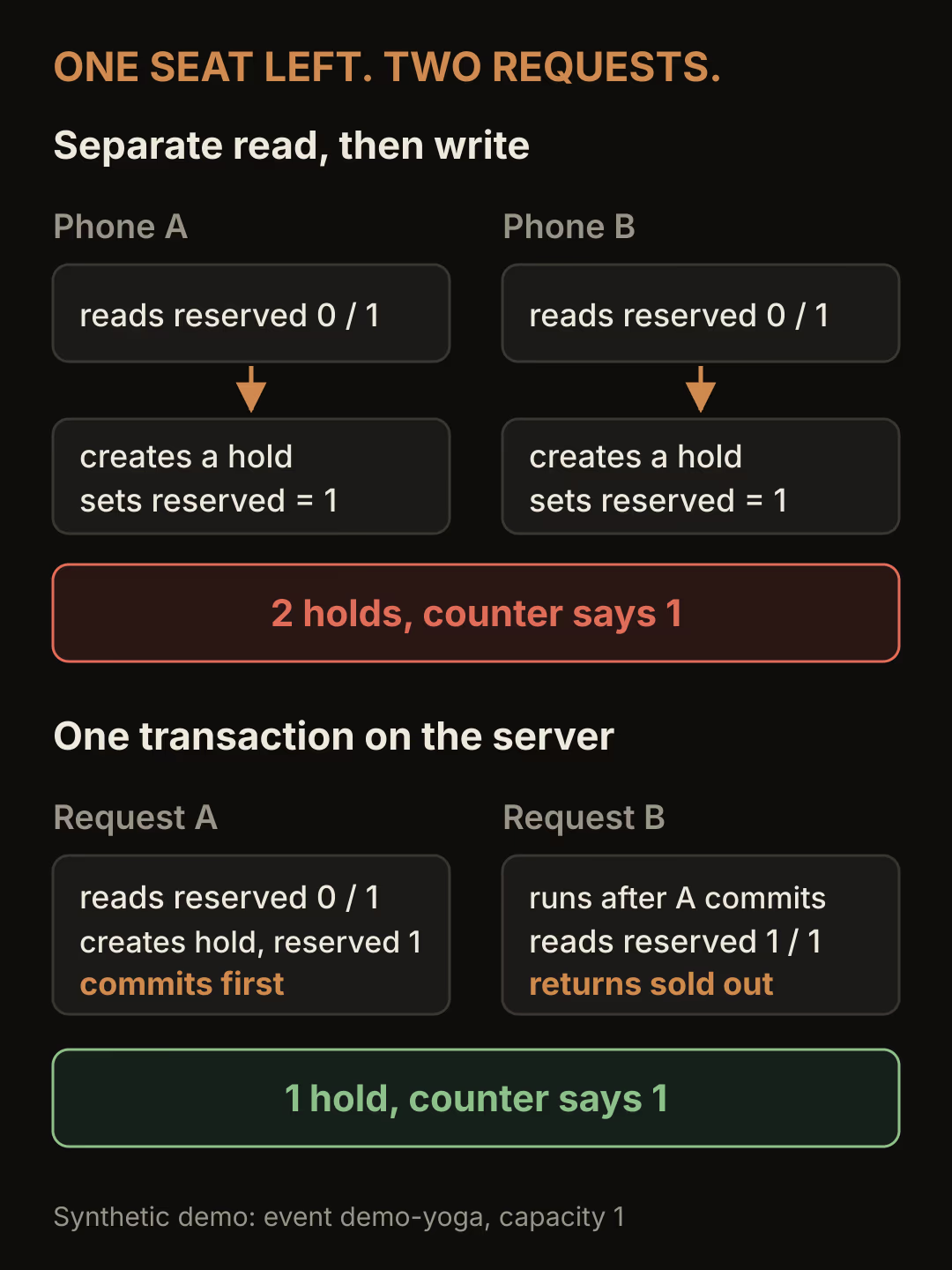
The left column is the bug in its plainest form. In the emulator run for this guide, 20 simultaneous naive reservations against one remaining seat were repeated five times. Every run ended with 20 hold documents and a counter of 1. The counter is also wrong, because each write set it to the value its own read had seen plus one.
The right column is what the Firestore transactions guide describes. A transaction is a set of reads followed by writes, and if a concurrent edit affects a document it read, Firestore runs the whole function again with fresh data. A transaction never applies only some of its writes.
Why a disabled button does not protect capacity
Disabling Reserve after the first tap stops one person from booking twice on one phone. It does nothing about two phones, because each app only knows about its own button.
A transaction run from the Flutter client is also the wrong place for this. The runTransaction reference says reads and the commit fail without a connection, and the client would need permission to write the shared counter. Any client allowed to write that counter can also set it to whatever it likes. Security Rules can validate related writes with getAfter(), but expressing "count went up by one and a matching hold was created" in rules is fragile. A callable Cloud Function decides on the server, using the caller's verified identity.
Server client libraries bypass Security Rules and use IAM instead, which is why the rules later in this guide block client writes to both collections.
The data the reservation needs
Use one event document that knows its capacity and one hold document per reservation attempt.
| Path | Fields | Who writes it |
|---|---|---|
events/{eventId} | capacity, reserved | Server only |
events/{eventId}/holds/{requestId} | uid, status, expiresAt, createdAt | Server only |
reserved counts holds whose status is held or confirmed. That gives you one invariant to test: reserved equals the number of active holds and is never above capacity.
The hold's document ID is the request ID the app generated. Reusing that ID on a retry makes the transaction find the existing hold instead of creating a second one.
Reserve inside one server transaction
This is the function that ran in the emulator. It uses the Firebase Admin SDK for Node.js.
const { Timestamp } = require('firebase-admin/firestore');

const HOLD_MINUTES = 10;
class SoldOut extends Error {}

async function reserveSlot(db, { uid, eventId, requestId }) {
  const eventRef = db.doc(`events/${eventId}`);
  const holdRef = eventRef.collection('holds').doc(requestId);

  return db.runTransaction(async (tx) => {
    const [event, hold] = await Promise.all([tx.get(eventRef), tx.get(holdRef)]);
    if (!event.exists) throw new Error('Event not found');

    // Same request seen before: return the original answer, change nothing.
    if (hold.exists) {
      if (hold.get('uid') !== uid) throw new Error('Request belongs to another user');
      return { status: hold.get('status'), holdId: hold.id, expiresAt: hold.get('expiresAt').toMillis() };
    }

    const { capacity, reserved } = event.data();
    if (reserved >= capacity) throw new SoldOut();

    const expiresAt = Timestamp.fromMillis(Date.now() + HOLD_MINUTES * 60_000);
    tx.create(holdRef, { uid, status: 'held', expiresAt, createdAt: Timestamp.now() });
    tx.update(eventRef, { reserved: reserved + 1 });
    return { status: 'held', holdId: holdRef.id, expiresAt: expiresAt.toMillis() };
  });
}
Both reads come before any write, which the transactions guide requires. The callback only reads and writes Firestore and returns a value. Do not charge a card, send an email or update in-memory state inside it, because Firestore can run the callback more than once. Return the result and act on it after the transaction resolves.
The replay branch returns whatever the hold says now. If the first response was lost and the hold has since expired, the retry reports expired, and the app should start a new attempt with a new request ID.
Wrap it in a callable function so the user ID comes from Firebase Authentication and never from the request body:
const { onCall, HttpsError } = require('firebase-functions/v2/https');
const { initializeApp } = require('firebase-admin/app');
const { getFirestore } = require('firebase-admin/firestore');

initializeApp();
const db = getFirestore();

exports.reserveSlot = onCall(async (request) => {
  if (!request.auth) throw new HttpsError('unauthenticated', 'Sign in to reserve.');
  const { eventId, requestId } = request.data ?? {};
  if (typeof eventId !== 'string' || !/^[A-Za-z0-9]{20}$/.test(requestId ?? '')) {
    throw new HttpsError('invalid-argument', 'eventId and requestId are required.');
  }
  try {
    return await reserveSlot(db, { uid: request.auth.uid, eventId, requestId });
  } catch (e) {
    if (e instanceof SoldOut) return { status: 'sold_out' };
    throw e;
  }
});
Sold out is an ordinary answer, so the function returns it as data instead of throwing. That keeps the Flutter side from having to match error codes for an expected outcome.
Call it from Flutter with an ID that survives retries
Create the request ID when the user decides to reserve, and keep it until that attempt is finished. Calling doc() with no path on a collection reference generates a random 20 character ID locally, without a network call, and the class below uses that.
class ReservationAttempt {
  ReservationAttempt(this.eventId)
      : requestId = FirebaseFirestore.instance.collection('holds').doc().id;

  final String eventId;
  final String requestId;
}

Future<Map<String, dynamic>> reserve(ReservationAttempt attempt) async {
  final result = await FirebaseFunctions.instance
      .httpsCallable('reserveSlot')
      .call({'eventId': attempt.eventId, 'requestId': attempt.requestId});
  return Map<String, dynamic>.from(result.data as Map);
}
If the call fails with a network error or a timeout, offer Try again and call reserve with the same attempt. If the server already created the hold, the replay returns it. Create a new ReservationAttempt only when the user starts over, for example after a sold out or expired answer.
The callable needs a connection, so a user who taps Reserve offline gets an error, not a queued booking. That is the correct behavior for shared capacity. Firestore's offline persistence keeps ordinary writes on the device and syncs them when it reconnects. If you rely on that for drafts or other local changes, keep it separate from reservations. The offline-first field tools guide covers that kind of outbound write queue.
In FlutterFlow, the built-in Create Document and Update Document actions run in the app and write directly from the client, so they cannot enforce this invariant. FlutterFlow can deploy a Cloud Function and call it as an action on the Blaze plan, with Require Authentication turned on, and read its return value from an action output.
Expire holds and release failed checkouts
A hold keeps a seat while the user pays. It needs an end time, a sweeper that returns expired seats, and a release path when checkout fails.

The hourglass is the part to design. Pick a hold length longer than a normal checkout, so a user who is still paying does not lose the seat. Release and expiry share one transaction:
async function releaseHold(db, { eventId, holdId, reason, now = Timestamp.now() }) {
  const eventRef = db.doc(`events/${eventId}`);
  const holdRef = eventRef.collection('holds').doc(holdId);

  return db.runTransaction(async (tx) => {
    const [event, hold] = await Promise.all([tx.get(eventRef), tx.get(holdRef)]);
    // Already confirmed, released or expired: releasing twice must not free a second seat.
    if (!hold.exists || hold.get('status') !== 'held') return false;
    if (reason === 'expired' && hold.get('expiresAt').toMillis() > now.toMillis()) return false;

    tx.update(holdRef, { status: reason, releasedAt: now });
    tx.update(eventRef, { reserved: event.get('reserved') - 1 });
    return true;
  });
}

async function expireHolds(db, now = Timestamp.now()) {
  const due = await db.collectionGroup('holds')
    .where('status', '==', 'held')
    .where('expiresAt', '<=', now)
    .limit(200)
    .get();
  let released = 0;
  for (const doc of due.docs) {
    const eventId = doc.ref.parent.parent.id;
    if (await releaseHold(db, { eventId, holdId: doc.id, reason: 'expired', now })) released++;
  }
  return released;
}
Run expireHolds from a scheduled function, for example every minute, and call releaseHold with reason: 'released' from a callable when the user cancels checkout or your payment provider reports a failure. The query runs outside a transaction, so each hold is re-read inside releaseHold. That re-read is what stops two overlapping sweeps from freeing the same seat twice. A collection group query on status and expiresAt needs a composite index in production; the emulator does not enforce indexes.
Firestore TTL policies look like a shortcut, but the TTL documentation says expired data is typically deleted within 24 hours and stays visible to queries until then. That is too slow to return a seat after ten minutes. TTL is still useful for deleting old released and expired hold documents later.
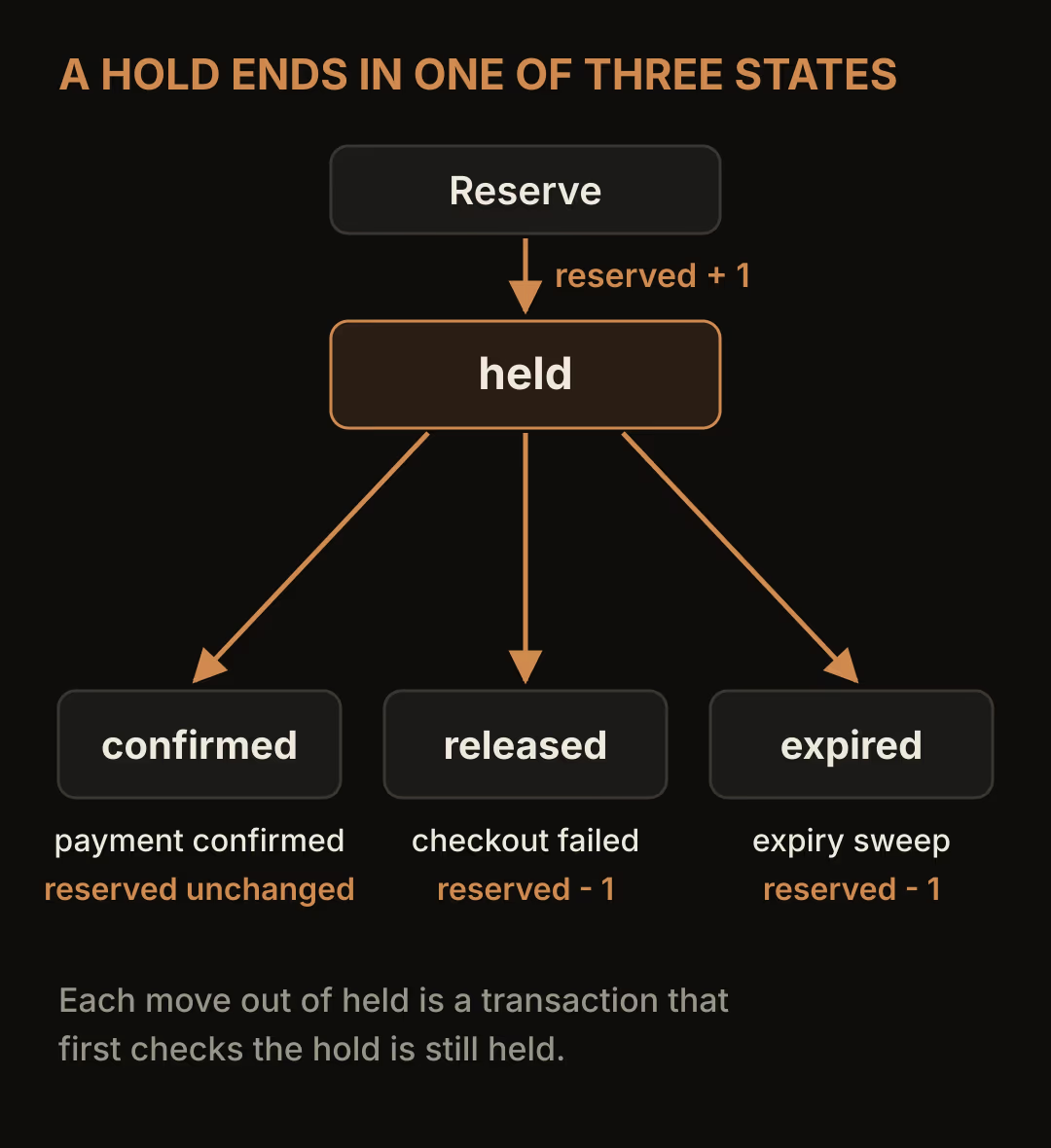
Every arrow out of held is a transaction that first checks the hold is still held. That check is what makes repeated releases, overlapping sweeps and late webhooks harmless.
Confirm payment outside the transaction
Start the payment only after the callable returns held. When your payment provider confirms success, usually through a webhook, run a short transaction that moves the hold to confirmed:
class HoldNotActive extends Error {}

async function confirmHold(db, { eventId, holdId, now = Timestamp.now() }) {
  const holdRef = db.doc(`events/${eventId}/holds/${holdId}`);
  return db.runTransaction(async (tx) => {
    const hold = await tx.get(holdRef);
    if (!hold.exists) throw new HoldNotActive();
    if (hold.get('status') === 'confirmed') return 'confirmed';
    if (hold.get('status') !== 'held' || hold.get('expiresAt').toMillis() <= now.toMillis()) {
      throw new HoldNotActive();
    }
    tx.update(holdRef, { status: 'confirmed', confirmedAt: now });
    return 'confirmed';
  });
}
The payment API call stays outside this callback. A confirmation that arrives after the hold expired throws HoldNotActive, and the money has already moved, so you need a decision for that case: refund it, or try to take a fresh seat if one is free. Payment webhooks can also arrive more than once, which the webhook reliability guide covers. Here, a repeated confirmation returns confirmed without writing again.
Block client writes in Security Rules
The app reads capacity and its own holds. It never writes either collection.
rules_version = '2';
service cloud.firestore {
  match /databases/{database}/documents {
    match /events/{eventId} {
      allow read: if request.auth != null;
      allow write: if false;

      match /holds/{holdId} {
        allow read: if request.auth != null
          && resource.data.uid == request.auth.uid;
        allow write: if false;
      }
    }
  }
}
A query for the user's holds must filter on uid == currentUser.uid, or the rules reject it. The Cloud Functions are unaffected because the Admin SDK does not go through these rules.
What the emulator run showed
These results come from the Firestore emulator in standard edition, using the Admin SDK functions above and synthetic users. They show that the logic keeps its invariant. They are not a measure of production throughput.
| Scenario | Result | Invariant held |
|---|---|---|
| 20 naive read-then-write requests, 1 seat, 5 runs | 20 holds, counter 1, every run | No |
| 20 transactional requests, 1 seat | 1 held, 19 sold out | Yes |
| 50 transactional requests, 3 seats, 5 runs | 3 held and 47 sold out in four runs; 2 held and 48 aborted in one | Yes, every run |
| Winner retries with the same request ID | Original hold returned, counter unchanged | Yes |
| Hold expires, two sweeps run at once | One sweep released it, the other found nothing | Yes |
| Payment confirmation after expiry | Refused as not active | Yes |
| Checkout failure released twice at once | First release freed the seat, second returned false | Yes |
| Confirmed hold after its expiry time | Sweep released nothing | Yes |
The aborted run matters. Under heavy contention, 48 requests failed with ABORTED: Transaction lock timeout instead of getting an answer, and the event still had a free seat. Nothing was overbooked, but those users saw an error. The contention guide explains that server libraries in standard edition lock the documents a transaction reads, and that contention failures surface as ABORTED once retries run out. Treat ABORTED as "try again" in the app, and reuse the same request ID when you do.
When one counter document is the wrong shape
Every reservation for an event writes the same event document. The distributed counters page says you can't update a single document at an unlimited rate, and the best practices put the exact limit down to the workload. For a class, a workshop or a small venue, where a few people compete for the last seats, one counter is the simplest correct design.
A ticket release where hundreds of people tap at the same moment is different. Split capacity across several slot documents, each with its own counter, and have the transaction try one at random before falling back to the others. You could also accept requests into a queue and process them in order. Both add work: sold out now means every slot is empty, and a queue needs its own status screen. The Flutter and Firebase SaaS overview covers where Firebase fits in a larger product.
Before you ship, run the eight scenarios from the table against your own emulator, then add an assertion that compares reserved with the count of active holds after each one.