
A user taps Delete account, confirms, and gets an error, because Firebase refuses to delete an identity whose sign-in is too old. The opposite failure is quieter. The app calls user.delete() first, the sign-in disappears, and a cleanup function that runs afterwards fails halfway. The person can no longer open the app to try again, and their notes and uploads stay in your database with no account attached.
Both problems go away when deletion becomes a server-owned job with a visible status. The app confirms the request, asks the user to sign in again, and calls one callable function. The server checks that the sign-in is fresh, records a deletion request, deletes the application data step by step, and deletes the Firebase Auth user last. Because the request record survives restarts and repeated taps, every step can be retried, and the app always has something truthful to show.
The example in this guide uses a synthetic demo app with notes and uploaded files. Firebase behavior was checked against the current Firebase documentation on 27 October 2026. The Dart and TypeScript snippets have not been compiled or run for this article, so treat them as a reference design and use the acceptance checks near the end to prove each behavior in your own project.
Why deletion fails in two different ways
The first failure is documented behavior. The Flutter guide to managing users lists deleting an account among the security-sensitive actions that require a recent sign-in. When the sign-in is too old, delete() throws a FirebaseAuthException with the code requires-recent-login, and the fix is to collect fresh credentials and call a reauthenticate method before trying again.
The second failure comes from the order of operations. Firebase can run a function after a user is deleted: the Cloud Functions guide to Auth events shows an onUserDeleted handler for this. That handler runs after the identity is already gone. If it times out or throws, the retry documentation says the event is dropped by default. Nothing in the app can trigger the cleanup again, because there is no signed-in user left to ask for it.
The result is an account with no identity to sign in with, and user data that no process is responsible for anymore. Firestore makes it easier to miss, because the delete data guide warns that deleting a document does not delete its subcollections.
| Client deletes the identity first | Server owns the deletion | |
|---|---|---|
| Recent sign-in check | Firebase enforces it on delete() | Your function enforces its own freshness rule |
| When the identity disappears | Before any cleanup | After every cleanup step succeeds |
| Failed cleanup | No user left to retry from the app | Request is marked failed and can be retried |
| App restarted midway | Nothing to read, the user is signed out | Status document shows where the job is |
| Repeated tap | Second call fails, the user may already be gone | Same request record is returned |
The deletion states this guide builds
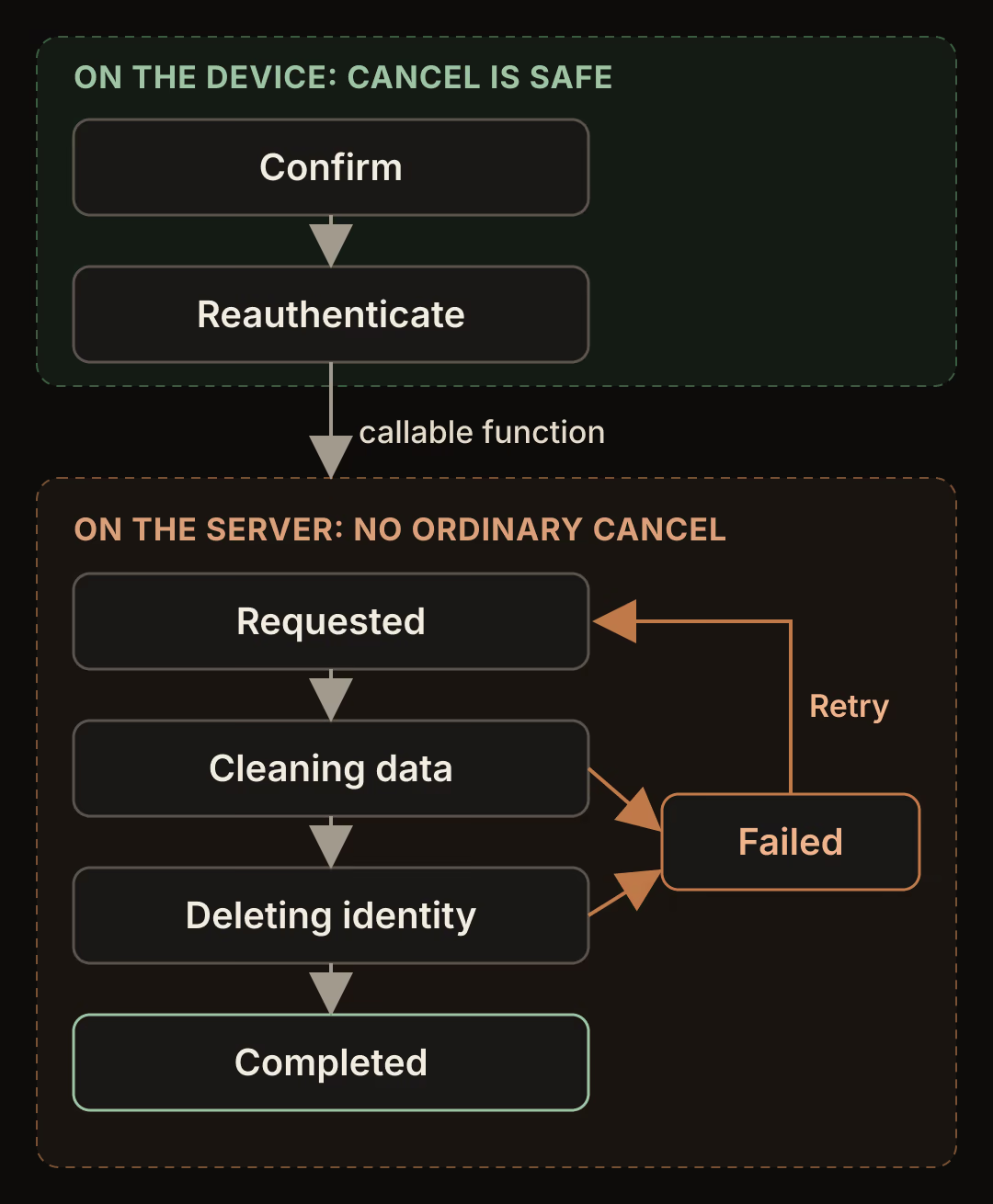
The diagram has two zones. Everything before the callable function runs happens on the device and changes nothing on the server, so Cancel is safe there. From requested onwards the server owns the job and deletes data that cannot be restored by tapping a button. The demo therefore offers no ordinary cancel after that point. If your product needs a grace period, make it an explicit scheduled state with its own expiry, and say in the UI when deletion will actually start.
The demo data is small on purpose:
demoProfiles/{uid}holds a display name, with anotessubcollection under it.- Cloud Storage holds uploads under
demo-uploads/{uid}/. accountDeletions/{uid}is the request record. It storesstatus,attempts,lastErrorand timestamps, and nothing personal.
Step 1: Confirm, then reauthenticate with the right provider
Ask for confirmation first, with a plain description of what will be deleted. Then reauthenticate using a provider the account actually has. The providerData list on the current user tells you which providers are linked.
Future<void> reauthenticateForDeletion(User user, {String? password}) async {
  final providers = user.providerData.map((p) => p.providerId).toSet();

  if (user.isAnonymous) {
    // No credential exists to re-enter. The server decides what an
    // anonymous deletion requires.
    return;
  }

  if (providers.contains('password')) {
    final credential = EmailAuthProvider.credential(
      email: user.email!,
      password: password!,
    );
    await user.reauthenticateWithCredential(credential);
    return;
  }

  if (providers.contains('apple.com')) {
    final result = await user.reauthenticateWithProvider(AppleAuthProvider());
    final code = result.additionalUserInfo?.authorizationCode;
    if (code != null) {
      await FirebaseAuth.instance.revokeTokenWithAuthorizationCode(code);
    }
    return;
  }

  if (providers.contains('google.com')) {
    // Obtain a fresh Google credential with the same sign-in flow the app
    // already uses, then pass it to reauthenticateWithCredential.
    final credential = await freshGoogleCredential();
    await user.reauthenticateWithCredential(credential);
    return;
  }

  throw UnsupportedError('No reauthentication path for $providers');
}
Email and password accounts use EmailAuthProvider.credential with reauthenticateWithCredential, as the manage-users guide shows. For Apple, the federated sign-in guide documents reauthenticateWithProvider on mobile and reauthenticateWithPopup on the web. The same guide says Apple sign-in on Apple platforms returns an authorization code that revokeTokenWithAuthorizationCode() can use to revoke the Apple token. Its example reads the code from a sign-in result, so confirm in your build that the reauthentication result carries it too. The iOS Apple guide explains why you need a fresh sign-in at this point: Firebase does not store Apple user tokens, so the user must sign in again before the token can be revoked.
freshGoogleCredential() is a placeholder for the Google flow your app already has. The Flutter guide shows Google sign-in through a credential on mobile, so reuse that flow instead of adding a second one.
Anonymous accounts have no password or provider to re-enter. If your app lets anonymous users create data, decide on the server what deleting one requires. The demo accepts it without a freshness check, because the session itself is the only proof available. If the account was upgraded later, the guide to linking an anonymous account covers how that identity changes.
If reauthentication throws, show the confirmation screen again and keep the account untouched. The error code differs by provider and platform, but in every case no request has been created, so a cancelled sheet means nothing happened.
Step 2: Request deletion through one callable function
The server cannot rely on the client having reauthenticated, because the Admin SDK can delete any user without a recent sign-in. Check freshness yourself. A callable function receives the decoded ID token in request.auth.token. The DecodedIdToken reference defines auth_time as the time the user signed in to the current session, which stays the same when the SDK refreshes the token every hour, and it exposes the sign-in method as firebase.sign_in_provider.
import { onCall, HttpsError } from "firebase-functions/https";
import { getFirestore, FieldValue } from "firebase-admin/firestore";

const FRESH_SECONDS = 5 * 60; // demo policy, not a Firebase limit
const STALE_MS = 15 * 60 * 1000; // a "cleaning" job older than this is retried

export const requestAccountDeletion = onCall(async (request) => {
  if (!request.auth) {
    throw new HttpsError("unauthenticated", "Sign in first.");
  }
  const { uid, token } = request.auth;
  const anonymous = token.firebase?.sign_in_provider === "anonymous";
  const age = Date.now() / 1000 - token.auth_time;
  if (!anonymous && age > FRESH_SECONDS) {
    throw new HttpsError("failed-precondition", "recent-login-required");
  }

  const db = getFirestore();
  const ref = db.doc(`accountDeletions/${uid}`);
  return db.runTransaction(async (tx) => {
    const snap = await tx.get(ref);
    const data = snap.data();
    const stuck =
      data?.status === "cleaning" &&
      Date.now() - data.updatedAt.toMillis() > STALE_MS;

    if (!snap.exists || data?.status === "failed" || stuck) {
      tx.set(ref, {
        status: "requested",
        attempts: FieldValue.increment(1),
        lastError: null,
        updatedAt: FieldValue.serverTimestamp(),
      }, { merge: true });
      return { status: "requested" };
    }
    return { status: data?.status };
  });
});
The five-minute window is a policy for this demo. The Flutter guide does not state the threshold behind requires-recent-login, so pick your own value and return a specific error the app can recognize. When the app receives recent-login-required, it runs Step 1 again and retries the call. Call user.getIdToken(true) after reauthenticating and before the call, so the function receives a token from the new sign-in.
The transaction makes repeated taps harmless. A second call while the job is running returns the current status instead of starting another job. A call after a failure, or after a job has been stuck in cleaning longer than STALE_MS, resets the request to requested, which starts the worker again.
Step 3: Block new writes while cleanup runs
Cleanup races with the app if the device can still write. A note saved while the worker is deleting the notes subcollection can survive the job. Firestore rules can read other documents with exists(), as the rules conditions guide describes, so the request record can close the account for writes.
function deletionStarted(uid) {
  return exists(/databases/$(database)/documents/accountDeletions/$(uid));
}

match /demoProfiles/{uid}/{document=**} {
  allow read: if request.auth.uid == uid;
  allow write: if request.auth.uid == uid && !deletionStarted(uid);
}

match /accountDeletions/{uid} {
  allow read: if request.auth.uid == uid;
  allow write: if false; // only the Admin SDK writes requests
}
Apply the same check to demo-uploads/{uid} in Storage rules. The Storage rules conditions guide documents firestore.exists() for reading a Firestore document from Storage rules, and the console or CLI asks you to grant the permission that connects the two products the first time you deploy such a rule. Keep reads allowed during cleanup so the progress screen can still load the status document. The comparison of Firestore rules and Postgres RLS covers how ownership checks like these scale across tenants.
Step 4: Make every cleanup step safe to repeat

The worker behaves like that checklist. It records which steps are finished, and each step can run a second time without harm. The retry documentation says retryable event-driven functions must be idempotent and recommends checking database state in a transaction before changing it. The demo keeps automatic retries off and uses the request record to decide what to do.
import { onDocumentWritten } from "firebase-functions/firestore";
import { getFirestore, FieldValue } from "firebase-admin/firestore";
import { getAuth } from "firebase-admin/auth";
import { getStorage } from "firebase-admin/storage";

export const runAccountDeletion = onDocumentWritten(
  "accountDeletions/{uid}",
  async (event) => {
    const uid = event.params.uid;
    const db = getFirestore();
    const ref = db.doc(`accountDeletions/${uid}`);

    const claimed = await db.runTransaction(async (tx) => {
      const snap = await tx.get(ref);
      if (snap.data()?.status !== "requested") return false;
      tx.update(ref, { status: "cleaning", updatedAt: FieldValue.serverTimestamp() });
      return true;
    });
    if (!claimed) return;

    try {
      await db.recursiveDelete(db.doc(`demoProfiles/${uid}`));
      await getStorage().bucket().deleteFiles({ prefix: `demo-uploads/${uid}/` });

      await ref.update({ status: "deleting_identity", updatedAt: FieldValue.serverTimestamp() });
      try {
        await getAuth().deleteUser(uid);
      } catch (e: any) {
        if (e.code !== "auth/user-not-found") throw e; // already deleted
      }
      await ref.update({ status: "completed", updatedAt: FieldValue.serverTimestamp() });
    } catch (e: any) {
      await ref.update({
        status: "failed",
        lastError: String(e.code ?? "unknown"),
        updatedAt: FieldValue.serverTimestamp(),
      });
    }
  },
);
The function triggers on every write to the request, including its own updates, so the claim transaction is what keeps it from running twice. Only a write that leaves the status at requested starts work.
Each step tolerates a rerun:
recursiveDeleteremoves a document and everything under it. The Node.js reference notes that if any delete fails, the promise rejects, and the top document is deleted regardless. Remaining subcollection documents are still reachable by path, so running it again finishes the job.- Deleting files by prefix finds nothing on the second run.
- The Admin SDK
deleteUserthrows when the uid has no user, according to the Admin manage-users guide, and the Admin error reference names that caseauth/user-not-found. The worker treats it as success.
Deleting the identity last is the decision the whole flow depends on. If any earlier step fails, the user can still sign in, sees a failed status, and can retry. The session management guide says refresh tokens expire when the user is deleted, so once deleteUser succeeds the app cannot renew its session.
What the request record keeps
After completion, accountDeletions/{uid} still exists with a status and timestamps. That is a retention decision you have to make, and so is every other record, such as invoices or support history, that your business keeps after an account closes. This guide does not set retention periods or claim compliance with any law or store policy. If you keep the record only for a limited time, a Firestore TTL policy can remove it after a timestamp you set.
Step 5: Show progress that survives a restart
The app reads the request record whenever a signed-in user opens it, and routes from its status:
| Status | Screen | Available action |
|---|---|---|
| No record | Normal app | Start deletion |
requested, cleaning | Progress | None, the server is working |
deleting_identity | Progress | None |
failed | Error with the safe lastError code | Retry, which reauthenticates if needed and calls the function again |
completed | Account deleted | Sign out locally |
Stream<String?> deletionStatus(String uid) => FirebaseFirestore.instance
    .doc('accountDeletions/$uid')
    .snapshots()
    .map((snap) => snap.data()?['status'] as String?);
When the stream reports completed, call FirebaseAuth.instance.signOut() and show a final screen. ID tokens last up to an hour, so without that local sign-out the app can look signed in for a while after the Auth user is deleted. A read can fail once the identity is gone, so if the last status was deleting_identity and the stream then reports an error, treat that as completion as well. A user who closed the app during cleanup and opens it again before the job ends lands back on the progress screen, because the record and their session both still exist.
The Flutter and Firebase SaaS architecture guide covers where a flow like this sits among the other server-owned jobs in a subscription app.
Run the acceptance checks with disposable accounts
Use the Firebase Local Emulator Suite or a separate test project, and create new accounts for each run.
- Stale sign-in. Sign in with email and password, wait longer than
FRESH_SECONDS, and request deletion. The function returnsrecent-login-required, the app reauthenticates, and the second call creates the request. - Cancelled reauthentication. Start deletion on an Apple or Google account and close the provider sheet. No
accountDeletionsdocument exists, and the profile and notes are unchanged. - Partial cleanup. Make the Storage step throw in the emulator. The request shows
failed, the notes are gone, the uploads and the Auth user remain, and the user can still sign in. Remove the fault, tap Retry, and confirm that the request reachescompletedand the Auth user no longer exists. - App restart. Add a delay inside the worker, kill the app during
cleaning, and reopen it. The progress screen appears, then the completed screen, then the signed-out state. - Repeated request. Call the function twice quickly. One request document exists,
attemptsis 1, and the worker logs one claimed run.
A test passes only when you also check the data directly: query the notes subcollection, list the Storage prefix, and look the uid up in Authentication.
Where this design stops
The flow deletes Firebase data that the worker knows about. Subscriptions, payment providers, analytics tools, email lists and backups are separate systems, so add a step for each or document why you keep its data. Apple's App Review Guidelines require apps that support account creation to offer account deletion within the app, and other stores have their own policies, which you should read for your release. Accounts with several linked providers need a reauthentication screen that offers the providers listed in providerData, and the worker shown here does not handle multi-tenant projects.
Start by listing every collection, Storage prefix and external service that holds data for a uid in your app. That list becomes the worker's steps, and anything on it without a step is data your current delete button leaves behind.