
Push notifications that reach one phone and miss another, or keep arriving for the previous account after sign-out, usually come from one data-model decision: the backend stores a push address per user when it should store one per app installation. Give every installation its own record, put the current user ID inside that record, rewrite the owner at sign-in, remove it at sign-out, and let the send path delete addresses that Firebase reports as unregistered.
There is a second reason to revisit this code now. Firebase Cloud Messaging is moving from registration tokens to Firebase Installation IDs, so the value your app uploads is changing too. This guide builds the per-installation model on the new API and explains where it differs from the token code you may already have.
Every identifier, user and device in the examples is a synthetic demonstration. The Dart snippets are reference code checked against the published API pages for firebase_messaging 17.0.1 and have not been run on a device here. The server function was type-checked against firebase-admin 14.5.0, and its error handling was checked against that SDK's error mapping with simulated responses. Neither was sent through live FCM.
Registration tokens are giving way to installation IDs
The Flutter setup guide now marks registration through getToken() and onTokenRefresh as deprecated. According to the FCM Flutter client documentation, that method will be removed in a future release, apps should register with Firebase Installation IDs (FIDs) instead, and the two registration systems should not be mixed in one app. The replacement is the onRegistered stream, whose value is the FID to send to your backend, plus register() and unregister(). These arrived as "FID registration APIs" in firebase_messaging 17.0.0, a release with breaking changes, according to the package changelog.
The server side has moved as well. The HTTP v1 message reference lists a fid target and deprecates token, which during the transition also accepts an FID. The Node.js Admin SDK release notes add FidMessage and FidMulticastMessage in version 14.1.0.
The token management guide says both systems are co-supported during the transition and its practices apply to both. The ownership model below therefore works with either value. If your app still calls getToken(), keep the same collection and store the token where this guide stores the FID until you migrate.
Why the second phone stops receiving pushes
The common first implementation keeps one document per user with one push address in it. Firebase's own Firestore example in the token management guide is shaped that way, with the document ID set to the user ID and a single installationId field. It is a small example of storing a timestamp, and it cannot represent a user with two devices.
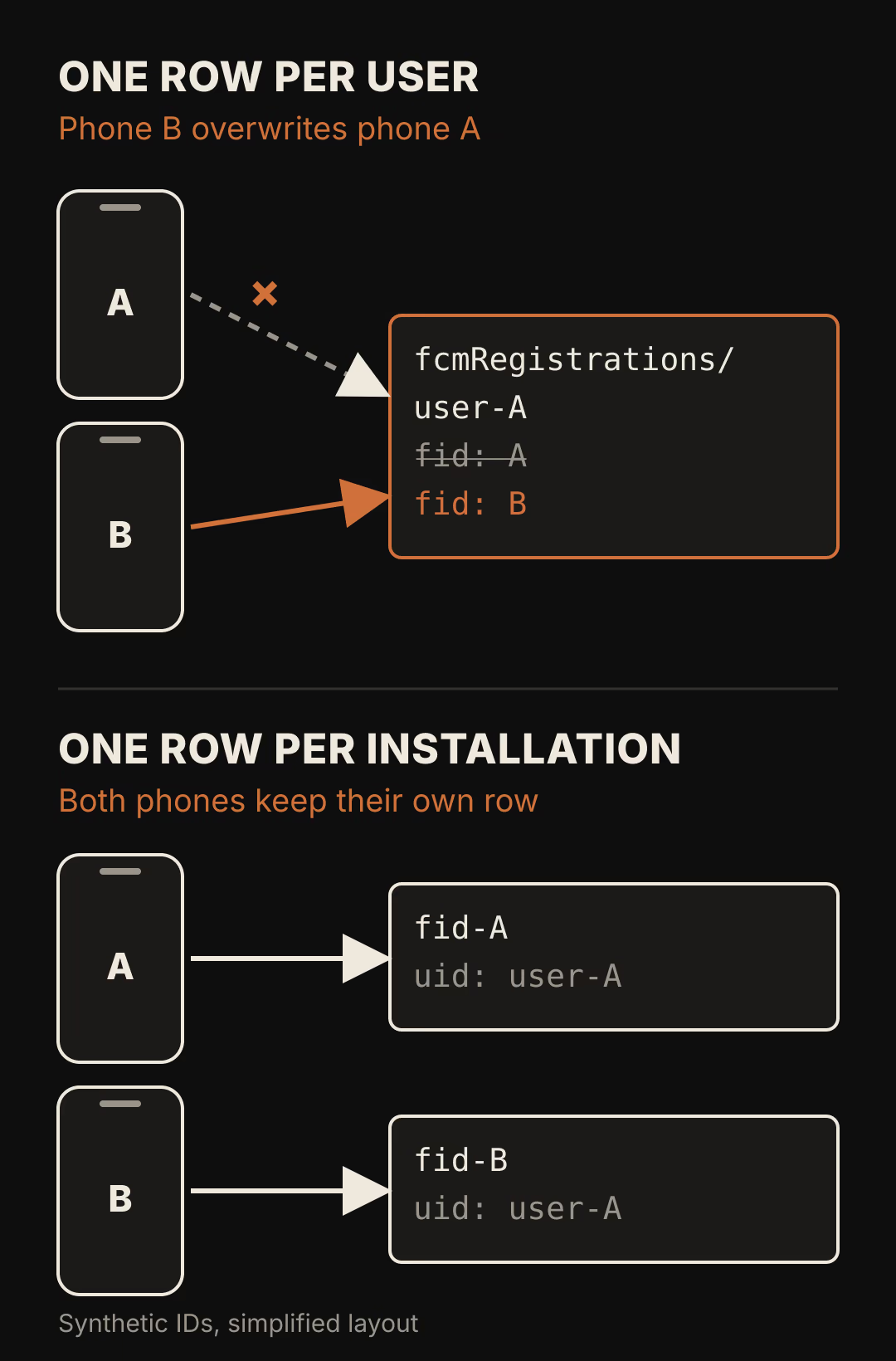
In the top diagram, phone A uploads its ID, then phone B uploads its own ID to the same document and replaces it. Phone A is still installed and still registered, but your server no longer has its address. In the bottom diagram, the document ID is the installation ID and the user ID is a field. Two phones produce two rows, and a query for the user returns both.
The same choice fixes the sign-out problem. When the installation is the key, a device can only ever belong to one account in your database. Signing in as someone else on that phone rewrites the uid field of the existing row instead of adding a second row that still points the device at the old account.
What you need before starting
- A Flutter app with Firebase Authentication, Cloud Firestore and firebase_messaging 17 or later. If you are still deciding on the backend, see how Flutter and Firebase fit a SaaS mobile app.
- Cloud Messaging configured for each platform you ship. On Apple platforms that includes APNs. On the web it includes a VAPID key from the Firebase console.
- A trusted server environment for sending, such as Cloud Functions, with firebase-admin 14.1.0 or later for
fidtargets. Version 14 requires Node.js 22 or newer, according to the same release notes. - Two test installations you can reinstall freely, for example an Android emulator and a physical iPhone, and two test accounts.
Store one document per installation
Create a top-level collection named pushInstallations and use the FID as the document ID. Each document holds four fields: uid, platform, permission and updatedAt. The timestamp is the one Firebase asks you to refresh on every upload, because it tells the server when that installation last opened and synchronised with FCM.
rules_version = '2';
service cloud.firestore {
  match /databases/{database}/documents {
    match /pushInstallations/{fid} {
      allow create, update: if request.auth != null
        && request.resource.data.uid == request.auth.uid
        && request.resource.data.keys().hasOnly(['uid', 'platform', 'permission', 'updatedAt'])
        && request.resource.data.updatedAt == request.time;
      allow delete: if request.auth != null
        && resource.data.uid == request.auth.uid;
      allow read: if false;
    }
  }
}
Clients can write a row only in their own name, and can delete a row only while they own it. Nobody can read the collection from a client, because the send path runs on a server and server client libraries bypass Security Rules.
The update rule allows any signed-in user to claim an existing row. That is what lets the next person who signs in on a shared phone take over the installation. It also means a signed-in user who learned another installation's FID could claim it and stop that device from receiving the other account's messages. Pushes for the claimant would then go to a device they do not hold. If that trade-off does not fit your app, move the write into a callable Cloud Function that decides who may take over an installation.
Upload the installation ID from the client
The client has two inputs that arrive in no fixed order: the FID from onRegistered and the signed-in user from Firebase Authentication. Keep the latest FID in memory and write only when both are present.
import 'dart:async';

import 'package:cloud_firestore/cloud_firestore.dart';
import 'package:firebase_auth/firebase_auth.dart';
import 'package:firebase_messaging/firebase_messaging.dart';
import 'package:flutter/foundation.dart';

class PushRegistration {
  PushRegistration(this._auth, this._db, this._messaging, {this.webVapidKey});

  final FirebaseAuth _auth;
  final FirebaseFirestore _db;
  final FirebaseMessaging _messaging;
  final String? webVapidKey;
  String? _fid;

  void start() {
    _messaging.onRegistered.listen((fid) {
      _fid = fid;
      unawaited(_upload());
    });
    _auth.authStateChanges().listen((user) {
      if (user != null) unawaited(refresh());
    });
  }

  /// Call after sign-in and whenever the app returns to the foreground.
  Future<void> refresh() async {
    final isApple = !kIsWeb && defaultTargetPlatform == TargetPlatform.iOS;
    if (isApple && await _messaging.getAPNSToken() == null) return;
    await _messaging.register(vapidKey: kIsWeb ? webVapidKey : null);
  }

  Future<void> _upload() async {
    final user = _auth.currentUser;
    final fid = _fid;
    if (user == null || fid == null) return;
    final settings = await _messaging.getNotificationSettings();
    await _db.collection('pushInstallations').doc(fid).set({
      'uid': user.uid,
      'platform': kIsWeb ? 'web' : defaultTargetPlatform.name,
      'permission': settings.authorizationStatus.name,
      'updatedAt': FieldValue.serverTimestamp(),
    });
  }
}
Call start() once, early in main() after Firebase.initializeApp(), so the listener exists before the plugin's startup sync. The client guide says onRegistered fires automatically at startup and on routine syncs when auto-initialization is enabled, and again after every manual register() call, even for an app that is already registered. That second behaviour is why refresh() calls register() after sign-in: it delivers the current FID at the moment a user exists to own it.
Three platform conditions sit inside refresh(). On the web, register() is required and takes the VAPID key. On Apple platforms the guide states that the APNs token must be available before FCM API requests, so the code returns early while getAPNSToken() is still null and tries again on the next resume. If you disabled auto-initialization, register() becomes the only way the FID reaches your callback, so the sign-in and resume calls must not be skipped.
Hand the installation over at sign-out and sign-in

The illustration stands for the two writes that move ownership. At sign-out the current owner removes the row while still authenticated, because the delete rule checks resource.data.uid against the signed-in user. At sign-in, refresh() writes the row again under the new user's ID.
// Add to PushRegistration.
Future<void> signOut() async {
  final fid = _fid;
  if (fid != null) {
    try {
      await _db
          .collection('pushInstallations')
          .doc(fid)
          .delete()
          .timeout(const Duration(seconds: 5));
    } catch (_) {
      // Offline, already removed or slow. The next sign-in on this
      // installation overwrites uid, and the sender ignores stale rows.
    }
  }
  await _auth.signOut();
}
Order matters. Calling FirebaseAuth.signOut() first leaves the client with no identity, and the delete rule refuses the request. The timeout keeps sign-out responsive on a bad connection, but it does not cancel the delete. If the request never reaches the server, the device can keep receiving the previous account's pushes until someone signs in on it or its row falls outside your staleness window.
For a shared or managed device where that gap is unacceptable, call unregister() as well. The package documentation says that afterwards onUnregistered provides the FID that is no longer active for direct sends, and the client guide says register() is needed again after unregister(). The refresh() call on the next sign-in covers that.
Lifecycle events and what each one should write
Not every change in a device's life comes through your sign-out button. The installations guide lists when an FID can be rotated: the app is uninstalled or reinstalled, the user clears the app's or device's cache, or the backend deletes the installation after 270 days of inactivity.
| Event | What changes | What your code does |
|---|---|---|
| First launch, user signs in | New FID appears | refresh() writes a row with the user's ID |
| Same user signs in on a second device | Second FID appears | Second row; the user query returns both |
| Sign-out | Owner leaves | Delete the row before signOut() |
| Different user signs in on that device | Same FID, new owner | set() overwrites uid |
| Reinstall or cleared app data | New FID; the old one is dead | New row; the old row fails on send or ages out |
| Notification permission turned off | FID unchanged | Next upload records the new permission value |
| No app launches for a month | Row timestamp stops moving | Sender skips it; a cleanup job may delete it |
The reinstall row is the one your code never sees directly. The old FID belongs to an installation that no longer exists, so no client is left to delete it. The send path has to recognise it.
Send to every fresh installation and prune the dead ones
With the FID APIs there is no client refresh job to schedule. The token management guide says the SDK delivers the current FID to onRegistered on routine startup syncs, while apps on legacy tokens are told to re-upload their token about once a month, which is periodic work for WorkManager or another background scheduler.
The same guide recommends treating a registration as stale when its app instance has not connected for a month, and lets you choose a different window. On Android, FCM considers a registration expired after 270 days of inactivity and rejects sends to it. Apple devices rely on APNs, which has no equivalent inactivity expiry, so your own staleness window is the only thing removing those rows.
import { getFirestore, Timestamp } from 'firebase-admin/firestore';
import { getMessaging } from 'firebase-admin/messaging';

const STALE_AFTER_MS = 30 * 24 * 60 * 60 * 1000;
const REMOVE_CODES = new Set([
  'messaging/installation-id-not-registered',
  'messaging/registration-token-not-registered',
]);

export async function notifyUser(uid: string, data: Record<string, string>) {
  const db = getFirestore();
  const cutoff = Timestamp.fromMillis(Date.now() - STALE_AFTER_MS);
  const snap = await db
    .collection('pushInstallations')
    .where('uid', '==', uid)
    .where('updatedAt', '>=', cutoff)
    .limit(500)
    .get();
  if (snap.empty) return { sent: 0, removed: 0 };

  const docs = snap.docs;
  const result = await getMessaging().sendEachForMulticast({
    fids: docs.map((doc) => doc.id),
    data,
  });

  let removed = 0;
  await Promise.all(
    result.responses.map(async (response, i) => {
      const code = response.error?.code;
      if (response.success || !code) return;
      if (REMOVE_CODES.has(code)) {
        // Skip the delete if the device re-registered after this read.
        await docs[i].ref
          .delete({ lastUpdateTime: docs[i].updateTime })
          .then(() => removed++)
          .catch(() => undefined);
      } else if (code === 'messaging/invalid-argument') {
        console.warn('Check payload before removing', docs[i].id.slice(0, 6));
      }
    }),
  );
  return { sent: result.successCount, removed };
}
The guide names UNREGISTERED (HTTP 404) and INVALID_ARGUMENT (HTTP 400) as the responses that can mean a dead registration. It also warns that INVALID_ARGUMENT is returned for payload problems, so a registration is safe to delete only when you are certain the payload was valid. The function deletes on the unregistered codes and only logs the other one.
The error code list contains both strings for a reason. The guide's sample deletes when the Admin SDK reports messaging/registration-token-not-registered, while firebase-admin 14.5.0 reports an unregistered target sent through the fid field as messaging/installation-id-not-registered. A cleanup that checks only the token code will keep dead FIDs forever.
The lastUpdateTime precondition closes a race. If the device opens and uploads between the query and the delete, the row's update time changes, the delete fails, and the fresh registration survives. The equality filter on uid combined with the range on updatedAt needs a composite index. Without it, the first run fails with an error that links to the index you need. The limit(500) matches the multicast maximum documented in the SDK.
Permission is a separate fact from registration
A registered installation can belong to a user who has switched notifications off. Store the permission state as information about the device, and keep the row. If you deleted it on a denial, a user who re-enables notifications in system settings would receive nothing until the next sign-in.
The message receiving guide lists four authorizationStatus values: authorized, denied, notDetermined and provisional. On Android 13 and later it warns that denied also covers a user who was never asked, so track your own "already asked" flag if the distinction matters. Calling refresh() from an app lifecycle resume handler updates the stored value after the user visits system settings.
Use the field to choose a fallback channel or to show an in-app prompt. A successful send means FCM accepted the message for that installation. It does not prove the notification appeared on screen, and it never proves a person read it.
Run the acceptance sequence with two test installations
Use synthetic accounts named user A and user B, and log only the first six characters of any FID. Full identifiers do not belong in screenshots, tickets or analytics.
- Install on device 1, sign in as user A, and confirm one
pushInstallationsrow withuidset to user A. - Install on device 2, sign in as user A, and confirm a second row. Send to user A and confirm
sent: 2. - On device 1, turn notifications off in system settings and return to the app. The row's
permissionvalue changes and the row stays. - On device 2, sign out. Its row disappears. Send to user A and confirm
sent: 1. - On device 2, sign in as user B. The row reappears with user B's ID. Send to user A again and confirm device 2 receives nothing.
- Uninstall and reinstall the app on device 1 and sign in as user A. A new row appears. Send to user A: the old row should be deleted as soon as FCM reports it unregistered, or it should drop out once it is older than your staleness window.
- Sign out on device 2 with networking disabled. Record whether the row survives, then sign in as user A on that device and confirm the row now carries user A.
Step 6 depends on timing you do not control, because the documentation does not say how soon a send to an abandoned FID starts failing. Record which of the two removal paths cleared the row instead of expecting one of them.
What this design does not cover
Topic subscriptions follow the installation, not the user. The token management guide recommends resubscribing whenever the FID changes and unsubscribing stale installations with the Admin SDK. A per-user notification preference stored in your database will not remove a device from a topic on its own.
The rows describe app installations. A single person with a phone and a tablet has two rows, and a family sharing one tablet has one row that changes owner. If your product needs to reach a person across shared hardware, that is a product decision about which account may receive what, and the push data model cannot make it for you.
FlutterFlow's built-in push notifications manage device registration for you. Its push notification documentation, last updated June 7, 2026, still describes registration tokens and says logged-out users do not receive pushes. The FID listener, the rules above and the cleanup function are custom code and backend work outside those built-in actions.
Where to start
Open the code that stores your push address and look at the document ID. If it is the user ID, two devices are already overwriting each other. Move the key to the installation, then run steps 1 and 2 of the acceptance sequence before changing anything else.