
A profile screen lets users change their display name and bio. The role and plan fields are not on that screen, so they look safe. Then a test account sends { role: "admin" } straight to its own users/{uid} document, and the write succeeds. The security rule only checked that the signed-in user owns the document.
The fix has two parts. On update, compare the incoming document with the stored one using request.resource.data.diff(resource.data).affectedKeys() and allow the write only when every changed key is on a list of fields the user may edit. On create, there is no stored document to compare with, so a separate allow create rule checks request.resource.data.keys().hasOnly(...). Privileged fields such as role and plan are then written only by server code, and access decisions read a source the client cannot write, such as a custom claim.
This article builds that rule set for a synthetic profile, reproduces the regression where tightening the update rule breaks sign-up, and runs both against the Firestore emulator. The users (alice, bob, admin1) and the project ID are invented for the demonstration.
Why hiding the role selector does not protect the role

The screen decides which fields a normal user is likely to edit. It does not decide which fields a request can contain. Firebase's API key guide says the API keys for Firebase services are safe to include in code, and that Firestore data is protected by Security Rules. Anyone who signs in to your app holds an ID token for their own account and can send Firestore writes from a script or a modified build. The rules evaluate the proposed document. They never see which widgets were visible.
The usual starting rule looks like this:
match /users/{uid} {
  allow read, write: if request.auth != null && request.auth.uid == uid;
}
It answers one question: is this your document? A user can still write any field to their own profile, including role: "admin" or plan: "pro". If another rule, a Cloud Function or the app trusts those fields, the user has just granted themselves access.
Decide which fields the client may write
Split the profile into fields the owner may edit and fields only trusted server code may set. The synthetic profile used in this article has five fields.
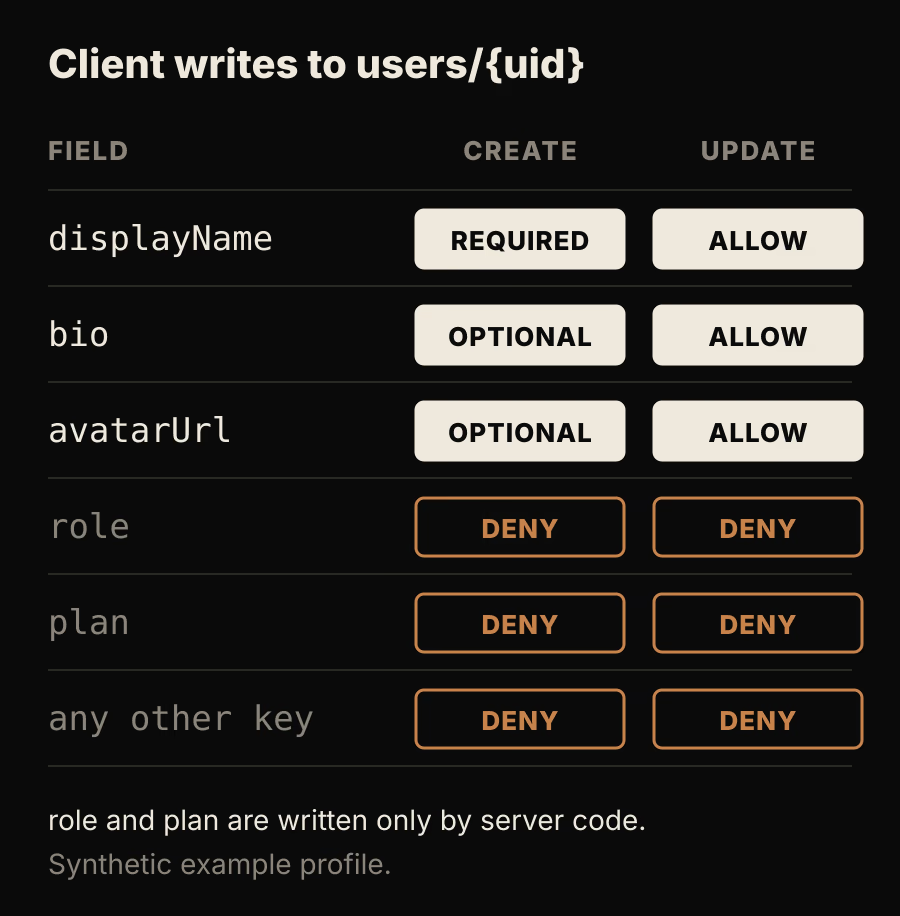
The matrix shows which keys a client write may touch. Light cells are the only ones the rules allow, and the bottom row matters as much as role: an unknown key such as isVerified is denied too.
| Field | Type in this example | Owner create | Owner update | Written by |
|---|---|---|---|---|
displayName | string, 1 to 50 characters | required | allowed | client |
bio | string, up to 280 characters | optional | allowed | client |
avatarUrl | string | optional | allowed | client |
role | string | denied | denied | server |
plan | string | denied | denied | server |
| any other key | denied | denied | nobody, until added |
Keep this table next to the rules file and change both together. Firebase's guide to controlling access to specific fields points out that with an allowlist, writes to a new field are rejected until you add it. That is the behavior you want: a new editable field needs a deliberate rule change.
The rule set
rules_version = '2';
service cloud.firestore {
  match /databases/{database}/documents {

    function signedInAs(uid) {
      return request.auth != null && request.auth.uid == uid;
    }

    function validDisplayFields(data) {
      return data.displayName is string
        && data.displayName.size() > 0
        && data.displayName.size() <= 50
        && data.get('bio', '') is string
        && data.get('bio', '').size() <= 280
        && data.get('avatarUrl', '') is string;
    }

    match /users/{uid} {
      allow read: if signedInAs(uid) || request.auth.token.role == 'admin';

      allow create: if signedInAs(uid)
        && request.resource.data.keys().hasAll(['displayName'])
        && request.resource.data.keys().hasOnly(['displayName', 'bio', 'avatarUrl'])
        && validDisplayFields(request.resource.data);

      allow update: if signedInAs(uid)
        && request.resource.data.diff(resource.data).affectedKeys()
             .hasOnly(['displayName', 'bio', 'avatarUrl'])
        && validDisplayFields(request.resource.data);

      allow delete: if false;
    }
  }
}
Each part has a specific job.
allow createchecks the whole document. Firebase's field guide notes thatrequest.resource.datarepresents the complete document as it would look after the write. On create, that is exactly what the client sent, sohasAllmakesdisplayNamerequired andhasOnlyrejectsrole,planand anything else.allow updatechecks only what changed. On update,request.resource.datastill contains the storedrole, sokeys().hasOnly(...)would reject every edit to a profile the server has already given a role. TheMapDiffreference definesaffectedKeys()as the keys that were added, removed or changed. A write that leavesrolealone passes. A write that changes, adds or removes it fails.validDisplayFieldsruns on both paths, because field types need to be enforced on create and on update.data.get('bio', '')supplies a default for optional fields. Reading a missing field directly causes an evaluation error, and an error denies the request.allow delete: if falsesends account deletion through server code. Change it if your app lets users delete their own profile document.- The admin read uses a custom claim. The section on trusted roles below explains where that claim comes from.
Rules accept or reject the whole write. The field guide states that you cannot keep some field changes from a request and drop others. An update that sends displayName together with plan saves nothing.
Send only editable fields from Flutter
Write the profile with update() and a map that contains only the editable keys:
Future<void> saveProfile({required String displayName, String? bio}) {
  final uid = FirebaseAuth.instance.currentUser!.uid;
  return FirebaseFirestore.instance.collection('users').doc(uid).update({
    'displayName': displayName,
    if (bio != null) 'bio': bio,
  });
}
Avoid set() without merge for profile edits. It replaces the stored document, so a payload without role removes it, affectedKeys() includes role, and the rule rejects the write. The emulator run below includes that case. In FlutterFlow, set only the editable fields in the Update Document action, and check the exported code if you need to confirm which write it performs. The Dart snippet above was not executed for this article. The emulator tests use the JavaScript SDK, which sends the same kinds of document writes to the same rules.
The regression: one tightened rule breaks sign-up
A common way to tighten the original rule is to keep one allow write and add the diff check to it:
match /users/{uid} {
  allow read: if request.auth != null && request.auth.uid == uid;
  // Tightened rule applied to every write, including create.
  allow write: if request.auth != null && request.auth.uid == uid
    && request.resource.data.diff(resource.data).affectedKeys()
         .hasOnly(['displayName', 'bio', 'avatarUrl']);
}
Existing users can still rename themselves, and role edits are blocked, so a test suite that only covers updates stays green. New users are a different story. On create there is no stored document, resource is null, and resource.data fails. Running a first profile create for bob against this rule on the emulator returned:
PERMISSION_DENIED: evaluation error at L7:23 for 'create' @ L7, ...
Null value error. for 'create' @ L7
The fix is the split shown earlier: allow create validates the full payload with keys(), and allow update uses diff(). Add a first-profile create test to the suite so this cannot return silently.
If FlutterFlow creates the user document after sign-in through its Users Collection setting, that first write contains the fields from your users collection schema. Add those field names to the create allowlist, or sign-up will fail the hasOnly check. FlutterFlow's Firestore Rules settings generate per-collection rules. To use custom rules like these, the documentation describes excluding that collection's generated rule and writing the advanced rules in the Firebase console. Review the before and after diff it shows before you deploy.
Keep roles on the server and read them from a trusted place
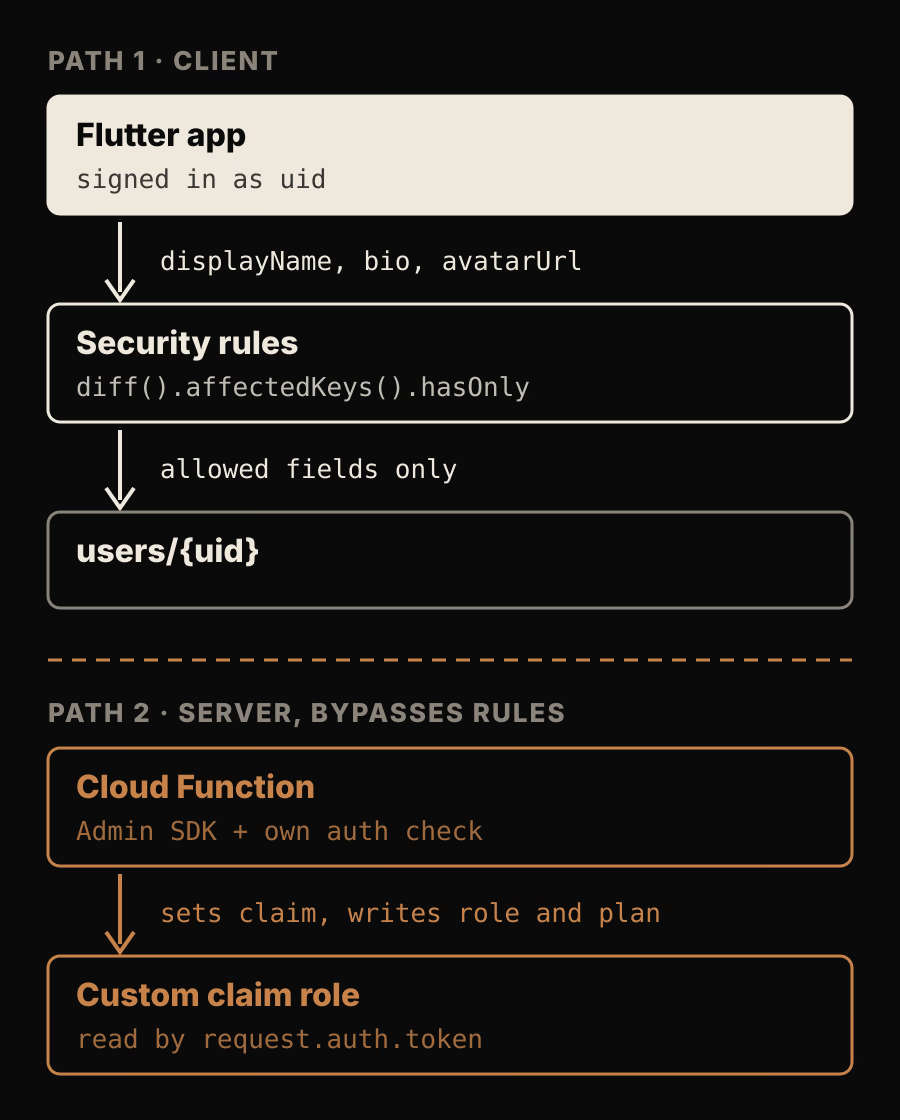
The diagram separates the two write paths. Path 1 goes through security rules. Path 2 does not, so it carries its own checks.
The client can no longer set role, but something still has to. The field guide states that the server client libraries bypass all Firestore Security Rules, so a Cloud Function or an admin script using the Admin SDK can write role and plan. That code must make its own authorization decision, for example only an existing admin may promote someone, or only your billing webhook may change plan.
Rules can then read the role from two places, both described in Firebase's rules and Auth guide:
| Source | How rules read it | Trade-off |
|---|---|---|
| Custom claim | request.auth.token.role == 'admin' | No extra read. Changes arrive with the next ID token. |
| Firestore field | get(/databases/$(database)/documents/users/$(request.auth.uid)).data.role == 'admin' | Current value, but each embedded read is a billed operation. |
This article uses a claim. According to the custom claims guide, claims should only be set from a privileged server environment with the Admin SDK, the payload must not exceed 1000 bytes, and claims are meant for access control rather than profile data. Setting claims replaces the user's existing claims. A callable function that changes a role can look like this:
import { initializeApp } from "firebase-admin/app";
import { getAuth } from "firebase-admin/auth";
import { getFirestore } from "firebase-admin/firestore";
import { onCall, HttpsError } from "firebase-functions/v2/https";

initializeApp();

const ROLES = ["member", "admin"];

export const setUserRole = onCall(async (request) => {
  if (request.auth?.token.role !== "admin") {
    throw new HttpsError("permission-denied", "Only admins can change roles.");
  }
  const { uid, role } = request.data as { uid: string; role: string };
  if (typeof uid !== "string" || !ROLES.includes(role)) {
    throw new HttpsError("invalid-argument", "Unknown user or role.");
  }
  // setCustomUserClaims replaces the user's existing claims.
  await getAuth().setCustomUserClaims(uid, { role });
  // Mirror for display only. Rules authorize with the token claim.
  await getFirestore().doc(`users/${uid}`).set({ role }, { merge: true });
  return { uid, role };
});
This function type-checks with firebase-functions 7.4.0, firebase-admin 14.5.0 and TypeScript 7.0.2 in strict mode. It was not deployed for this article. The first admin has to come from somewhere else, such as a one-off Admin SDK script you run yourself.
A new claim reaches the client the next time an ID token is issued: on sign-in, on a normal token refresh, or on a forced refresh. In Flutter, call FirebaseAuth.instance.currentUser?.getIdToken(true) after a role change if the user needs the new access straight away. Removing a role has the same delay, which matters when you revoke an admin.
Run the rules against the emulator
The rules unit testing guide uses @firebase/rules-unit-testing with initializeTestEnvironment, authenticatedContext, unauthenticatedContext, assertSucceeds and assertFails. Seed a profile with withSecurityRulesDisabled, which stands in for the server writing role and plan:
import fs from "node:fs";
import { initializeTestEnvironment, assertSucceeds, assertFails } from "@firebase/rules-unit-testing";
import { doc, setDoc, updateDoc, getDoc } from "firebase/firestore";

const testEnv = await initializeTestEnvironment({
  projectId: "demo-profile-rules",
  firestore: { rules: fs.readFileSync("firestore.rules", "utf8"), host: "127.0.0.1", port: 8080 },
});

await testEnv.withSecurityRulesDisabled(async (ctx) => {
  await setDoc(doc(ctx.firestore(), "users/alice"),
    { displayName: "Alice Demo", bio: "", role: "member", plan: "free" });
});

const alice = testEnv.authenticatedContext("alice").firestore();
const admin = testEnv.authenticatedContext("admin1", { role: "admin" }).firestore();

await assertSucceeds(updateDoc(doc(alice, "users/alice"), { displayName: "Alice B" }));
await assertFails(updateDoc(doc(alice, "users/alice"), { role: "admin" }));
await assertFails(updateDoc(doc(alice, "users/alice"), { isVerified: true }));
await assertSucceeds(getDoc(doc(admin, "users/alice")));
Run the file with firebase emulators:exec --only firestore "node test.mjs". The full suite for this article ran on firebase-tools 14.27.0 with Cloud Firestore emulator 1.19.8, @firebase/rules-unit-testing 5.0.2 and the firebase JavaScript SDK 12.19.0. All 18 assertions passed:
| Case | Expected | Result |
|---|---|---|
| Owner creates profile with display fields only | allow | allowed |
Owner creates profile with role: "admin" | deny | denied |
| User creates someone else's profile | deny | denied |
Create without displayName | deny | denied |
| Unauthenticated create | deny | denied |
Owner updates displayName | allow | allowed |
Owner updates bio | allow | allowed |
Owner sets role to admin | deny | denied |
Owner sends displayName with plan: "pro" | deny | denied |
Owner adds unknown field isVerified | deny | denied |
displayName sent as a number | deny | denied |
| Unauthenticated update | deny | denied |
| Another user updates the profile | deny | denied |
Full set() that keeps role and plan unchanged | allow | allowed |
Full set() that drops role | deny | denied |
Token with role: "admin" claim reads another profile | allow | allowed |
| Member reads another profile | deny | denied |
| Owner reads own profile | allow | allowed |
These results show how this rules file behaves in the emulator. They do not test your deployed rules, your Flutter build or your server code. Run the same cases against your own rules file before each deploy.
When a profile write is denied, or allowed when it should not be
- Read the emulator's denial message. It names the operation and the rule line that returned false or failed, as in the
Null value errorabove. - Check whether the document existed. A first write is evaluated by
allow create, and later writes byallow update. - Log the exact map the client sends before writing. Generated code and helper functions sometimes add fields such as timestamps.
- For an update, list the keys whose values actually change, including keys a full
set()removes. Any key outside the allowlist explains the denial. - Check types and lengths. A number where the rule expects a string fails
is string. - For admin features, confirm the claim is in the user's current token. In Flutter,
currentUser?.getIdTokenResult(true)refreshes the token and returns itsclaims. - If a write you expected to be denied succeeds, look for a second matching rule. Firebase's rules structure guide explains that when several
allowexpressions match a request, access is granted if any of them is true.
What field rules cannot do
- They cannot hide fields on read. Reads are evaluated per document, so the field guide recommends moving sensitive values, such as a billing customer ID, into a separate document with its own read rule.
- They do not apply to the Admin SDK. Server code has to validate its own inputs.
- They cannot check every element's type inside a list or map, only that the field is a list or a map.
- They do not make claims instant. Access changes follow the ID token.
For the wider picture of where profile documents fit in a Firebase app, see the Flutter and Firebase mobile SaaS guide. For comparing this per-field model with row policies, read Firestore rules versus Postgres RLS for multi-tenant data, and for tenant-scoped rules on a larger schema, see the multi-tenant clinic rules walkthrough.
Before your next rules deploy, add two tests to your suite: a first profile create from a brand new account, and an update from that account that sets role. If the first fails or the second succeeds, fix the rules before shipping.