
A user buys the Pro plan in your Flutter app, turns off auto-renew a week later, and gets a refund from store support after that. The export button still works. A month on, another subscription reaches its end date and the same button keeps exporting. In both cases the app decided "this user is Pro" once, right after the purchase, and stored that answer.
The short answer is to stop treating the purchase result as a permanent fact. Read entitlement from the RevenueCat SDK's current customer state for the interface. Check it again at the moment a paid action runs. For anything that costs you money or returns protected data, let your server decide from its own webhook-driven record. Cancelling renewal, expiry, a billing failure and a refund are separate events with separate timelines, and most of them do not end access the moment they happen.
The example below uses a synthetic app with a pro entitlement, an export feature and a small backend. The names are invented for the demonstration. My own products bill through Stripe rather than in-app purchase, so this article is based on RevenueCat's and Stripe's documentation, read in November 2026, and not on a production RevenueCat account. The Dart snippets have not been run against a store sandbox; the test plan at the end lists what you should verify in your own project.
When does a cancelled subscription actually lose access?
A cancelled subscription keeps access until its expiration date, because cancelling only turns off the next renewal. Access ends when the period expires, and the app has to read that state rather than react to the cancellation.
RevenueCat's CustomerInfo documentation lists the fields that separate these cases on each entitlement:
| Field | What it tells you |
|---|---|
isActive | Whether the user has access right now |
expirationDate | When the current access ends; null for lifetime access |
willRenew | Whether the entitlement is set to renew; it may lag the store by several hours |
unsubscribeDetectedAt | When auto-renew was turned off; this alone does not make the entitlement inactive |
billingIssueDetectedAt | When a charge failed; this alone does not make the entitlement inactive |
After a user cancels in the store, a typical entitlement therefore reads isActive: true, willRenew: false, with an unsubscribeDetectedAt timestamp and an expirationDate still in the future. RevenueCat's webhook event flows describe the sequence: a CANCELLATION event when the customer cancels, then an EXPIRATION event at the end of the billing cycle, when entitlements are revoked.
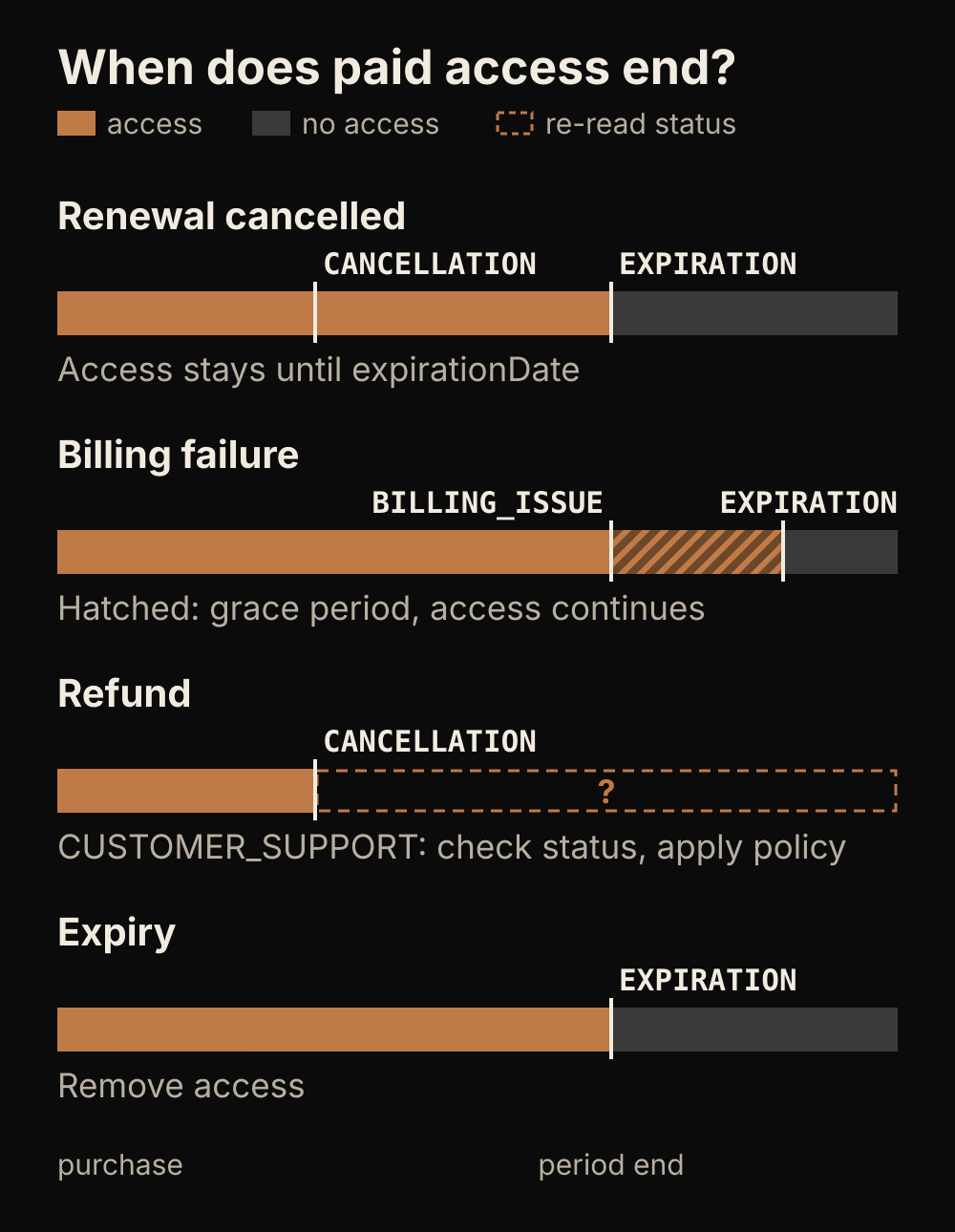
The diagram shows where access really ends in each case. Only the expiry row ends with access removed by the event itself. The refund row is the one most apps get wrong, in either direction.
A refund is not the same as expiry. In RevenueCat's event types reference, a refund from Apple support or a Google Play refund through RevenueCat arrives as a CANCELLATION with cancel_reason set to CUSTOMER_SUPPORT. The same page warns that a subscription's auto-renewal may still be active after a refund, because refunds can be given without cancelling the subscription, and tells you to check the current subscription status. It does not say the entitlement ends at the moment of the refund. So write down what your product does after a refund, and apply that policy on your server instead of assuming the store has already removed access.
Read entitlement from the SDK instead of the purchase screen
Get the current state from Purchases.getCustomerInfo() and listen for changes, because a value saved at checkout goes stale as soon as the subscription changes.
Future<bool> hasProAccess() async {
  final info = await Purchases.getCustomerInfo();
  return info.entitlements.all['pro']?.isActive ?? false;
}
RevenueCat's documentation says the SDK updates and caches customer info when the app becomes active, so this call normally returns from the cache without a network request. Its cache section adds that the cache is refreshed when it is older than five minutes, and only when you call getCustomerInfo(), make a purchase or restore purchases. The two statements do not settle whether bringing the app to the foreground always refreshes the cache, so test that behavior with the SDK version you ship.
To react while the app is open, register a listener once at startup and push the result into your app state:
void listenForAccessChanges(void Function(bool hasPro) onChange) {
  Purchases.addCustomerInfoUpdateListener((info) {
    onChange(info.entitlements.all['pro']?.isActive ?? false);
  });
}
The same page states that updates are never pushed from the RevenueCat backend. The listener fires after an outbound request from the device, at launch and whenever the customer info on the device changes. A refund processed by store support can therefore take a while to reach a running app. Design for that delay instead of promising instant revocation.
Purchases.restorePurchases() also returns fresh customer info, but RevenueCat's restoring purchases guide says to call it only from a user action, such as a Restore button, because it can show an operating system sign-in prompt. For background refreshes, keep using getCustomerInfo().
Check access when the action runs
A paid action should read entitlement again at the moment it executes. The screen can show the last known state, but the action must ask again, and actions that spend money must get their answer from your server.

The dusty pass on the left is a decision made in initState or at login. The lit pass on the right is the same entitlement checked when the user taps the button. That second check closes the gap that let the export keep running.
Future<void> onExportPressed(BuildContext context) async {
  if (!await hasProAccess()) {
    showPaywall(context);
    return;
  }
  await exportLocally(); // runs on the device and costs the backend nothing
}
For a feature that runs entirely on the device, this client check is a reasonable gate. For a server feature, such as a model call, a storage quota or a protected download, the client check only decides what to show. A modified build passes it, and so does a device whose cache has not caught up yet. Send the request to your backend and let the backend check its own access record before it does the work:
Future<ExportResult> requestServerExport(String projectId) async {
  final response = await api.post('/exports', body: {'projectId': projectId});
  if (response.statusCode == 402) {
    // Server says access has ended; refresh the local state and show the paywall.
    await Purchases.getCustomerInfo();
    throw AccessEndedException();
  }
  return ExportResult.fromJson(response.body);
}
Here api, ExportResult and AccessEndedException are placeholders for your own client code, and 402 is the status this demo chose for "no paid access". The RevenueCat paywall and entitlement setup covers why client entitlement should drive rendering while server entitlement guards spending.
Keep the interface calm while state catches up. Show the latest known state and move the user to the free tier on the next refresh, rather than locking the screen in the middle of a tap.
Reconcile access on the server from webhooks
Your server should keep its own access record, updated from webhook events, and remove access only on the events that mean access has ended.
| RevenueCat event | Meaning for access |
|---|---|
CANCELLATION | Auto-renew was turned off or the purchase was refunded. Access usually continues to the expiration date. For refunds, check the current status and apply your refund policy. |
EXPIRATION | The subscription expired. Remove access. |
BILLING_ISSUE | A charge failed. The subscription has not necessarily expired, so wait for a later EXPIRATION. |
SUBSCRIPTION_PAUSED | A pause is scheduled for the end of the period. Remove access on the EXPIRATION whose reason is SUBSCRIPTION_PAUSED. |
TRANSFER | Entitlements moved to another app user ID. Only the destination user receives this event. |
TEMPORARY_ENTITLEMENT_GRANT | A temporary grant of at most 24 hours while the store cannot validate a purchase. |
These meanings come from RevenueCat's event types reference. An EXPIRATION event carries an expiration_reason such as UNSUBSCRIBE, BILLING_ERROR, CUSTOMER_SUPPORT or SUBSCRIPTION_PAUSED, which is worth storing so support can see why access ended.
Billing failures need care. RevenueCat's grace period guide explains that during a store grace period users keep access, and the subscription is not considered expired until the grace period ends, even though RevenueCat immediately sends events saying the subscription was cancelled. If your handler revokes access on the first failed charge, it locks out a customer whose payment may still succeed.
If you bill through Stripe directly, base access on the subscription status rather than on the cancellation request. Stripe's subscription webhooks guide says to revoke access when a subscription becomes canceled or unpaid, to notify the customer when it becomes past_due, and, after invoice.paid, to confirm the subscription status is active before extending access. It also lists charge.refunded for full or partial refunds and explains how to resolve the charge back to its subscription.
Both systems point to the same shape. Store an access expiration timestamp per user, written only by your webhook handler, and check it on every protected request. Stripe describes this pattern directly: keep a timestamp for the access expiration date and check whether it is still in the future when the customer signs in. The full map of Stripe statuses and what each one means for access is in the SaaS subscription lifecycle states guide.
Keep user content when the plan ends
When access ends, downgrade what the user can do and keep what they created. Make premium content read-only or locked, and say so in the app.
If a user built ten projects on Pro and the plan lapses, deleting those projects turns a billing change into data loss. Keep the records, stop new privileged writes and show existing premium items as read-only or behind the paywall until the user subscribes again.
Write the policy down for each premium capability. A short table in your codebase is enough: what stays readable, what becomes locked, what is capped (for example, the first three projects stay editable) and what happens after a refund. Enforce it in the same server code that checks the access timestamp, so the entitlement check and the content rule cannot drift apart.
How do you test refunds and expiry before release?
Run every lifecycle transition in a store sandbox and against your webhook handler, and confirm that paid actions re-check access while state is still catching up.
- Cancelled renewal with time left. Turn off auto-renew in the sandbox. Confirm
isActivestays true,willRenewbecomes false,unsubscribeDetectedAtis set and the export keeps working untilexpirationDate. - Expiry. Let a sandbox subscription lapse. Confirm the entitlement becomes inactive, the server receives
EXPIRATIONand the export shows the paywall. - Refund or revocation, where the store sandbox supports it. Confirm the server receives
CANCELLATIONwithCUSTOMER_SUPPORT, reads the current status and applies your refund policy. - Billing failure. Confirm
BILLING_ISSUEleaves access in place during the grace period and that removal waits forEXPIRATION. - Delayed update. Change the subscription in the store, then use the app before the SDK refreshes. Confirm the execution-time check and the server record catch the change even though the screen was briefly out of date.
- A paid server action during reconciliation. Send the protected request while the webhook is still on its way. Confirm the server answers from its own record and returns a clear "no access" or "try again" response.
Use this checklist when a paid feature keeps working after it should not:
- Does a paid action read entitlement only in
initState, at login or after purchase? Move the check to the moment the action runs. - Does the server trust a flag sent by the client, or does it read its own webhook-driven record?
- Does the handler revoke on
CANCELLATIONor on the firstBILLING_ISSUE? Move removal toEXPIRATION, or to Stripe'scanceledandunpaidstatuses. - Does a refund have a written policy, or does the code assume the store already removed access?
- Does a downgrade delete user data? Change it to read-only or locked.
There is one limitation you cannot remove. None of these updates arrive instantly. RevenueCat does not push to the device, the client cache can be minutes old, and Stripe retries a failing webhook endpoint for up to three days in live mode, according to its subscription webhooks guide. A design that expects a refund to reach the app the second it happens will leave a gap. Close it by checking access on the server when the action runs, and treat the client's state as the latest known value.
Start by searching your project for the entitlement identifier and listing every place that reads it. Each read that happens only once, before the user acts, is a place where a refund or expiry can slip through.