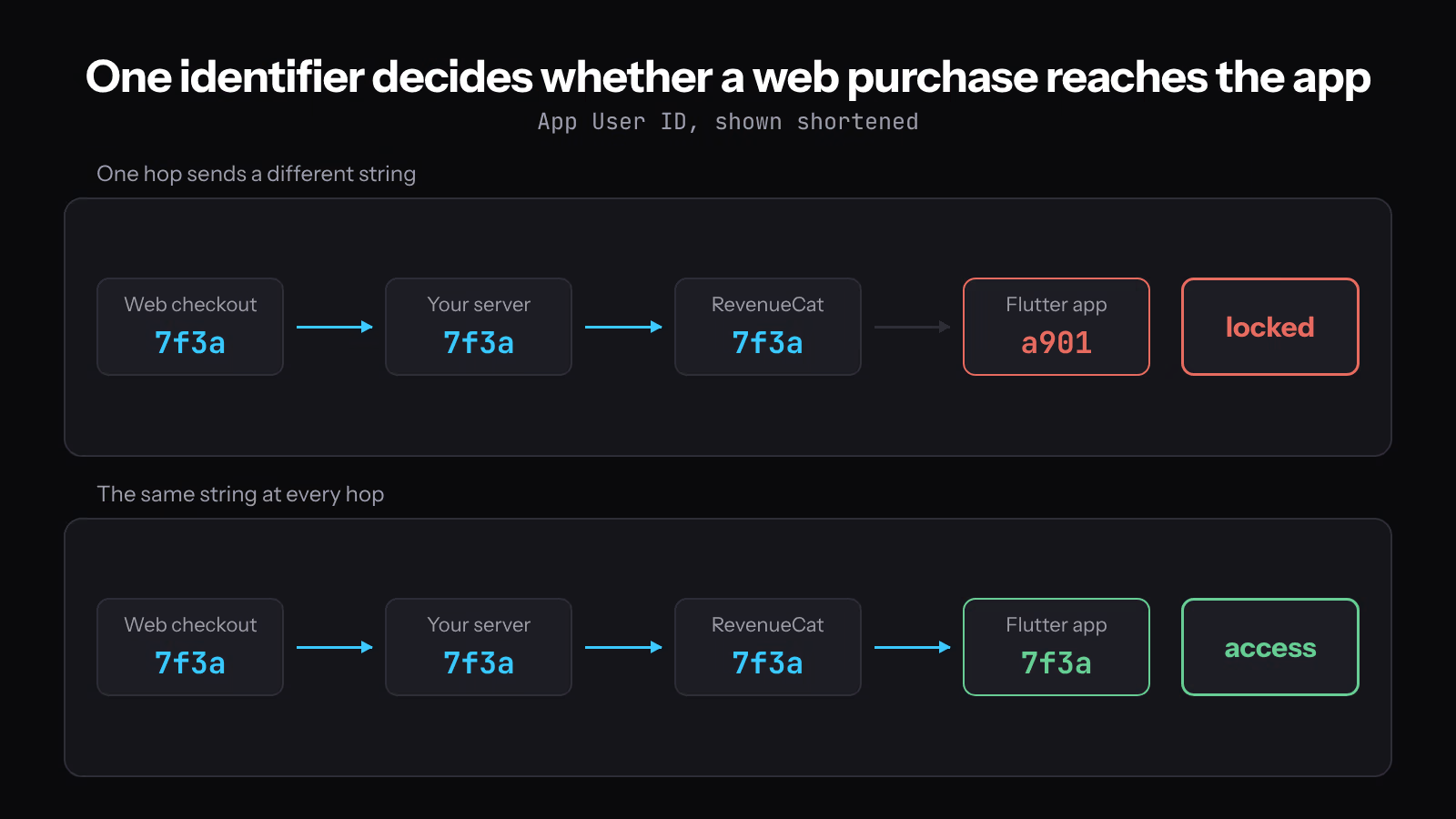
A customer pays on your website, opens your Flutter app signed in to the same account, and the paywall is still there. Stripe shows an active subscription. RevenueCat shows a customer with an entitlement. Both records are correct, and as far as your app is concerned they describe two different people.
The join key is the App User ID. RevenueCat grants entitlements to the App User ID the SDK was configured with, so a Stripe purchase reaches that user only when your server posts the purchase against the same string. RevenueCat's integration guide states the requirement directly: "In order for a Stripe subscription to be honored within an app, the Purchases SDK must be configured with the same App User ID" (RevenueCat, track external Stripe purchases). What follows is the sequence that makes those two strings identical, the client read that makes the app notice, and the checks that tell you which component held the old answer.
The identifier that decides what the app can unlock
Pick one stable ID from your own account system and use it in both places. RevenueCat grants entitlements to an App User ID, which is "case-sensitive" and "scoped to a whole Project", and "a user logged into the same App User ID on different platforms will be considered the same user" (RevenueCat, identifying customers).
Three properties of that ID decide whether the join works:
- If you never call
logIn(), the SDK generates a random ID prefixed with$RCAnonymousID:and caches it on the device. Anonymous IDs "are not able to share subscription status across apps and platforms", so an app still holding one cannot see a web purchase at all. - Case matters. A user row stored as
A1B2on the web and sent asa1b2from the app produces two RevenueCat customers and one locked account. - RevenueCat recommends "a non-guessable pseudo-random ID, like a UUID (RFC 4122 version 4)", capped at 100 characters, and advises against email addresses on both guessability and GDPR grounds. The SDK also blocks values such as
anonymous,guest,unknown,null,-1,0, and any ID containing a forward slash.
The Stripe customer ID looks like a convenient join key and it cannot serve as one. Your app configures the SDK when someone signs in, which is usually long before they pay, and at that moment no Stripe customer exists for them. Use your own user ID on both sides and treat the Stripe customer as a billing record attached to it.
Check the product catalogue before writing any code
This integration only carries the price shapes RevenueCat imports. In the Product Catalog, "a product in RevenueCat maps directly to a single Stripe product", one price per product is the recommended arrangement, and the web purchase flows support recurring flat-rate and one-off flat-rate prices. Tiered, usage-based and customer-chooses pricing are not supported, and "once a Stripe price is imported into RevenueCat, its price type cannot be changed" (RevenueCat, Stripe integration).
Two settings on that page change what you will observe later. You choose whether RevenueCat registers an active subscription when Stripe creates its invoice or after the invoice is paid, and the same page notes that Stripe Test Clocks "are not fully supported", so advancing a clock is not a reliable way to test a renewal here.
If your price is metered or tiered, change the pricing or choose a different plan shape before going further. A product RevenueCat will not import cannot be joined to an entitlement by any amount of webhook code.
Carry your user ID into the Checkout Session
Put your own user ID on the Checkout Session so your server can read it back when the event arrives. Stripe's client_reference_id is built for this: "A unique string to reference the Checkout Session. This can be a customer ID, a cart ID, or similar, and can be used to reconcile the session with your internal systems", with a 200 character limit (Stripe, create a Checkout Session).
// Trusted server. The browser never chooses which account gets access.
const session = await stripe.checkout.sessions.create({
  mode: 'subscription',
  line_items: [{ price: PRICE_ID, quantity: 1 }],
  // Read from the authenticated session, never from a query parameter.
  client_reference_id: req.user.id, // your UUID v4, also the App User ID
  // client_reference_id is a Checkout Session field. Copy the ID onto the
  // subscription too, so customer.subscription.* events carry it.
  subscription_data: { metadata: { app_user_id: req.user.id } },
  success_url: `${SITE}/welcome?session_id={CHECKOUT_SESSION_ID}`,
  cancel_url: `${SITE}/pricing`,
});
The duplication in that snippet prevents a specific bug. RevenueCat recommends listening to customer.subscription.created for subscriptions, and the subscription object that event carries has its own metadata; it does not inherit the session's client_reference_id. Set subscription_data.metadata as well, or resolve the Checkout Session from the subscription before you look for the ID. Reading the user ID from a query parameter instead would let any caller name the account that receives access, so take it from the authenticated request.
Grant access from the webhook, not from the redirect
A redirect proves the browser reached your page. It does not prove payment, and it does not always happen. Stripe is explicit: "You can't rely on triggering fulfillment only from your checkout landing page, because it's not guaranteed customers visit that page", and "Automatic fulfillment with webhooks is required if you sell subscriptions" (Stripe, fulfill orders).
Your handler has four obligations before it grants anything:
- Verify the signature. Stripe signs every event in the
Stripe-Signatureheader, verification needs the raw request body, and a framework that reparses or rewrites that body breaks it. The official libraries default to a five minute tolerance between the event timestamp and your clock (Stripe, webhooks). - Return a 2xx quickly, "before any complex logic that could cause a timeout". Queue the work and acknowledge the delivery.
- Check
payment_statuson the retrieved session rather than assuming a completed session was paid. Stripe's reference fulfillment function retrieves the session withline_itemsexpanded and acts only whenpayment_statusis notunpaid. - Make fulfillment safe to run twice. Stripe states the function "might be called multiple times, possibly concurrently, for the same Checkout Session", which also becomes true the moment you add the landing page as a second trigger.
For delayed payment methods, checkout.session.completed arrives before the money does, and a later checkout.session.async_payment_succeeded reports the result. Granting an entitlement on the first of those for a bank debit hands out access that may never be paid for.
Post the purchase to RevenueCat
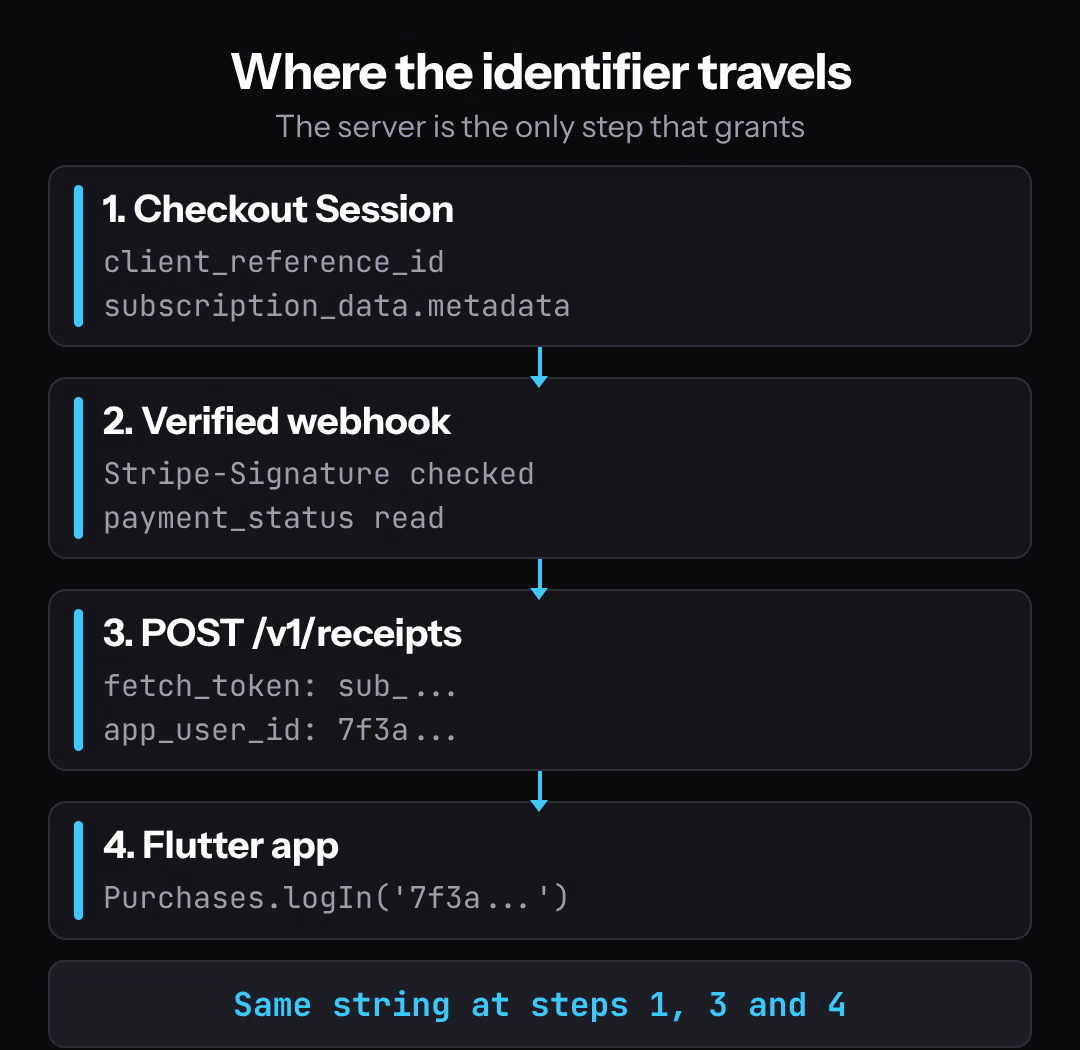
Once your server trusts the event, one POST attaches the Stripe subscription to the App User ID. The receipts endpoint takes the Stripe app's public API key and a platform header, and "The only required fields when sending a Stripe purchase to the RevenueCat API are" fetch_token and app_user_id, where fetch_token is "Your Stripe subscription ID (sub_...) or your Stripe Checkout Session ID".
// Runs from the queue, after signature verification and after
// payment_status has been checked.
async function grantFromStripe({ eventId, subscriptionId, appUserId }) {
  if (await alreadyProcessed(eventId)) return; // dedupe on event ID

  const response = await fetch('https://api.revenuecat.com/v1/receipts', {
    method: 'POST',
    headers: {
      'Content-Type': 'application/json',
      'X-Platform': 'stripe',
      Authorization: `Bearer ${RC_STRIPE_PUBLIC_KEY}`,
    },
    body: JSON.stringify({
      fetch_token: subscriptionId, // sub_... or the Checkout Session ID
      app_user_id: appUserId,      // the same string the app logs in with
    }),
  });

  if (!response.ok) throw new Error(`RevenueCat ${response.status}`);
  await markProcessed(eventId);
}
RevenueCat recommends customer.subscription.created for subscriptions and checkout.session.completed for one-time purchases. The dedupe check earns its place because webhook endpoints "might occasionally receive the same event more than once", and Stripe retries failed deliveries "for up to three days with an exponential back off in live mode". Key that check on the event ID. Stripe says not to use the created timestamp for ordering or for deciding whether you already processed something, since distinct events can share a timestamp.
Why the app still shows the old state
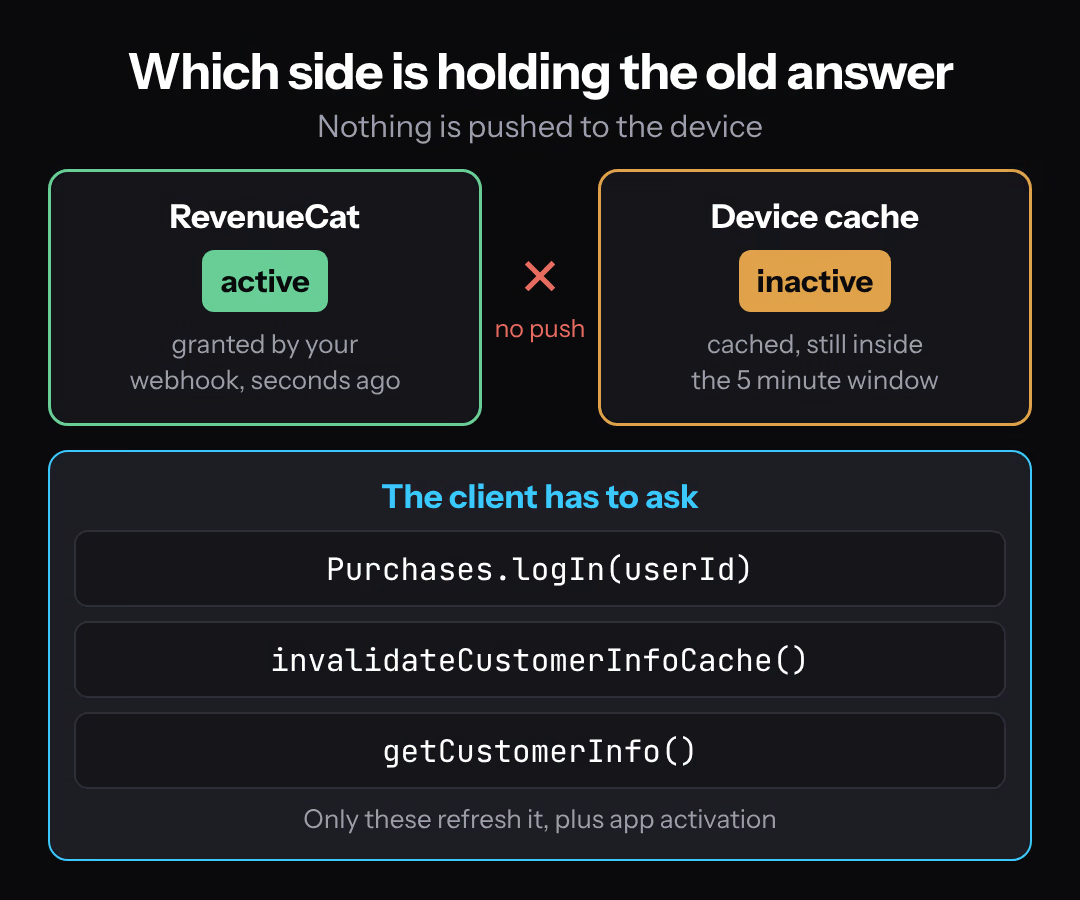
The app is reading its own cached copy and nothing has told it to look again. "CustomerInfo updates are not pushed to your app from the RevenueCat backend." The SDK caches the last answer, "will update the cache if it's older than 5 minutes", and does that "only if you call getCustomerInfo(), make a purchase, or restore purchases", plus when the app becomes active (RevenueCat, customer info).
Line that up with the symptom. Your server granted the entitlement while the app was open and holding a four minute old cached answer that says no. The update listener does not cover this case either: it "will fire whenever we receive a change in CustomerInfo on the current device", so it reports changes the device learned about, not changes that happened on the server while the device was idle.
The client side is three calls, in this order:
// purchases_flutter 10.17.0 signatures.
Future<bool> refreshEntitlementAfterSignIn(String userId) async {
  // 1. The same string the server posted as app_user_id. Case-sensitive.
  await Purchases.logIn(userId);

  // 2. Skip the five minute cache for this read: the web purchase may
  //    have landed seconds ago.
  await Purchases.invalidateCustomerInfoCache();

  // 3. Ask the backend. Safe to call often.
  final info = await Purchases.getCustomerInfo();
  return info.entitlements.active.containsKey('pro');
}
Purchases.logIn() creates the identity if it does not exist yet, so a user who paid on the web before ever opening the app still lands on the right customer. Call logIn() directly when someone switches accounts, because the documentation says you do not need logOut() first, and logOut() generates a fresh anonymous ID that owns nothing.
Where to put that refresh depends on timing. If the purchase happened while the app sat in the background, activation already triggers a cache update, and a getCustomerInfo() call on the screen that gates the feature covers the rest. The explicit invalidate matters when the user returns inside the five minute window, which is exactly what happens when they pay on a laptop and reach for their phone.
Restore Purchases cannot recover a web purchase
Restore reads the store account, so it has nothing to say about a card charged on your website. RevenueCat defines it as "reactivating any content that had previously been purchased from the same store account", meaning Apple, Google or Amazon (RevenueCat, restoring purchases).
Keep the Restore button on the screen for store purchases, and keep it user-initiated. It "may cause OS level sign-in prompts to appear" and "should only be called from some user interaction", which is why the same page warns against calling it in code and points at syncPurchases() for programmatic cases. That method carries "a risk of transferring or aliasing an anonymous user", so it belongs in a one-time migration rather than in your sign-in path.
When a support ticket says restore did not help a web subscriber, compare the App User IDs. A second restore attempt cannot change the outcome.
Late, duplicated and out of order events
Build the handler so arrival order does not matter, because Stripe does not promise one. "Stripe doesn't guarantee the delivery of events in the order that they're generated", and creating a single subscription can produce customer.subscription.created, invoice.created, invoice.paid and charge.created in any sequence.
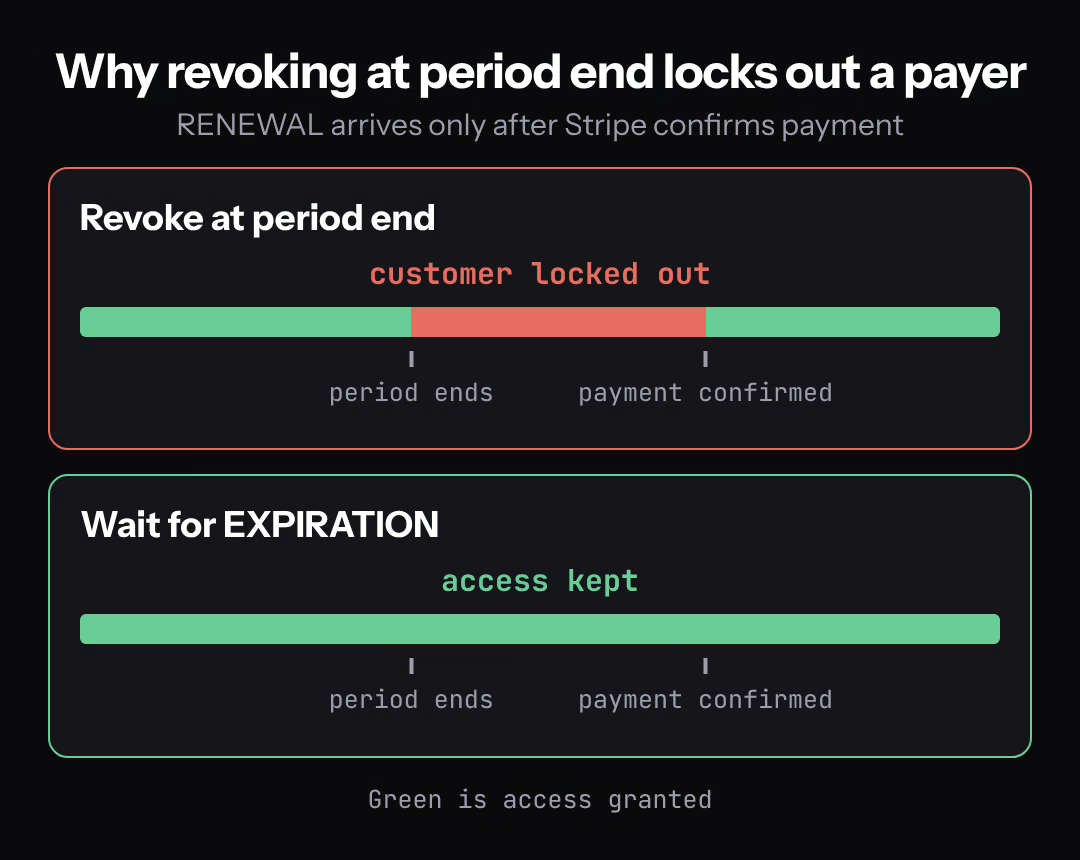
Renewals add a second ordering subtlety on the RevenueCat side. Stripe moves a subscription into its next period when the previous one ends, but RevenueCat sends its RENEWAL webhook only after Stripe confirms payment, and the integration page advises keeping access until an EXPIRATION webhook arrives. Revoking at period end and waiting for confirmation locks out paying customers for the length of the payment round trip. Billing failures are also quieter than you might expect: one billing issue event is generated when payment first fails, and later retry failures do not create new events.
The subscription lifecycle states a Stripe subscription moves through decide what your own access column should say while all of this is in flight.
Cancellation and the two hour window
Cancellation reaches the app through a background refresh that can lag. Immediate and end-of-period cancellations are both supported, and "it may take up to two hours for a Stripe cancellation to be reflected in the RevenueCat backend". The documented shortcut is to "re-post the same subscription to RevenueCat after a user cancels, and it will be updated immediately", so your customer.subscription.updated and customer.subscription.deleted handlers should call the same receipts endpoint with the same fetch_token.
One boundary belongs in your UI. A subscription can only be managed on the platform where it was purchased, and this integration routes customer management through the Stripe Customer Portal. Link a web subscriber there instead of showing a cancel button in the app that cannot do anything.
Run the sequence that produces evidence
Everything above is documented behavior. The sequence below is what tells you it holds in your project, and it is worth running before you ship.
- In Stripe test mode, point the webhook at a local listener and confirm that a normal purchase grants the entitlement end to end. Sign in on the device first and write down the exact App User ID your app sends.
- Stop the listener, then complete a second test checkout. The event now has nowhere to go, which gives you the delay to study instead of waiting for one in production.
- With the grant still missing, sign in on mobile and confirm the app reports no entitlement. This is the state in the support ticket, reproduced on purpose.
- Restart the listener and resend the event. Dashboard resend works for up to 15 days after event creation, and
stripe events resend <event_id> --webhook-endpoint=<endpoint_id>works for up to 30 days. - Without restarting the app, run the refresh path. If the entitlement appears, the server and the identity join are correct and the cache held the old answer. If it does not appear, open the RevenueCat customer and compare its App User ID to the string from step 1, character for character.
- Cancel the subscription in Stripe, let your handler re-post the subscription, and confirm the app reports the entitlement inactive after a refresh. Skipping the re-post means waiting out the two hour window instead.
Diagnostic checklist
| Symptom | First thing to read | Usual cause |
|---|---|---|
| App shows no entitlement, RevenueCat customer has one | The App User ID on that customer, against the one the app logs in with | Two customers: an anonymous ID, a casing difference, or a different ID source on the web |
| RevenueCat has no customer for the payer at all | Your queue and the Stripe event delivery log | The receipts POST never ran, or it failed and the error was swallowed |
| Entitlement correct in the RevenueCat dashboard, stale in the app | Whether the gating screen calls getCustomerInfo() after sign-in | A cached read inside the five minute window |
| Subscription event arrives with no user ID attached | Whether the ID was set in subscription_data.metadata | client_reference_id sits on the session, not on the subscription |
| Grant works in test mode but not in production | Which signing secret and which RevenueCat API key the server loaded | Test and live secrets differ per endpoint |
| Webhook deliveries marked failed with a 3xx | The endpoint URL | Stripe counts redirect responses as failures, so register the resolved URL |
| Access revoked at renewal for a paying customer | Whether you expire on period end or on EXPIRATION | Revoking before RevenueCat confirms the renewal payment |
What account-based access does not authorize
Honoring a purchase made on your website is a narrower permission than selling inside the app. Apple's guidelines require in-app purchase to "unlock features or functionality within your app", then list exceptions. Clause 3.1.3(b) covers this case with a condition attached: "Apps that operate across multiple platforms may allow users to access content, subscriptions, or features they have acquired in your app on other platforms or your web site, including consumable items in multi-platform games, provided those items are also available as in-app purchases within the app" (App Store Review Guidelines, read 2026-10-20).
The proviso at the end is the part that fails review. Honoring a web subscription is permitted when the same thing can also be bought in the app. A web-only plan with no in-app equivalent is outside what 3.1.3(b) describes.
Google Play states its requirement separately and carries no equivalent multiplatform clause on the same page. The Payments policy says apps charging for in-app features, content or goods "must use Google Play's billing system for those transactions unless Section 3, 8, or 9 applies", and the out-of-app payment options in Section 9 are limited to "developers in eligible countries/regions" enrolled in the applicable programme (Google Play Payments policy, read 2026-10-20).
Both documents change and both have region-specific programmes, so the dates above are a reading rather than a standing rule. Check the current text for your product category and your markets before you design the pricing page, keep the equivalent store purchase available in the app, and do not point users out of the app to avoid store billing.
Where FlutterFlow's built-in actions stop
FlutterFlow's RevenueCat integration documents three actions: Paywall, Purchase and Restore Purchases (FlutterFlow, RevenueCat). None of them is the identity call this integration needs, and that page documents no built-in way to refresh or invalidate customer info.
So the work lands in three places. The Stripe checkout and the webhook are server code regardless of how the app is built. The logIn() call that ties the signed-in user to the App User ID, and the invalidate plus read that refreshes the entitlement, go into a custom action using purchases_flutter. The Paywall and Purchase actions keep covering the store purchase path. The same page also notes that "The underlying package for RevenueCat does not support web", so a FlutterFlow web build cannot read entitlements through the SDK, which is one more reason the grant decision belongs on your server.
If the store side is still in progress, the Flutter RevenueCat subscription paywall setup covers the part this article assumes already works.
Next
The code here is a reference implementation checked against the endpoint, header, field and SDK signatures published by Stripe, RevenueCat and purchases_flutter 10.17.0. None of it was executed against a Stripe account, a RevenueCat project or a device while writing this, so treat the snippets as shapes to adapt and the six step sequence as the part that produces evidence.
Start with step 1 and write down the App User ID your app actually sends. Comparing that one string against the RevenueCat customer costs a minute and rules out the entire server path before you change any code.