The user taps Subscribe, changes their mind on the store sheet, and your paywall shows a red "Purchase failed" dialog. Another user pays with a method that has to clear later, or a child sends an Ask to Buy request to a parent, and the app either reports an error or unlocks premium straight away. Both apps treat every purchase outcome as success or failure, and the store has more answers than that.
The short answer is to keep five outcomes apart: cancelled, pending, completed, failed and unresolved. Only an active RevenueCat entitlement unlocks paid features, and a long-lived CustomerInfo listener, rather than the paywall screen, is what notices when a pending purchase completes later.
The demo app in this guide is synthetic: one entitlement called pro and a monthly package. Store and SDK behavior was checked against current RevenueCat, Google Play and Apple documentation on 28 October 2026. The Dart snippets follow the RevenueCat Flutter examples but have not been compiled or run for this article. Version 11.0.0 of purchases_flutter appeared on pub.dev that day with Android build changes, so read its migration notes before upgrading, and use the acceptance checks at the end to prove each state in your own project.
What can one tap on Buy return?
One call to Purchases.purchase can end in five different situations, and only one of them means the user should have access right now.
| Outcome | How it reaches your code | What the user sees |
|---|---|---|
| Cancelled | PlatformException with purchaseCancelledError | Back on the paywall, no message |
| Pending | PlatformException with paymentPendingError | Waiting for approval or payment |
| Completed | PurchaseResult whose CustomerInfo has an active entitlement | Premium unlocked |
| Failed | Another error code, such as purchaseNotAllowedError | A specific message and a way back |
| Unresolved | storeProblemError, or a network error after the store sheet | Checking status, no charge assumed either way |
The RevenueCat error guide describes PURCHASE_CANCELLED as a user who cancelled and was not charged, and says no action is required. It adds that on iOS the same code can mean the Apple account already owns the product, which is why the paywall should keep its Restore button visible. The same guide defines PAYMENT_PENDING_ERROR as additional action required by the user before an entitlement is granted, on both Apple and Google, and recommends confirming to the user that they have started the pending purchase.
The unresolved row comes from the same page. It says to assume the user was not charged unless a store problem error occurred, in which case they may or may not have been charged, and that RevenueCat retries purchase failures automatically. Treat that as "we don't know yet" and go and check, rather than as a failure that invites another payment.
Where pending purchases come from
Google Play calls these pending transactions: purchases with extra steps between the user starting a purchase and the payment method being charged. Its documentation says to grant entitlement only when the purchase state is PURCHASED, and to tell the user they still need to complete actions while it is PENDING. Pending support is required for one-time products, and with Play Billing Library 7.0 or later it can also be enabled for subscription prepaid plans.
On Apple platforms, the common source is Ask to Buy, where a child's purchase request goes to a parent or guardian. StoreKit reports this as a pending purchase result, and if it later succeeds, StoreKit delivers the transaction through Transaction.updates. RevenueCat wraps both stores in the same error code. Its Android one-time products guide states that RevenueCat does not grant entitlements for pending purchases and that its backend detects when the payment completes.
Model the outcomes as states
Give the paywall its own state type, so cancellation and pending are ordinary values and not exceptions the UI has to interpret.
sealed class PaywallState {
  const PaywallState();
}

class Idle extends PaywallState { const Idle(); }
class Purchasing extends PaywallState { const Purchasing(); }
class AwaitingApproval extends PaywallState { const AwaitingApproval(); }
class Unlocked extends PaywallState { const Unlocked(); }
class CheckingStatus extends PaywallState { const CheckingStatus(); }

class PurchaseFailed extends PaywallState {
  const PurchaseFailed(this.message);
  final String message;
}
There is no Cancelled class on purpose. A cancelled purchase returns the paywall to Idle, which is exactly where the user chose to be.
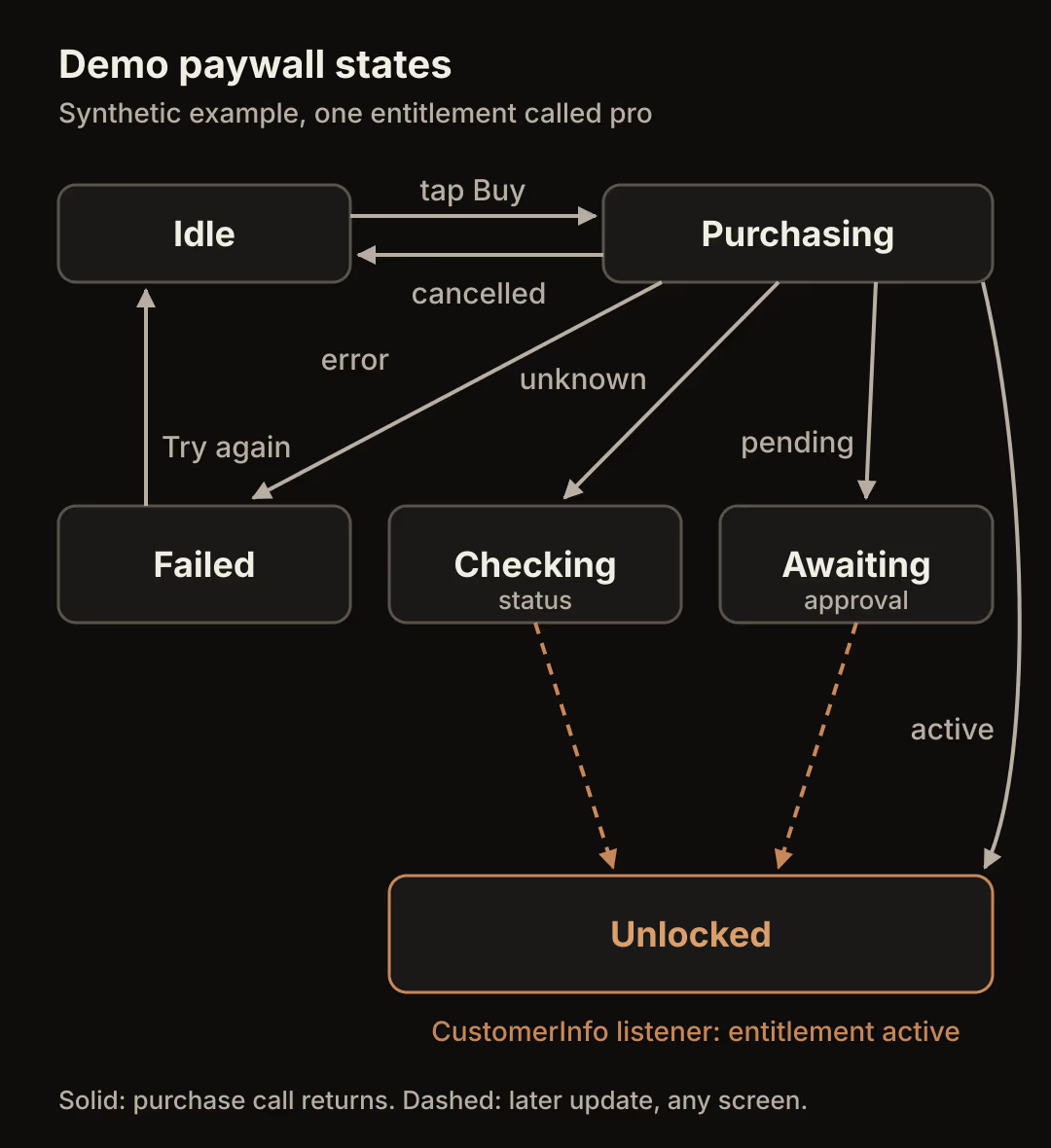
Notice that two arrows enter Unlocked from states where the original purchase call has already returned. Those transitions are driven by the entitlement listener described below, not by the code that ran when the user tapped Buy.
Map RevenueCat errors to those states
Purchase errors arrive as a PlatformException. PurchasesErrorHelper.getErrorCode converts it to a PurchasesErrorCode, and the making purchases guide uses the same pattern to skip the error dialog on cancellation.
const entitlementId = 'pro';

Future<PaywallState> buy(Package package) async {
  try {
    final result = await Purchases.purchase(PurchaseParams.package(package));
    final active =
        result.customerInfo.entitlements.all[entitlementId]?.isActive ?? false;
    return active ? const Unlocked() : const CheckingStatus();
  } on PlatformException catch (e) {
    switch (PurchasesErrorHelper.getErrorCode(e)) {
      case PurchasesErrorCode.purchaseCancelledError:
        return const Idle();
      case PurchasesErrorCode.paymentPendingError:
        return const AwaitingApproval();
      case PurchasesErrorCode.storeProblemError:
      case PurchasesErrorCode.networkError:
      case PurchasesErrorCode.operationAlreadyInProgressError:
        return const CheckingStatus();
      case PurchasesErrorCode.purchaseNotAllowedError:
        return const PurchaseFailed('Purchases are not allowed on this device.');
      default:
        return const PurchaseFailed('The purchase did not go through.');
    }
  }
}
A completed call without an active pro entitlement goes to CheckingStatus rather than Unlocked. That covers a misconfigured product that is not attached to the entitlement, which you want to see in testing instead of shipping an unlock that the server will never confirm. operationAlreadyInProgressError is in the checking group because the error guide says an identical operation is already running and you should wait for it to finish.
PurchaseFailed needs more specific copy in a real app. The 11.0.0 changelog notes that a blocked Play Store now produces purchaseNotAllowedError instead of storeProblemError, which is one reason to keep this mapping in a single function that you can review when you upgrade the SDK.
Keep the button responsive without double submissions
Disable the Buy button only while a purchase call is actually in flight, and show progress on the button itself. When the call returns, the state decides what the user can do next.
Future<void> onBuyPressed(Package package) async {
  if (state is Purchasing) return;
  setState(() => state = const Purchasing());
  final next = await buy(package);
  if (!mounted) return;
  setState(() => state = next);
}
The mounted check matters because the user can leave the paywall while the store sheet is open, and the outcome must not depend on that screen still existing. In AwaitingApproval, replace the Buy button with a status message and a Check status action that calls Purchases.getCustomerInfo(), so a waiting user is not invited to start a second purchase of the same product. Keep Restore Purchases available on every state. The restoring purchases guide says restorePurchases should only run from a user action such as that button, because it can trigger operating system sign-in prompts.
Recover when the store finishes later
A pending purchase can complete after the paywall has closed, after the app has been killed, or on another day. Put entitlement state in an object that lives as long as the app and listens for CustomerInfo changes.
class EntitlementController extends ValueNotifier<bool> {
  EntitlementController() : super(false) {
    Purchases.addCustomerInfoUpdateListener(_onInfo);
  }

  void _onInfo(CustomerInfo info) {
    value = info.entitlements.all[entitlementId]?.isActive ?? false;
  }

  @override
  void dispose() {
    Purchases.removeCustomerInfoUpdateListener(_onInfo);
    super.dispose();
  }
}
Create it once after Purchases.configure, and have every paid feature read value instead of remembering what happened on the paywall. The addCustomerInfoUpdateListener reference says the function is called right away with the latest customer info, which gives a restarted app its current answer without a special code path.

The completion arrives at a fixed address in the app, whichever screen happens to be open. The paywall can listen to the same controller and move from AwaitingApproval to Unlocked while it is visible, but it is never the only place that hears about it.
There is one timing limit to design for. The CustomerInfo documentation says updates are not pushed from the RevenueCat backend to the app. The SDK refreshes CustomerInfo when the app becomes active, and refreshes a cache older than five minutes when you call getCustomerInfo(), purchase or restore. Depending on the store, a purchase approved while the app sits open may therefore not unlock until the SDK makes its next request, for example when the user returns to the app or taps Check status. For features enforced on your server, use RevenueCat webhooks or your own entitlement records, as described in the subscription lifecycle states guide.
Write pending copy that gives the user a way back
Pending is not a failure, so the message should say what happens next and what the user can do. For the demo app:
- Title: Purchase waiting for approval
- Body: Your purchase was started, but the store still needs a payment or an approval. Premium unlocks automatically when the store confirms it. You can keep using the free version until then.
- Primary action: Check status
- Secondary action: Continue with free
Avoid copy that promises a time, because the app cannot know how long a parent or a payment method will take, and it cannot make the store finish the transaction. Google Play may also cancel a pending purchase: its real-time notifications include SUBSCRIPTION_PENDING_PURCHASE_CANCELED, so your server should not treat pending as a promise of revenue either.
Run the acceptance checks
Use store test accounts with no previous purchases. The existing RevenueCat paywall guide covers the initial SDK and entitlement setup these checks assume.
| Store | Tool for pending purchases | Note |
|---|---|---|
| Google Play | License tester with "Slow test card, approves after a few minutes" and "Slow test card, declines after a few minutes" | Listed in Google's billing test guide |
| Apple | StoreKit configuration file with Ask to Buy enabled, approved or declined in the Xcode transaction manager | RevenueCat needs the configuration's public certificate, and its sandbox guide says flutter run ignores the scheme's StoreKit file, so launch from Xcode |
- User cancellation. Open the store sheet and dismiss it. The paywall returns to Idle with no dialog, and no entitlement appears.
- Pending purchase. Buy with the slow approving card or Ask to Buy. The app shows the waiting message, the Buy button is gone, and paid features stay locked.
- Delayed completion. Wait for the slow card, or approve in Xcode, then bring the app to the foreground. The controller reports
proas active without visiting the paywall again. - Declined pending purchase. Repeat with the declining card or decline in Xcode, restart the app, and confirm
prois still inactive. - App restart while pending. Kill the app after step 2 and reopen it. Paid features remain locked until completion, then unlock on the next foreground.
- Transient SDK error. Turn on airplane mode after the store sheet confirms. If the SDK reports a network or store problem, the paywall shows Checking status rather than a failure, and turning the network back on followed by Check status reaches the state the store reports.
Log the state transitions in debug builds so a failing check tells you which arrow in the diagram was taken.
What this design does not cover
The app reflects what the store and RevenueCat report. It cannot approve an Ask to Buy request, speed up a delayed payment, or recover a purchase the store declined. Offline entitlements are also limited: the CustomerInfo documentation says they do not currently work for one-time purchases, which return an error instead. If your paywall sells a lifetime product, test the unresolved path for it separately.
Start by searching your paywall code for every place that unlocks a feature. Each one should read the entitlement controller, and any that reacts to the purchase call returning is where the next pending purchase will be unlocked too early.