
A paid account signs out on a shared phone. The next person signs in, reaches the home screen, and every premium feature is still open to them. No purchase was made on that account, no receipt exists for it, and the app is completely confident about the access it just granted.
Signing out of Firebase Authentication does not change who RevenueCat thinks it is. These are two identity systems with two separate switches, and the SDK keeps answering for the previous App User ID until something tells it to stop. The repair is to pair every Firebase sign-in and sign-out with a RevenueCat identity call, guard the one that throws, and treat "not known yet" as a real state your UI can render.
This article covers the transition between identities. If you are still building the purchase flow itself, gating a Flutter app behind a RevenueCat paywall handles the single-user case; this one starts at the moment a second account appears on the same device.
Why the next account still sees premium
RevenueCat identifies a customer by an App User ID and keeps using that identifier until your code changes it. If you never supplied one, the SDK invented one: anonymous identifiers are prefixed with $RCAnonymousID: and cached on the device, and a reinstall clears that cache and produces a new one.
So a single device holds two independent answers to the question of who is using it:
- Firebase Authentication answers with the signed-in user. Its
authStateChanges()stream emits right after the listener is registered, when a user signs in, and when the current user signs out. - RevenueCat answers with the current App User ID, which changes only when you call
logInorlogOut.
Sign out of Firebase alone and only the first answer changes. The second still names the account that paid, which is why the next person inherits it.
Pick one identifier and never change your mind
Use one stable, non-guessable identifier for the lifetime of the account, supplied by the system that already owns identity. In a Firebase app that is the uid.
RevenueCat's guidance on choosing an App User ID is specific: unique per user, under 100 characters, and ideally a non-guessable pseudo-random value such as a UUID. It is equally specific about what to avoid.
| Candidate | What the documentation says | What it costs you |
|---|---|---|
Firebase Auth uid | Not named in the docs, but it satisfies the stated constraints: unique, opaque, stable, short | Nothing, provided you use it everywhere and never fall back to another value |
| Email address | "we don't recommend using email addresses as App User IDs" | Changes when the person changes it, and leaks an identifier you did not mean to publish |
| Device or advertising identifier | "Advertising identifiers should not be used" | Identifies a device rather than a person, so the purchase stays with the phone |
| A hardcoded string | "Don't hardcode strings as App User IDs" | Every install collapses into one customer |
The first row is a recommendation rather than a documented instruction. RevenueCat does not name Firebase; the uid simply meets the constraints it does state, and your backend already trusts it.
Change the identity at the two moments that matter
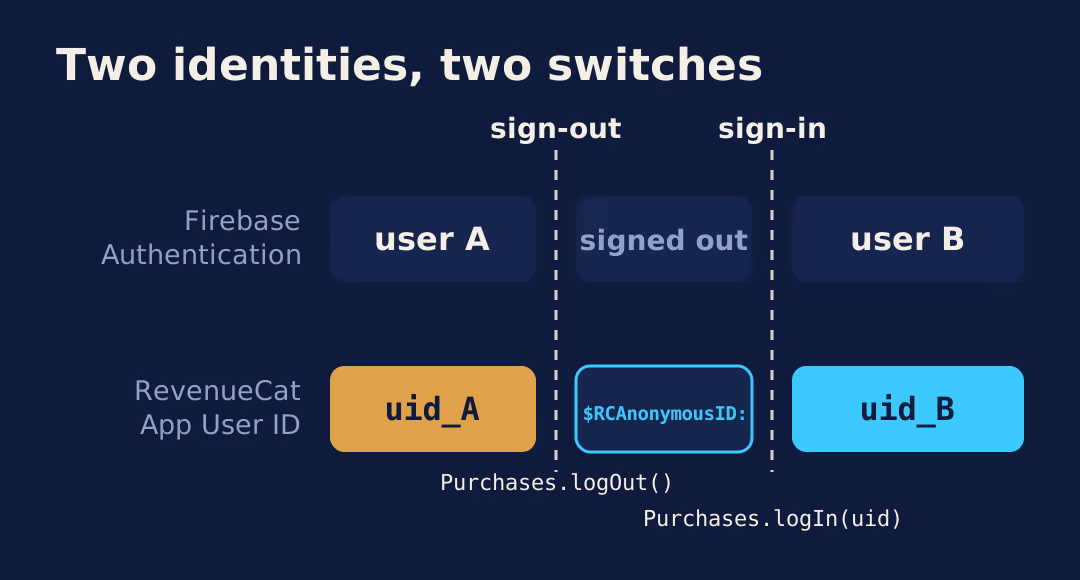
Configure the SDK once, then move the identity on sign-in and on sign-out. There is no third moment.
- Configure once at startup, before any purchase code runs. RevenueCat's SDK configuration guide says to configure only once, early in the application lifecycle. If nobody is signed in yet, pass no identifier and let the SDK generate an anonymous one.
- On sign-in, call
logInwith theuid. It returns aLogInResultcarrying the freshcustomerInfofor that identity and acreatedflag that is true the first time RevenueCat has seen this App User ID. - On sign-out, call
logOutbefore you sign out of Firebase. You still have a confirmed identity at that point, and a failure leaves the person signed in rather than signed out with someone else's purchase identity attached.
// Reference implementation. Not executed against a store sandbox.
class SessionIdentity {
  Future<CustomerInfo> onSignedIn(String uid) async {
    final LogInResult result = await Purchases.logIn(uid);
    // result.created is true the first time RevenueCat sees this App User ID.
    return result.customerInfo;
  }

  Future<void> onSignOutRequested() async {
    // logOut throws when the current user is already anonymous, so ask first.
    if (!await Purchases.isAnonymous) {
      await Purchases.logOut();
    }
    await FirebaseAuth.instance.signOut();
  }
}
Step three is ordering advice rather than a documented requirement. The documented parts are the method signatures and what each one does.
What logOut does when nobody was logged in
It throws. The Flutter API reference for logOut states that it throws a PlatformException if there was a problem restoring transactions, or if the method is called while the current user is anonymous. On success it clears the saved App User ID and generates a new anonymous one.
That single sentence explains a whole class of crash reports. A sign-out handler written as "always call logOut" works the first time and fails the second, because the user is already anonymous by then. It also fails for anyone who reaches a sign-out control without ever having signed in.
Guarding it with Purchases.isAnonymous, as above, is enough. What is not enough is catching the exception and moving on. If logOut fails and the app proceeds to its signed-out screens, RevenueCat still holds the paying identity, and any purchase or restore made in that window attaches to it.
Scope the listener and the cached answer to the active session
Entitlement state arrives two ways, and both outlive a sign-out unless you handle them.
Purchases.addCustomerInfoUpdateListener receives a callback whenever CustomerInfo changes on the current device, and RevenueCat says to expect it at launch and throughout the life of the app. A listener registered once at startup keeps firing across an account switch, so whatever it writes into your state must be keyed to the session it belongs to, not stored as a bare isPremium boolean.
Reads are cached. The SDK updates its cache if it is older than five minutes, and only when you call getCustomerInfo, make a purchase, or restore purchases. The SDK handles its own cache across a logIn, which is why that call returns fresh customerInfo for the new identity. The hazard is the copy you keep yourself. A provider value, a stored preference, or a widget that read the answer before the switch will happily report the previous account's access.
Treat the customerInfo returned by logIn as the first answer for the new session, discard anything held for the previous one, and remove listeners you no longer want with removeCustomerInfoUpdateListener.
What should the UI show while entitlement state is unresolved?
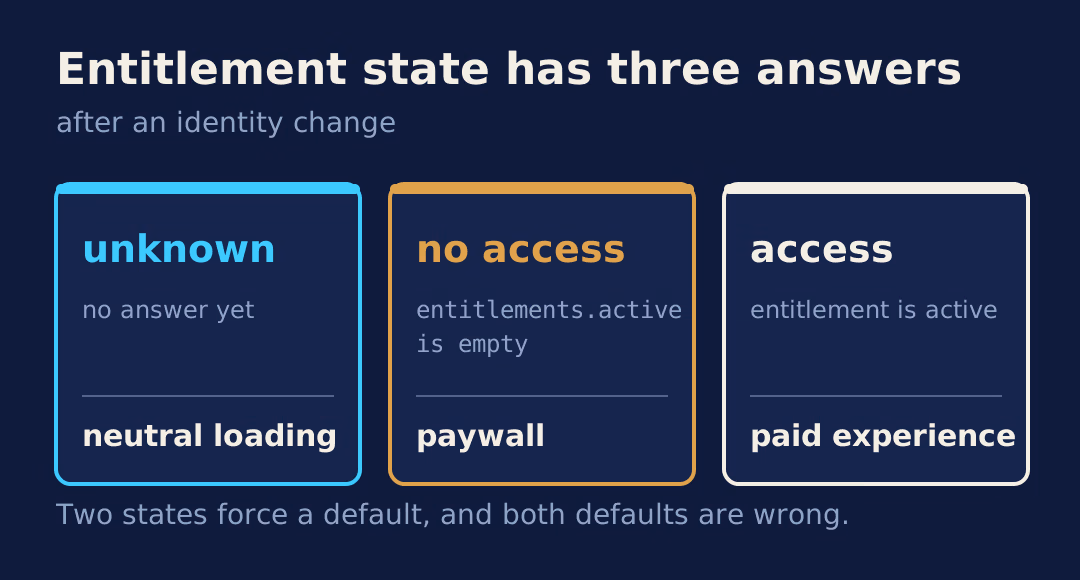
Show neither the paid experience nor the paywall. Between a sign-in and the first CustomerInfo for that identity there is a real third state, and giving it its own screen is cheaper than taking a feature back from someone who already saw it.
- Unknown. Identity has changed and no entitlement answer has arrived yet. Render a neutral loading state on the gated surface. Do not route anywhere.
- No access. An answer arrived and
entitlements.activeis empty for this account. Route to the paywall. - Access. An answer arrived and the entitlement is active. Render the paid experience.
Two states force you to pick a default, and both defaults are wrong: starting locked flashes a paywall at a subscriber, starting open hands a feature to someone who has not paid for it.
Transfer and alias settings are product decisions
A dashboard setting, not your code, decides what happens when a purchase is restored onto a different App User ID. The restore behavior setting lives in Project settings > General, and its default moves the purchase.
| Restore behavior | What happens | Who it suits |
|---|---|---|
| Transfer to new App User ID (default) | Purchases move to the restoring App User ID. Only one customer has access at a time, so the original user loses it | Consumer apps where a person moves between their own accounts |
| Transfer if there are no active subscriptions | Transfers only when no active subscription is involved | Apps where a churned subscriber should be able to start fresh |
| Keep with original App User ID | Returns an error when the restoring App User ID differs from the original purchaser. The documentation marks it "use with caution" | Products that would rather block a restore than move access silently |
| Share between App User IDs (legacy) | Merges App User IDs that restore the same subscription. Legacy only, and it cannot be re-enabled once you move away from it | Nothing new |
Aliases are the same conversation from the server side. RevenueCat merges customers automatically during a logIn or a restore, and webhook payloads carry original_app_user_id alongside an aliases array holding every App User ID the subscriber has ever used. The documentation is explicit that lookups in your own systems should search both.
None of this guarantees that a person's existing purchases will follow them correctly to a new account. The setting decides, the store receipt decides, and restorePurchases is documented as linking App User IDs to any user also using those purchases. On a shared device, a restore is an identity event rather than a harmless recovery button.
Do you need to verify entitlements on your own backend?
Yes, for anything a client should not be able to grant itself. CustomerInfo decides what the app displays; your server decides what the app is allowed to do.
The chain has two links. First, identify the caller: Firebase's Admin SDK verifies an ID token with verifyIdToken(), and you take the uid from the decoded token rather than from a parameter the client supplied. Second, ask RevenueCat about that customer directly. The v2 REST API customer endpoints expose GET /projects/{project_id}/customers/{customer_id} and GET /projects/{project_id}/customers/{customer_id}/active_entitlements, both under https://api.revenuecat.com/v2 with bearer authentication.
Webhooks close the loop. A TRANSFER event means transactions and entitlements moved between App User IDs, and it carries transferred_from and transferred_to so your own records can follow the move instead of discovering it later.
For the states a subscription passes through once it exists, the subscription lifecycle states your app has to handle covers the ground after identity is settled.
A checklist for a switch that went wrong
Run this against two synthetic accounts, one paid and one not, on the same device.
- Read
Purchases.appUserIDimmediately after each sign-in. It should equal that account's Firebaseuid, every time. - Read
Purchases.isAnonymousafter sign-out. If it is false,logOutdid not run or did not finish. - Confirm the sign-out path actually reaches
logOutand does not swallow its exception. - Read
entitlements.activefor the unpaid account. It should be empty. - Check the restore behavior in Project settings > General against what you expect to happen when the same receipt reaches a second account.
- Look for a
TRANSFERwebhook you did not intend, and readtransferred_fromandtransferred_to. - Kill the app and cold start it on each account. A cached answer that survives a restart is the one worth chasing.
Where this advice stops
FlutterFlow's built-in RevenueCat actions are Paywall, Purchase and Restore Purchases. None of them manages the App User ID, so the identity work above is custom code in a FlutterFlow project rather than a toggle.
Platform support is worth checking yourself before you promise anything. RevenueCat's Flutter installation page lists web support alongside iOS and Android when a billing engine is configured, while FlutterFlow's documentation states that the underlying RevenueCat package does not support web and its integration covers iOS and Android only. Those are two primary sources describing different scopes, so verify against the versions you actually ship. The same page pins the practical floor: a purchases_flutter 10.10.0 example, iOS 13.0 or higher, Flutter 3.22 or later, and FlutterFragmentActivity on Android.
Every snippet here is a reference implementation written against the published API reference. None of it was executed against a store sandbox, a live RevenueCat project, or a real purchase while this article was written, and nothing about identity behaviour can be proven by a passing build.
Open your sign-out handler and count the calls inside it. If there is exactly one and it belongs to Firebase, you already know which account is going to see premium next.