
An endless spinner is rarely a slow network. It is almost always a routing decision taken before the app knows which state it is in.
If you are chasing a FlutterFlow auth redirect loading screen, the fix is usually not a faster query or a longer timeout. It is separating two questions the app is currently asking as one: is this person signed in? and is this person's application profile ready? Firebase answers the first almost immediately. The second is your own database read, with its own latency, its own permission rules, and its own ways of returning nothing at all. When a single startup check waits on both and routes on one, you get a spinner that outlives the user's patience, or a bounce between login and home.
This guide covers startup routing only. Provider setup, deep-link domain association, and subscription gating are separate jobs.
Why does a FlutterFlow auth redirect get stuck on a loading screen?
Because the app routes on a state it has not finished resolving: identity and profile arrive on different clocks, and routing fires too early. A single startup check cannot wait for an answer it never asked for separately.
Firebase Authentication tells you who someone is. It does not tell you that the document describing them in your own database has arrived. Those are two reads against two systems, and the second one can be slow, empty, or denied while the first has already succeeded. A returning user is the case that exposes it: they are authenticated the moment the listener attaches, so the app sends them to a home screen that immediately starts waiting for a profile it has no plan for.
The three outcomes that produce a permanent spinner are all states nobody wrote a route for: the profile read is still in flight, the profile document does not exist, or the read failed. If every one of those lands on the same loading widget, the loading widget is the app's error screen.
What FlutterFlow decides at startup, and what it does not promise
FlutterFlow picks a starting page from login state alone. Its documented startup settings select a route; none of them wait for your application data to load.
Three editor settings do the visible work here, and it is worth being precise about what each one covers:
The Entry Page is, in FlutterFlow's words, "the first page users see when they open your app." With authentication enabled, "this page becomes the login, signup, or onboarding page for users who are not authenticated" (Initial Page settings). The Logged In Page is "displayed when the app starts for authenticated users," and a user who signs in successfully is "automatically redirected to the page specified here" (same source).
Requires Authentication, a Route Setting on an individual page, ensures "only users who are logged in can access that page," and emits requireAuth: true into the generated route object (Page Route Settings). A separate setting, Skip On Page Load When Inactive, "ensures that actions are bypassed if the Entry Page or Logged In Page is detected as inactive" (same source).
Read those together and the boundary is clear. Every one of them keys off authentication state. None of them is documented as waiting for a Firestore read, because none of them knows your profile collection exists. If your Logged In Page needs a profile document to render anything useful, that wait is yours to design, and the editor will happily route a user there while the document is still in flight.
That is not a defect in the editor. It is a division of labour that only hurts when you assume the other half is covered.
Six startup states, one route each
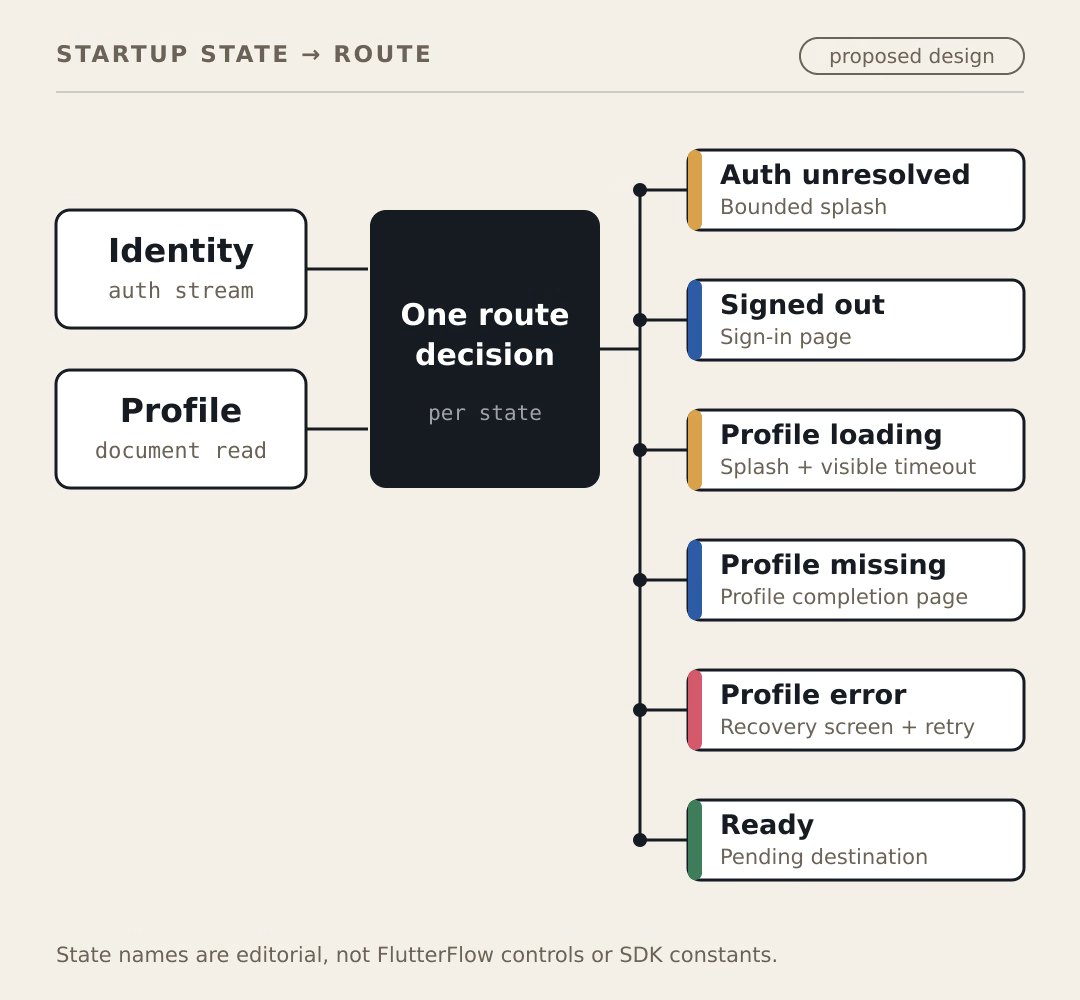
Write down every state the app can be in at startup and give each one exactly one destination. A state with no route is the spinner you are looking for.
The table below is a proposed design, not a FlutterFlow feature. These names are editorial — they are not editor controls or SDK constants, and you will map them onto whatever your own project exposes.
| Startup state | What is true | Where the user goes | Recovery available |
|---|---|---|---|
| Auth unresolved | The auth listener has not emitted yet | Short, bounded splash | None needed; this is measured in milliseconds |
| Signed out | Listener emitted, no user | Sign-in page | Normal sign-in |
| Profile loading | User known, document read in flight | Splash, with a visible timeout | Retry appears after the timeout |
| Profile missing | Read succeeded, document absent | Profile completion page | Create the record |
| Profile error | Read failed, usually on rules | Recovery screen naming the failure | Retry, sign out, contact support |
| Ready | Identity and profile both resolved | Pending destination, or home | Not applicable |
Two of those rows are the ones teams skip. Profile missing is a successful read that returned nothing, which is a completely different situation from a failure — a user whose account was created but whose setup step never finished belongs on a completion screen, not on a retry screen. Profile error is usually a security rule saying no, and it will not resolve by waiting, no matter how long the spinner turns.
The bounded timeout matters more than it sounds. A spinner with no deadline is a promise the app cannot keep. A spinner that becomes a retry button after a few seconds is a state machine that admits it failed.
Identity and profile are two signals, not one
Watch them separately. Firebase exposes identity as a stream that fires immediately on attach, and your profile is a second stream with its own loading, empty, and error outcomes.
Firebase Authentication offers three listeners, and the choice between them is not cosmetic:
| Listener | Fires on | Use it when |
|---|---|---|
authStateChanges() | Listener registration, sign-in, sign-out | You only need to know whether someone is signed in |
idTokenChanges() | All of the above, plus token refreshes and changed custom claims | Your routing depends on a role or claim |
userChanges() | All of the above, plus reload(), updateProfile(), updateEmail() and similar | The UI reflects mutable Auth profile fields |
All three "provide an immediate event of the user's current authentication state, and then provide subsequent events whenever the authentication state changes" (Authenticate with Firebase in Flutter). That immediacy is why the auth-unresolved window is short, and why it still has to exist.
One documented gap is worth planning around: none of these listeners fire when you update, disable, or delete a user through the Admin SDK or the Firebase console. The same documentation says you must call reload() manually to pick those changes up. If your support team disables an account, the signed-in app will not find out on its own.
On the other side, a Firestore document listener "delivers an immediate snapshot with current document contents when first attached" and routes failures, including permission errors, to its onError callback (Get realtime updates with Cloud Firestore). Absence is reported separately again: exists "returns true if the document exists" (DocumentSnapshot.exists), so a successful read of a missing profile never has to be guessed at.
Those three facts are the whole state machine. Here is one way to wire them together:
// Reference implementation, composed from the Firebase documentation cited
// above. It has NOT been executed or runtime-tested — treat it as a design to
// verify against your own project, not a drop-in file.

enum Startup { authUnresolved, signedOut, profileLoading, profileMissing, profileError, ready }

class StartupState extends ChangeNotifier {
  StartupState(this._auth, this._db) {
    // idTokenChanges also covers refreshed custom claims, which matters if a
    // role decides the destination.
    _authSub = _auth.idTokenChanges().listen(_onIdentity);
  }

  final FirebaseAuth _auth;
  final FirebaseFirestore _db;

  StreamSubscription<User?>? _authSub;
  StreamSubscription<DocumentSnapshot<Map<String, dynamic>>>? _profileSub;

  Startup status = Startup.authUnresolved;
  String? _activeUid;

  void _onIdentity(User? user) {
    // A change of identity invalidates everything the previous one started.
    _profileSub?.cancel();
    _profileSub = null;
    _activeUid = user?.uid;

    if (user == null) {
      _set(Startup.signedOut);
      return;
    }

    _set(Startup.profileLoading);

    final uid = user.uid;
    _profileSub = _db.collection('profiles').doc(uid).snapshots().listen(
      (snapshot) {
        if (_activeUid != uid) return; // stale result, identity moved on
        _set(snapshot.exists ? Startup.ready : Startup.profileMissing);
      },
      onError: (Object error) {
        if (_activeUid != uid) return;
        _set(Startup.profileError);
      },
    );
  }

  void _set(Startup next) {
    status = next;
    notifyListeners();
  }

  @override
  void dispose() {
    _authSub?.cancel();
    _profileSub?.cancel();
    super.dispose();
  }
}
The stale-result guard is the part that is easy to leave out and expensive to debug. Sign out while a profile read is in flight, and the response still arrives — against a user who is no longer there. Without the _activeUid check, that late snapshot flips a signed-out app back to ready.
Where the redirect loop actually comes from
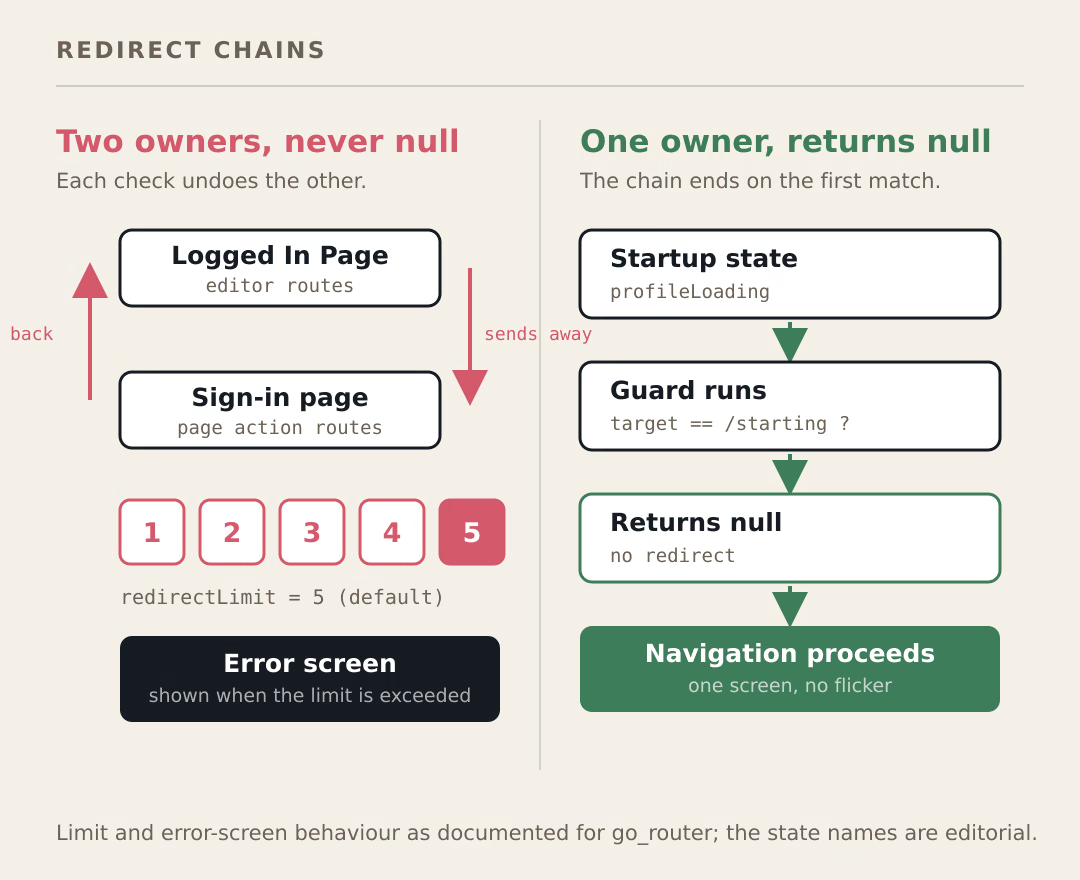
A loop means two owners. One redirect sends the user away, a second check sends them back, and neither ever reports that it is satisfied.
The classic version is a page-load action that navigates, sitting on a page the editor already routes to by login state. The editor sends an authenticated user to the Logged In Page; the page's own action checks something, finds it unresolved, and navigates to sign-in; the sign-in page sees a signed-in user and sends them back. Nobody is wrong, and the user watches a flicker.
If your project is exported and its routing runs on go_router, the mechanics are documented precisely. A top-level redirect runs before any navigation event, and the callback is invoked repeatedly until it returns null or the same path, at which point navigation proceeds (Redirection). When the chain never terminates, it does not spin forever: redirectLimit defaults to 5 (GoRouter constructor), and "GoRouter will display the error screen if this redirect limit is exceeded." An error screen on startup is a useful symptom — it names the problem as routing, not loading.
A guard that terminates looks like this:
// Reference implementation, not runtime-tested. The pattern that matters:
// every branch returns null once the user is already at the destination.
String? startupRedirect(BuildContext context, GoRouterState state) {
  final startup = context.read<StartupState>();
  final target = state.matchedLocation;

  String? to(String destination) => target == destination ? null : destination;

  switch (startup.status) {
    case Startup.authUnresolved:
    case Startup.profileLoading:
      return to('/starting');
    case Startup.signedOut:
      return to('/sign-in');
    case Startup.profileMissing:
      return to('/complete-profile');
    case Startup.profileError:
      return to('/recover');
    case Startup.ready:
      // Leave every other destination alone; this guard's job is done.
      return (target == '/starting' || target == '/sign-in') ? '/home' : null;
  }
}
Two rules keep it honest. One owner decides the route, and that owner is the guard — page-load actions stop navigating. And every branch returns null as soon as the user is already where that state wants them, which is the condition that ends the chain.
When routing has to consult state the editor does not model, you are into custom code territory, and it is worth reading when to drop from FlutterFlow to pure Flutter before committing to a guard you will maintain by hand.
What happens to a deep link that arrives before auth resolves?
It can arrive before the app knows who the user is, and on iOS it can arrive after the first route has already been shown. Hold the destination; do not navigate to it yet.
Flutter documents the asymmetry. For an app that is not already launched, on iOS the app "gets initialRoute ("/")" and "shortly after gets a pushRoute", while on Android initialRoute already contains the deep link path (Deep linking). With the Router API the incoming link is parsed and handed to RouterDelegate.setNewRoutePath. That page covers delivery mechanics only; it says nothing about guards, which is why the guard behaviour above is cited from go_router instead.
The practical consequence: on one platform your startup guard may run before the link exists, and on the other it runs with the link already in hand. A design that depends on the link being present at first frame works on Android and fails on iOS.
So store it and spend it later:
- Capture the incoming location into a pending destination. Do not navigate.
- Run the startup state machine to completion.
- When the state reaches ready, pop the pending destination and navigate once.
- Authorize the destination separately. "Logged in" is not "allowed to see this record" —
requireAuthis a route check, and the records behind that route still need ownership rules. - If authorization fails, clear the pending destination and show a denial screen rather than looping back through the guard.
Step 4 is the one worth labouring. A route-level login check and a backend ownership rule protect different things, and only one of them survives someone with a copy of the link.
A diagnostic checklist
Run these in order. Each one eliminates a different cause, and the first mismatch is usually the answer:
- Put a log line on every state transition in the startup machine. If the last state logged is profile loading, the problem is the read. If it alternates between two states, you have two navigation owners.
- List every place in the project that can navigate during startup: the editor's Logged In Page setting, page-load actions, and any custom guard. If the count is above one, reduce it.
- Sign in with a user whose profile document you deleted. A spinner means the missing case has no route; a completion screen means it does.
- Point the profile read at a document your rules forbid. If
onErroris unhandled, the app will wait forever on a read that already failed. - Set the profile read behind a deliberate delay and confirm a retry affordance appears. No deadline means no deadline in production either.
- Sign out while the profile read is in flight, then check whether a late snapshot flips the app back to a signed-in screen.
- Cold-start a deep link on both platforms, not one. The iOS ordering is the case Android will not reproduce.
Where this does not apply
An app whose home screen renders fine without a profile does not need any of this; route on auth state and read the document lazily. Offline-first apps need a different table, because a cached profile and a server profile are not the same signal. And if a single screen owns the whole post-login experience, a StreamBuilder with three branches is less machinery for the same result.
What to build first
Open your project and count the navigation owners that can fire during startup. Count the places that can call a navigate action before the first frame settles, rather than the states or the queries. Most redirect loops are a count above one, and most permanent spinners are a state with no route attached. Fix the count first, then fill in the table, then test the deleted-profile case, because that is the one real users hit without ever filing a report.
If you end up writing the guard in custom code, what a FlutterFlow custom widget must get right covers the parameter and state-update boundaries that decide whether that code stays maintainable.