
Your signup screen says success. Firebase Authentication has a user, the console lists the email, and FirebaseAuth.instance.currentUser is not null. The users/{uid} document that every other screen reads does not exist. Try to register again and you get email-already-in-use, so the person is locked out of their own account by a document that was never written.
The repair has three parts: a profile write that is safe to run on every launch, security rules that allow a narrow set of fields instead of everything, and a screen that offers a retry rather than a spinner. None of it requires deleting the account.
This article covers the write path and the recovery. If you are looking for which screen to show while identity and profile are still loading, that belongs to FlutterFlow auth redirects without endless spinners; this one starts after the write has already failed.
Two records, and only one of them exists
Firebase Authentication holds the identity. Firestore holds the profile. When a Flutter Firebase auth flow reports a user created but the profile missing, the first record landed and the second did not.
Why doesn't Firebase create the profile with the account?
Because they are two operations against two systems, and nothing in either API joins them into a single unit of work. Account creation stores an identity; your Firestore write stores a document.
The sequence matters. Firebase's password authentication guide for Flutter states that after createUserWithEmailAndPassword succeeds, "the user is also signed in" and "a new event will be sent to your listeners". Your app therefore has a signed-in user, and probably a navigation event, before the profile write has been acknowledged by anything.
That second call is an ordinary Firestore write with ordinary ways to fail. Security rules can deny it. Connectivity can drop between the two calls. The process can be killed while the request is in flight. A Firestore transaction would not help: it covers Firestore documents, not the Authentication record, so there is no boundary you can wrap around both.
Make the profile write idempotent with SetOptions(merge: true)
An idempotent bootstrap is one you can call on every launch without producing a second document or clobbering existing data. set on a known document path gives you that, because the path is derived from the uid rather than generated.
// Reference implementation. Synthetic field names for demonstration.
Future<void> ensureProfile(User user) async {
  final doc = FirebaseFirestore.instance.doc('users/${user.uid}');

  final snapshot = await doc.get();
  if (snapshot.exists) return;

  await doc.set({
    'uid': user.uid,
    'displayName': user.displayName ?? '',
    'locale': 'en',
  }, SetOptions(merge: true));
}
The cloud_firestore reference for DocumentReference.set documents the two properties this depends on: "If the document does not yet exist, it will be created", and with SetOptions supplied "the data can be merged into an existing document instead of overwriting". Merge is the part that makes a second call harmless rather than destructive.
Call ensureProfile in two places, not one: right after signup, and again on the signed-in startup path. The second call is what turns a failed signup into a self-repairing launch instead of a support ticket.
Notice what the payload does not contain. No role, no plan, no createdAt. Those belong to the next section.
Which fields may the client write, and which should the server own?
The client may write what it legitimately knows: its own uid and the user's own preferences. Everything that grants access or records history belongs to the server, and rules are where that boundary is enforced.
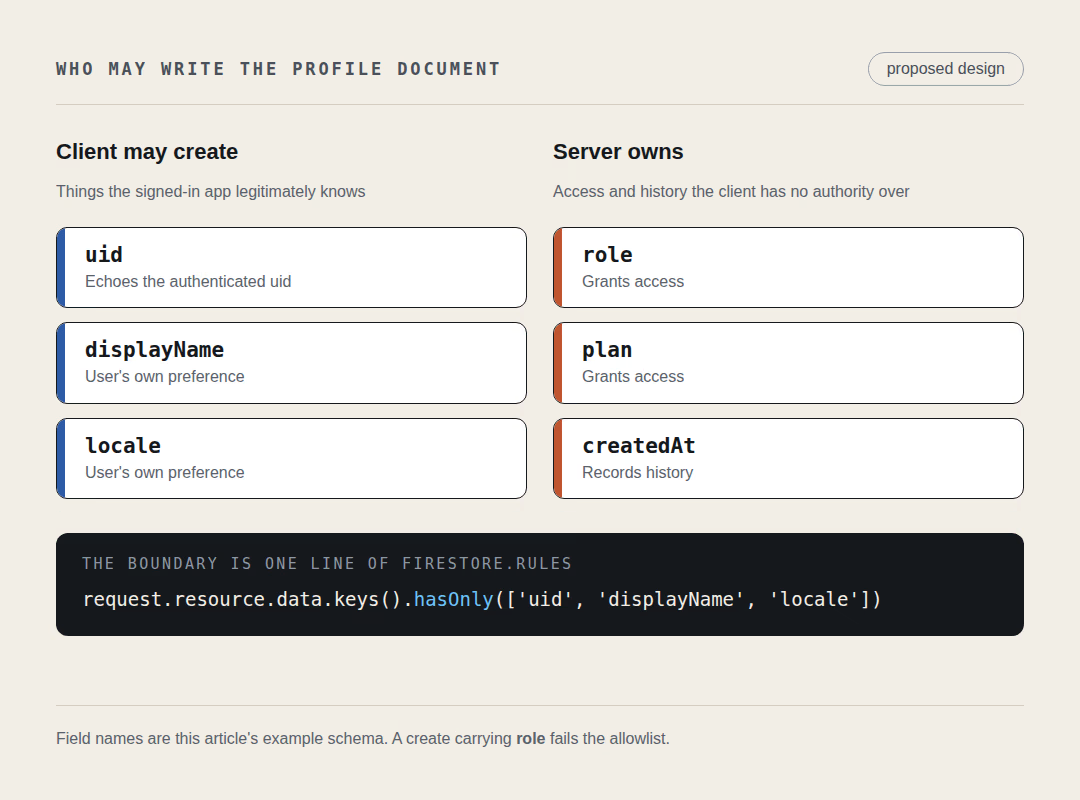
| Field | Written by | Why |
|---|---|---|
uid | Client, on create | Echoes the authenticated uid so rules can compare it against request.auth.uid |
displayName, locale | Client | The user's own preferences, harmless if wrong |
role, plan | Server only | Grants access. A client that can write it can promote itself |
createdAt, counters | Server only | Records history the client has no authority over |
The allowlist that enforces this is a field-level condition on create:
rules_version = '2';
service cloud.firestore {
  match /databases/{database}/documents {
    match /users/{userId} {
      allow read, update: if request.auth != null
        && request.auth.uid == userId;

      allow create: if request.auth != null
        && request.auth.uid == userId
        && request.resource.data.keys().hasAll(['uid'])
        && request.resource.data.keys().hasOnly(['uid', 'displayName', 'locale'])
        && request.resource.data.uid == request.auth.uid;
    }
  }
}
Firebase's guide to controlling access to specific fields documents hasAll for required fields and hasOnly for the complete permitted set, and shows the mirror-image pattern request.resource.data.diff(resource.data).affectedKeys().hasOnly([...]) for restricting which fields an update may touch. If you prefer to name the forbidden field instead of listing the allowed ones, the data validation guide shows that form too: allow create: if !("ranking" in request.resource.data).
hasOnly is doing the work here. A create carrying role: 'admin' is rejected because role is not in the list, which is what "no client-assigned privileged role" means in practice. It is also the reason the tempting fix is the wrong one. Replacing the condition with allow write: if request.auth != null makes the error disappear and hands every signed-in account the ability to rewrite any field it likes. For how this field-level model compares with a row-level one, see Firestore rules versus Postgres RLS for multi-tenant data.
Being specific also costs you something: the allowlist breaks the moment a new build sends an extra field. That is a real maintenance tax, and it is still cheaper than an open write rule.
Who writes the defaults the client is not allowed to write?
A server process does, and Firebase gives you two shapes of it with different prerequisites. Both are worth knowing before you pick one, because one of them changes your billing and auth tier.
The first is a blocking function. Firebase's blocking functions documentation describes beforeUserCreated as triggering "before a new user is saved to the Firebase Authentication database, and before a token is returned to your client app", and it can set customClaims, which persist across sessions. The constraints are explicit: "To use blocking functions you must upgrade your Firebase project to Firebase Authentication with Identity Platform", the function "must respond within 7 seconds", and "anonymous and custom authentication do not trigger blocking functions". Deploying any function at all requires the paid tier, since Firebase states that "to deploy functions, your project must be on the Blaze pricing plan" in its Cloud Functions getting-started guide.
The second shape is a plain deployed function that writes the server-owned fields after the fact, triggered on document creation or run on a schedule. Still Blaze, no Identity Platform upgrade.
If neither is available to you yet, do not work around it by letting the client write the field. Leave role out of the document entirely and read the absence as the default tier. An account with no role is a normal account; an account that wrote its own role is a security bug, and you cannot tell the two apart later from the data alone. Deciding this early is part of the same groundwork described in the Flutter and Firebase SaaS architecture guide.
How does a returning user recover without registering again?
They sign in as the account that already exists and your startup path runs the same bootstrap. Nothing special is needed for the common case, because the client usually has not lost the session at all.
On mobile this is the default. The Flutter authentication setup guide states that on Android and Apple platforms persistence "is not configurable and the user's authentication state will be persisted on device between app restarts". The returning user comes back signed in, ensureProfile runs, and the document appears. On web, persistence defaults to IndexedDB and is configurable, so a signed-out return is more likely there.
Two variants need thought:
- The user reinstalled and tries to register again. They get
email-already-in-use, so your signup error handler should offer sign-in for that specific code instead of a generic failure message. The account is intact; only the profile is missing. - The user comes back with a different provider, such as Google instead of a password. Firebase's account linking guide documents
linkWithCredentialfor attaching the new credential to the existing user, the collision codecredential-already-in-use, and the property that makes this safe: "Users are identifiable by the same Firebase user ID regardless of the authentication provider they used to sign in". Because the uid is stable, the profile path does not change.
What about the accounts that never come back? Treat cleanup as a policy decision, not an error handler. Deleting an Authentication user from the catch block of a failed profile write means a dropped connection on a train destroys a real account. A scheduled server job that removes accounts with no profile, no sign-in activity and an age measured in weeks is a different thing: deliberate, reviewable, and running where you can audit it.
Prove the denial before you ship
Write three rules tests. They are cheap, they run without touching production, and they turn "no client-assigned privileged role" from an intention into something you can watch fail.
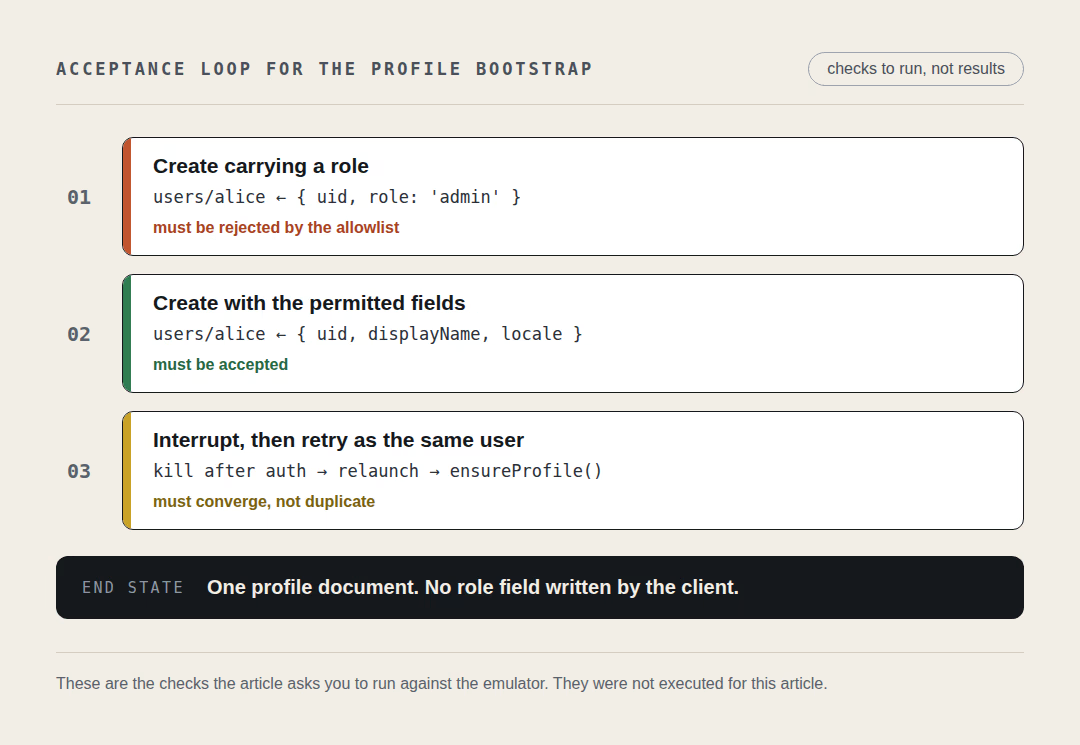
Firebase's rules unit testing guide documents the @firebase/rules-unit-testing package, initializeTestEnvironment, the authenticatedContext and unauthenticatedContext helpers, and the assertFails and assertSucceeds wrappers. It also notes the prerequisite plainly: "Successful execution requires emulators to be running."
// Reference implementation. Synthetic uids for demonstration.
import fs from 'node:fs';
import {
  initializeTestEnvironment,
  assertFails,
  assertSucceeds,
} from '@firebase/rules-unit-testing';

let testEnv;

beforeAll(async () => {
  testEnv = await initializeTestEnvironment({
    projectId: 'demo-profile-bootstrap',
    firestore: { rules: fs.readFileSync('firestore.rules', 'utf8') },
  });
});

test('the owner can create an allowed profile', async () => {
  const db = testEnv.authenticatedContext('alice').firestore();
  await assertSucceeds(
    db.doc('users/alice').set({ uid: 'alice', displayName: 'Alice', locale: 'en' }),
  );
});

test('the client cannot assign itself a role', async () => {
  const db = testEnv.authenticatedContext('alice').firestore();
  await assertFails(db.doc('users/alice').set({ uid: 'alice', role: 'admin' }));
});

test('nobody writes another uid', async () => {
  const db = testEnv.authenticatedContext('alice').firestore();
  await assertFails(db.doc('users/bob').set({ uid: 'bob' }));
});
The second test is the one that matters. If it passes, your rules accept a self-assigned role and the article you are reading has not fixed anything yet.
Then do the manual half, because rules tests cannot see your UI. Kill the app between the Auth call and the profile write, relaunch it, and confirm two things: the user lands on an incomplete-account screen with a working retry rather than an indefinite spinner, and the retry leaves exactly one document behind.
A checklist when the profile is still missing
- Log the actual error. Catch
FirebaseExceptionaround the write and printe.codeande.messagefrom your own failing run, then compare that against your rules. Do not branch on an error-code string from memory. - Compare the path character by character.
users/{uid}andusers/{userId}/profile/mainare different documents, and a rule written for one says nothing about the other. - Confirm the rules you are reading are deployed, and deployed to the project the app is actually pointing at.
- Check the field set the client sends against the allowlist. One extra analytics field is enough to fail
hasOnly. - If a profile query fails rather than a document read, remember that security rules are not filters. Rules are evaluated against a query's potential result, so an unconstrained query is rejected even when every document it would return is readable.
- Reproduce on the platform you ship. Offline persistence "is enabled by default" on Android and Apple platforms and "is disabled by default" for web, so a browser reproduction and a phone reproduction are not the same test.
Where this advice stops
Two behaviors here deserve measurement rather than trust, and I did not verify either while writing this.
The first is the exact code your FirebaseException carries when rules reject a write from cloud_firestore. That is why step one of the checklist is to log it instead of hard-coding it.
The second is what happens to a write that is queued offline and then rejected by rules once it reaches the backend. Firebase documents that "when the device comes back online, Cloud Firestore synchronizes any local changes made by your app to the Cloud Firestore backend", but how a rejected queued write is surfaced to the original caller, and whether an awaited set completes before the server acknowledges it, are things to confirm on your own build with the emulator and airplane mode. Design the retry so it does not depend on the answer: an idempotent bootstrap you can re-run is correct either way.
Every snippet above is a reference implementation. The Dart, the rules and the tests were written against current Firebase documentation, not executed against a live project in the course of writing this.
Open firestore.rules, add the three tests, then kill your app between the Auth call and the profile write. Which screen does your user land on, and can they get out of it without your help?