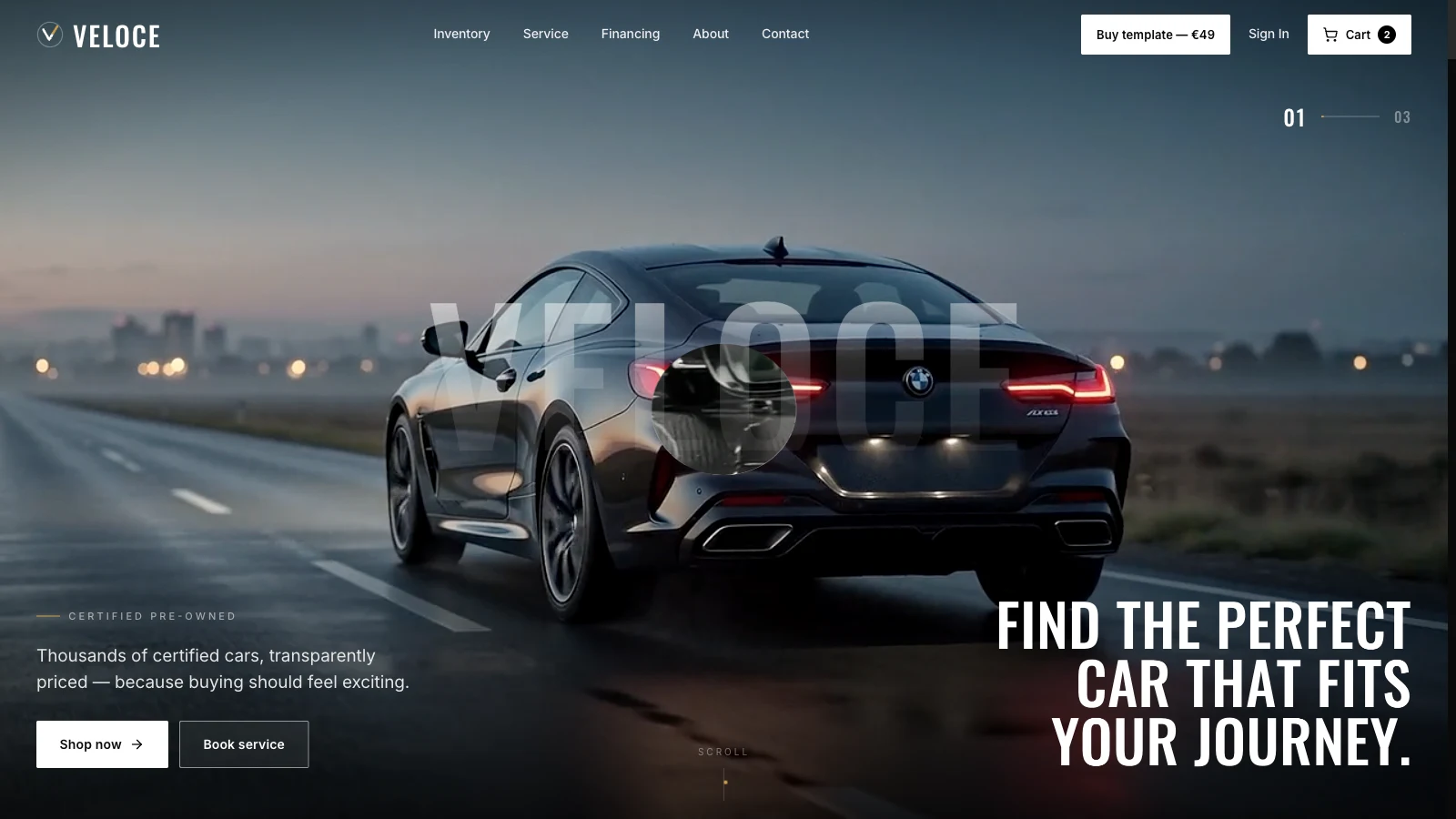
If you're comparing options for a car dealer website template, you probably want a homepage that shows stock by category, a payment calculator that does real arithmetic, and a service booking page, all without a CMS you don't need. Veloce is one of my web templates aimed at that brief. Open the live demo, scroll the hero once on your phone, and keep the page source open while you read. I checked everything below against the deployed files on 2026-09-30, and where the code disagrees with what an earlier version of this post said, the code wins.
One label up front: every vehicle, price, count, spec, phone number, warranty term and inspection figure in Veloce is placeholder copy. The "Huracán EVO" spotlight, "561 certified" and "172 points" describe no real dealership. The template has no inventory feed, no lead handling and no credit check.
What should a car dealer website template include?
A car dealer website template should let a buyer browse stock, open one vehicle, estimate a payment and book service, with each step one click from the last. Veloce covers those steps across six static pages.
The pages are the homepage (Veloce.html), Inventory, Vehicle, Financing, Service and About. The homepage runs through a hero, a seven-category inventory grid, a spotlight on one vehicle, a six-step inspection scroller, a payment calculator, a service band with video, an About block and a scrolling brand strip. The inventory page holds nine placeholder vehicles in one shared data file, data.jsx. Buyers can filter by body type (All, Sport, SUV, Electric, Hybrid, Truck) and sort four ways. The vehicle page reads an ?id= query and draws that vehicle.
| Page | What it does | Placeholder content |
|---|---|---|
| Homepage | Scroll hero, category grid, spotlight, inspection, calculator | Counts, "from" prices, Huracán EVO specs |
| Inventory | Body-type filter and four sort orders over nine vehicles | All nine vehicles |
| Vehicle | Gallery, specs, payment estimate, similar vehicles | Every spec and price |
| Financing | Sliders plus a pre-qualify form | Rate bands, "soft check" text |
| Service | Pick a service, date and time, then "book" | Service names, 12-month warranty |
The earlier post opened with "filters that don't filter". The inventory filter here does filter, in the browser, over the data file. What it can't do is read a real stock feed, because there isn't one.
Is the financing calculator real arithmetic?
Yes, for the maths, and no for the credit part. The homepage calculator takes a price from $12,000 to $150,000, a down payment from 0 to 50 percent, a term from 24 to 84 months in 12-month steps and an APR from 2.9 to 12.9 percent. It applies the standard amortization formula to get the monthly payment, total interest and total cost. A label under the button says "Soft check · won't affect your credit", but nothing checks credit: on the Financing page, the "pre-qualify" result is computed from the credit band the visitor picks. That's a demo of the interface. Real lending has rules a template can't meet, so send a real form to a real lender's system.
What does the inspection section do?
The "172 points. Zero shortcuts." section is a horizontal scroller that's driven by vertical scroll. Six cards (Exterior and Paint 31, Mechanical and Drivetrain 44, Brakes and Tires 26, Electronics and Safety 33, Interior and Trim 22, Road Test 16) add up to 172 checkpoints, and a count-up animates each figure. The figures and the "12-mile mixed-route drive" are invented. If you publish a number like that, you need an inspection process that matches it.
How is the Veloce car dealer template built, and what does it cost the browser?
Veloce is static HTML with no build step: each page loads Tailwind from its Play CDN, React 18.3.1 development builds, Babel and GSAP 3.12.5 with ScrollTrigger, then compiles JSX in the browser.
The React and Babel tags carry integrity hashes, which is a good habit. The setup is easy to edit, and it has costs. The Tailwind docs say the Play CDN is designed for development purposes only and isn't intended for production, and the React files are development builds. The earlier post said it read the console warning and shipped anyway, and that the whole site was under 2 MB. I can't stand behind either statement as written. Here is what I measured instead, with HEAD requests on 2026-09-30:
| File | Bytes | Length |
|---|---|---|
| hero-driving.mp4 | 1,140,565 | 10 s |
| hero-studio-1.mp4 | 1,099,972 | 10 s |
| hero-studio-2.mp4 | 513,258 | 4 s |
| service-workshop.mp4 | 626,466 | 10 s |
All four are 1280 by 720 at 24 frames per second. The three hero clips together are 2,753,795 bytes, and with the service video the four total 3,380,261 bytes. The eight photos used on the homepage range from 29,693 to 79,784 bytes. So the earlier "about 7 MB" and "22 product photos" figures don't match the live site, and neither does "under 2 MB compressed", because the videos alone exceed that.
For context, the HTTP Archive Web Almanac 2024 page weight chapter reports a median page weight of 2,652 KB on desktop and 2,311 KB on mobile in October 2024, and video responses at the 90th percentile of 2,835 KB on desktop and 3,432 KB on mobile. Two of the three Veloce hero clips, at roughly 1.1 MB each, are above the desktop 75th percentile (875 KB) and close to the mobile one (1,169 KB), and all three are below the 90th percentile on both. All three hero videos use preload="auto", so the browser is asked to fetch them up front. If your dealer audience is on mobile data, recompress them or load the second and third clips later. My guide to why Mobile Safari reloads video-heavy pages explains why several large videos on one page need care.
The navbar also has a "Buy template" link to a checkout for this template, marked in the source as a demo storefront link to delete on your own copy.
How does the scroll-driven hero work?
The hero stacks three video plates in one sticky, full-height frame, and scrolling grows a clip-path ellipse on the second and third plate that reveals each one from the centre outward.
The wrapper is calc(100vh + 300vh) tall, with a sticky 100vh stage inside. SCROLL_PER_SLIDE_VH is 150, so each slide takes 1.5 viewport heights of scroll. A scroll listener (passive) reads the wrapper's position and, for each of the two upper plates, turns progress into an eased value and writes a clip-path. Here is the core of it as it appears in hero.jsx:
const slideDist = (SCROLL_PER_SLIDE_VH / 100) * vh;
const scrolled = -wrapperRef.current.getBoundingClientRect().top;
let p = (scrolled - idx * slideDist) / slideDist;
p = Math.max(0, Math.min(1, p));
const e = easeInOut(p);
ref.current.style.clipPath = `ellipse(${5 + e * 150}% ${8 + e * 150}% at 50% 50%)`;
MDN describes clip-path as creating a clipping region that sets which part of an element is shown, with parts inside the region shown and parts outside hidden. That's the whole trick: the plate is always full size, and the ellipse grows from 5 by 8 percent to well past the frame.
Does the hero hold 60 frames per second?
I can't confirm that. The earlier post said a requestAnimationFrame debounce holds 60 fps on a mid-tier Android. The code does use requestAnimationFrame, with a flag so the work runs at most once per frame, but I haven't measured frame rates on any device, so I'm dropping the number. Writing clip-path on every scroll frame can trigger repaints on large video layers, so test it on your target phones before promising smoothness.
What happens with reduced motion?
Part of the page respects it and part doesn't. The IntersectionObserver reveal is disabled by a prefers-reduced-motion rule in the stylesheet, the count-ups jump to their end values, and most GSAP entrances are skipped, and the horizontal inspection scroller is switched off. But the hero's scroll-driven clip-path runs regardless, the service cards animate in without a check, and the videos still autoplay. MDN's page for the media feature explains how to detect a device setting that minimizes non-essential motion. Decide what a still version of the hero looks like, and serve that.
Which layout bugs does the Veloce source already handle?
Three fixes are visible in the source: a page-exit overlay that clears after back navigation, a gallery that hides single-photo thumbnails, and a hero title that comes first on mobile.
How does it clear the page-exit overlay?
Clicking an internal link adds a black #page-exit overlay, waits 430 ms, then navigates, which gives a fade between pages. A browser can restore a page from its back/forward cache with that overlay still in place, which leaves a black screen. The fix in icons.jsx removes the overlay on pageshow when event.persisted is true, and on popstate. MDN documents the persisted flag on pageshow, and web.dev's bfcache guide says it's true when the page was restored from bfcache. The same guide cites Chrome usage data that 1 in 10 navigations on desktop and 1 in 5 on mobile are back or forward, so this case isn't rare. Test it yourself: open a vehicle, press back, and check the homepage isn't black.
What about single-image galleries?
The vehicle page only draws the thumbnail row when v.gallery.length > 1. In the data file, the first vehicle has four gallery images and the next several have one, so a clickable single thumbnail would lead nowhere. The check is one line.
Why does the hero title come first on mobile?
The hero has a title block and a block with the kicker, subtitle and buttons. On desktop the title sits at the right and the copy at the left. The JSX gives the title order-1 lg:order-2 and the copy order-2 lg:order-1, so on a narrow screen the title leads and on a wide screen the layout flips. It's an ordinary Tailwind technique, worth reusing wherever desktop and mobile reading order differ.
To verify my reading yourself:
- Open the Network tab and compare the four MP4 sizes with the table above.
- Turn on reduced motion in your operating system, reload, and check what still moves.
- On the Inventory page, pick "Electric" and sort by price to see the filter work on the nine vehicles.
- Open a vehicle, press back, and confirm the homepage isn't black.
- Move the financing sliders and check the result against a spreadsheet's payment function.
For how I package these templates, read Building Web Templates: Design, Engineering, and Selling. For a sibling that also leans on scroll-driven video, see Horizon, the space tourism template.
Your next step: open the hero on the phone your customers use, and note whether the second clip arrives before you reach it.