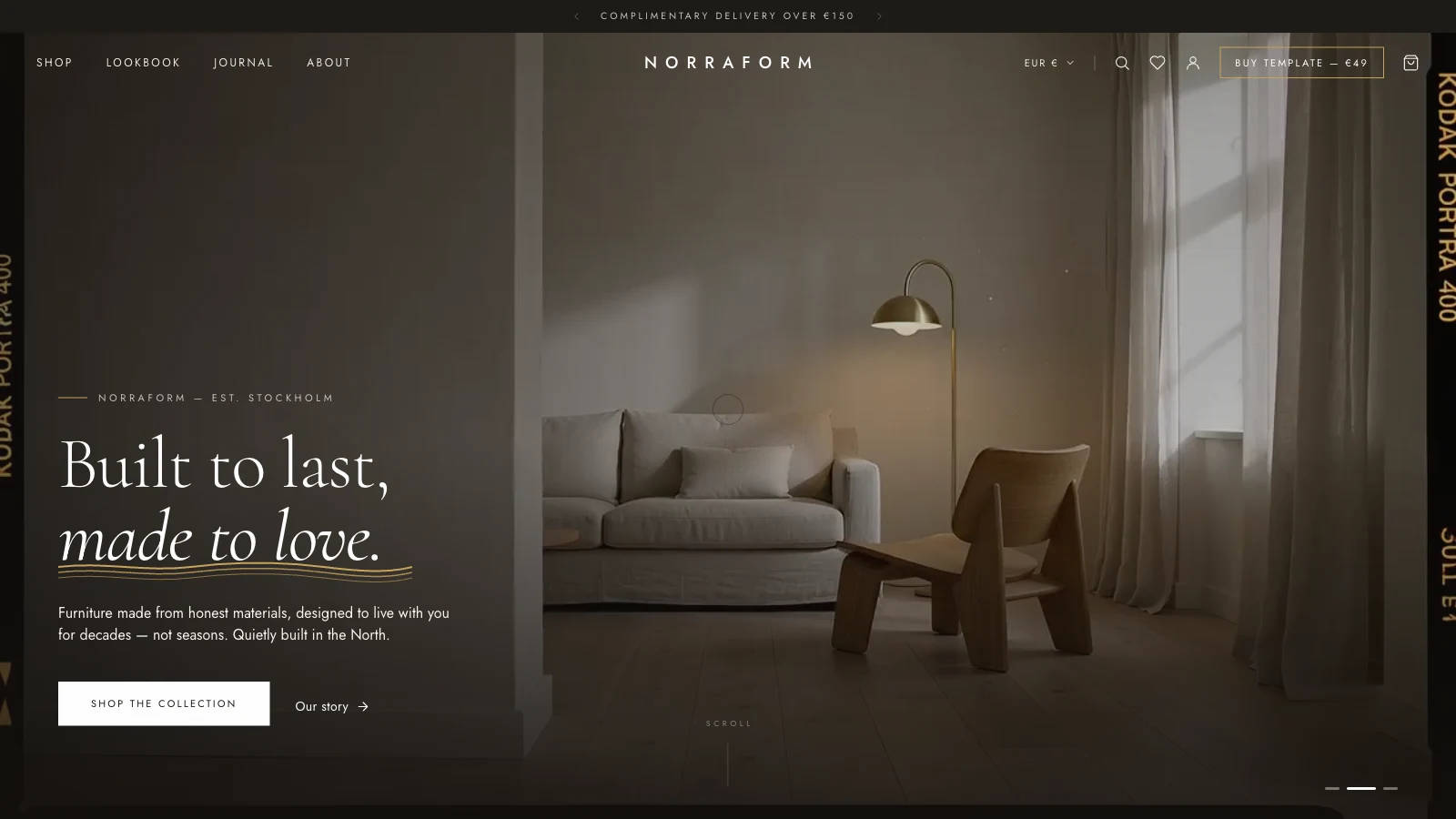
If you're searching for a furniture store website template, the useful question is whether it handles the parts that make a furniture shop different: big photography, a product page with a real gallery, a bag that survives navigation and a way to show rooms, not just items. Norraform is one of my web templates built around that brief. Open the live demo, click through to a product, then keep the page source open while you read. I checked everything below against the deployed files on 2026-09-30, and where the code disagrees with what an earlier version of this post said, the code wins.
One label up front: the brand, the Stockholm kicker, the seven products, prices, category counts, testimonials, press logos and company name in Norraform are placeholder copy for a demo. There is no real furniture maker, workshop or stock behind any of it.
What should a furniture store website template include?
A furniture store website template needs a catalogue with quick previews, a product page with a gallery, a persistent cart, a wishlist and some room-led browsing, and Norraform ships all five as separate pages backed by shared scripts.
The deployed site answers at index.html, shop.html, product.html, article.html, account.html, checkout.html, wishlist.html, lookbook.html and about.html. The earlier post listed a cart.html too, and that file doesn't exist on the demo: a request for it returns 404. The bag is a slide-out drawer that opens from any page instead.
| Need | How Norraform handles it | Stored where |
|---|---|---|
| Browse | shop.html with product cards and a quick view overlay | Catalogue in data.jsx |
| Decide | product.html?id=... with thumbnails and a gallery | Same catalogue |
| Keep items | Bag drawer, key norraform_cart_v1 | Browser localStorage |
| Save for later | Heart button, key norraform_wishlist_v1 | Browser localStorage |
| See rooms | lookbook.html with hotspots on scenes | Scene data in lookbook.jsx |
The catalogue has seven products with a name, category, material line and a euro price, for example a three-seat sofa at 2,480 and a floor lamp at 540. These are placeholders, and so are the three room categories with counts of 42, 28 and 19. The image map in data.jsx uses keys that look like stock-photo IDs, and a comment calls the cards "Unsplash queries". I haven't traced where each photo came from, so check the licence of every image before you reuse them in a shop.
How is the Norraform template built, and is the checkout real?
Norraform is a multi-page static site: each page loads Tailwind from its Play CDN, React and React DOM 18.3.1 development builds, @babel/standalone 7.29.0 and a set of shared JSX files, and mounts its own React tree. The checkout is a demo and charges nothing.
The home page loads thirteen JSX files plus a plain polish.js. Each page loads the subset it needs, so shop.html adds recent.jsx, shop.jsx and shop-app.jsx, while checkout.html adds checkout.jsx. That split is the honest version of the old "no SPA router" claim: navigation is a real page load, and shared state lives in localStorage, not in a router. The earlier post put the cost at about 200 ms per navigation, and I can't back that number, so I removed it. polish.js adds a page-transition curtain, a custom cursor and a paper-grain overlay, and it switches the cursor and curtain off for reduced motion and touch.
The checkout form validates nine required fields and an email pattern, builds an order number like "NF-" plus six random digits, clears the bag and shows a confirmation. A line under the card fields says "This is a demo — no card is charged." There is no payment provider behind it, which means the first job when you adopt the template is a real checkout. My Stripe integration glossary entry is a starting point for that step.
Two script choices need the same scrutiny as any of my templates. The Tailwind docs state that the Play CDN is designed for development purposes only and is not intended for production, and the React scripts are development builds (react.development.js), which I would swap for production builds before launch. My Tailwind CSS glossary entry explains the compile step, and the Tailwind v4 production migration post walks through it.
How do the hero, the gallery and the lookbook work?
The hero cross-fades three looping videos, the product gallery stacks images and fades the active one in, and the lookbook pins pulsing hotspots over a scene that open a product card on hover or tap.
What does the hero actually rotate?
It rotates three muted, looping MP4 files, and the earlier post was wrong to call them photos: hero-editorial.mp4 at 604,114 bytes, cat-living.mp4 at 504,700 and cat-bedroom.mp4 at 583,640, measured with HEAD requests on 2026-09-30. A timer advances the active index every 6.5 seconds, and each video fades its opacity over 1,200 ms. The earlier post said 700 ms. Three small bars at the bottom right switch videos by click.
All three tags carry autoplay and preload="auto", so the page asks for all three up front, which is about 1.7 MB of video before anything else. The HTTP Archive Web Almanac 2024 page weight chapter gives video response sizes with a median of 194 KB on desktop and 299 KB on mobile, and a 75th percentile of 875 KB and 1,169 KB. Each Norraform clip sits between the median and the 75th percentile, so the files are reasonable individually. The total is the cost to watch, and lazy-loading the second and third clips would be a cheap improvement.
Why does the product gallery depend on the Img wrapper?
The shared Img component fades an image in from a blurred state once it has loaded, and it lets a parent's explicit opacity win. The product gallery relies on that: it renders every gallery image on top of the others, with opacity 1 for the active one and 0 for the rest, and a 700 ms opacity transition.
The deployed wrapper sets opacity: loaded ? (style.opacity != null ? style.opacity : 1) : 0. If a wrapper forced opacity to 1 after load, every stacked image would become visible at once, which is the failure the earlier post described. I can't verify that the failure happened, only that the current code prevents it, so treat the fix as a pattern to keep. The wrapper also shows a striped tinted placeholder with the alt text if an image fails, sets a 14-pixel blur until load, and transitions opacity over 0.9 seconds, not the 320 ms the old post quoted.
Did the reveal animation really get shortened everywhere?
Only in one helper. The Reveal helper in hooks.jsx uses a 0.45-second transition and an 8-pixel rise, which is the gentle version. But the SectionHead component in sections.jsx still uses a 1-second transition with a 1.75 rem rise, and the hero copy uses a 1.1-second transform-only entrance. The old claim that the reveal was cut on all sections doesn't match the code.
A global rule in the page's stylesheet shrinks all animation and transition durations to 0.001 ms for visitors who prefer reduced motion. MDN describes that media feature as detecting a request to minimise non-essential motion, and notes that scaling or panning large objects can trigger vestibular discomfort. Because the rule uses !important, it also overrides the inline transitions on the reveal helpers. The hero videos still play, since nothing pauses them, so add that if your audience needs it.
How do the ticker, the hotspots and the quick view behave?
The values ticker is a duplicated row in a flex container that translates by minus 50% over 34 seconds, with a CSS mask that fades the outer 9% on each side, and it pauses on hover. Its items are words like "Solid oak" and "Made to order", not materials as the old post said.
Lookbook hotspots are buttons with an aria-label. They open on mouse enter or on click, and a card about 15 rem wide appears with the product. The pulsing ring is a 20-pixel circle that scales to 2.4 times over 2.6 seconds while fading out, which replaces the smaller figures in the old text.
The quick view is a modal with a 450 ms backdrop transition. It closes on outside click or Escape, locks body scroll while open, has a quantity stepper, and its heart button sets aria-pressed. A "View full details" link goes to product.html?id=....
Can you verify this yourself?
- Request
cart.htmlandshop.htmland compare the status codes. - Open the Network tab on the home page, filter to media, and compare the three file sizes above.
- Add an item to the bag, open a product page in a new tab, and check that the count matches, then look at the
norraform_cart_v1key in Application storage. - Switch between gallery thumbnails and watch the
opacityinline style change on the stacked images. - Submit the checkout with valid fields and confirm that no network request carries card data.
For the wider story of how I package templates, read Building Web Templates: Design, Engineering, and Selling. For a sibling with a different commerce problem, see Arclight, the fintech template.
Your next step: replace the seven entries in data.jsx with three of your own products and photographs you have the rights to, then decide which checkout provider will replace the demo form.