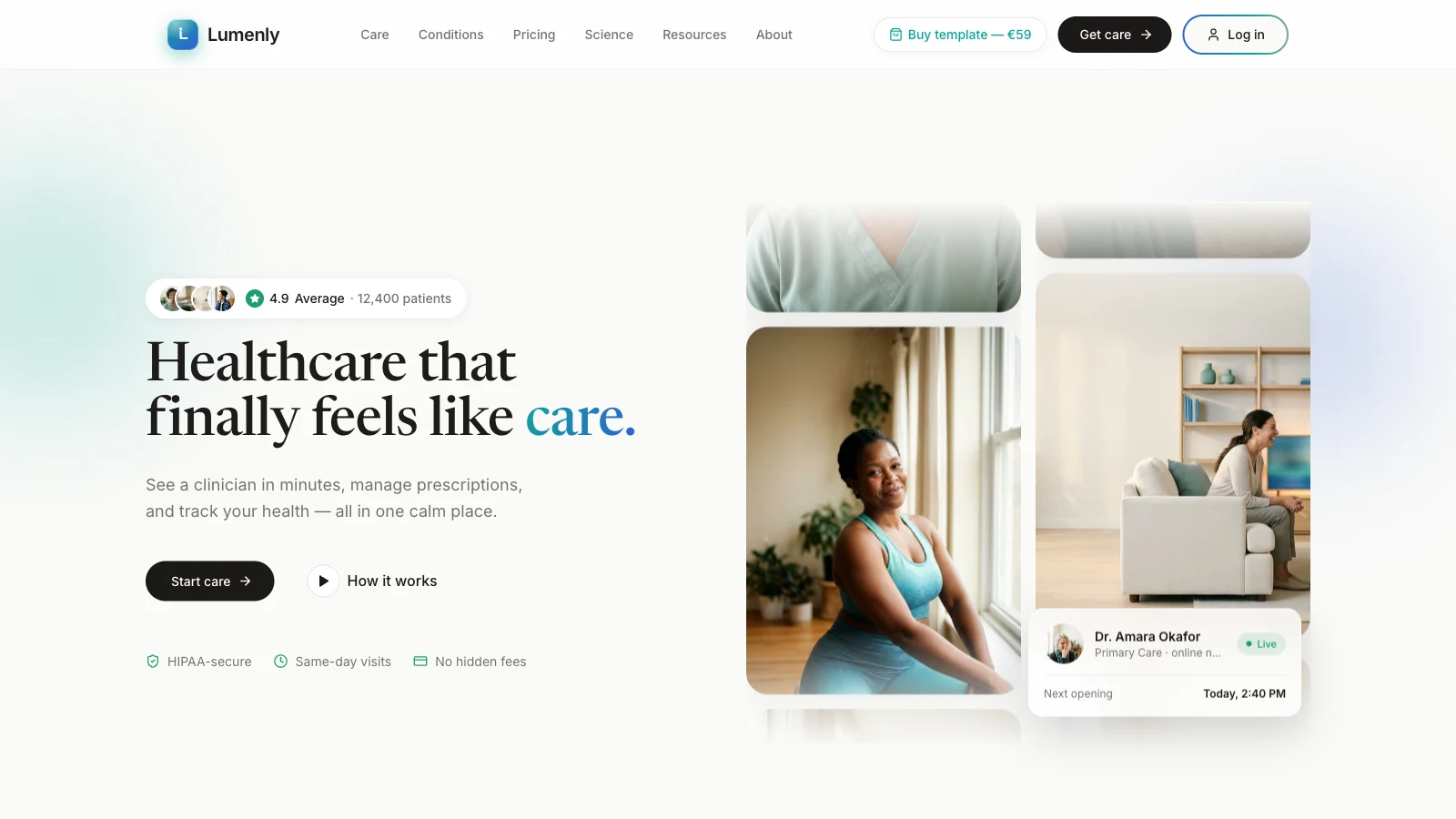
If you're shopping for a telehealth website template, you probably want a landing page that feels calmer than the usual clinic site, a believable intake flow, and pricing that a visitor can read in one scroll. Lumenly is one of my web templates aimed at that brief. Open the live demo and keep the page source open while you read. I checked everything below against the deployed files on 2026-09-30, and where the code disagrees with what an earlier version of this post said, the code wins.
One label up front, and it matters more here than for other templates: Lumenly is a demo, and it is not a medical service. Every clinician name, rating, patient count, price, testimonial, licence number and "HIPAA" label in it is placeholder copy. The template has no server, no clinician network and no medical compliance of any kind. Don't publish it as a real telehealth product without the legal, clinical and security work that a real one needs.
What should a telehealth website template include?
A telehealth website template should show what care is offered, how a visit works, what it costs and why a patient can trust the provider, then lead to an intake flow. Lumenly does that on one long homepage plus a few linked pages.
The homepage runs in this order: hero, a cursor-reveal photo band, a stats band, six care areas with "from" prices, six trust points, a three-step "How it works", a clinician carousel, a short film, a phone-app showcase, testimonials, pricing, a FAQ and a closing call to action. The other pages are a four-step intake (Lumenly-GetCare.html), a login, a treatment page that changes with a ?care= query, About, a journal, a dashboard and a style guide. The earlier post listed ten pages such as Booking.html and Insurance.html. Those files don't exist on the live site, so I removed them.
| Section | What it does | Placeholder content |
|---|---|---|
| Hero | Word-by-word headline, trust pill, two scrolling photo columns | "4.9 Average", "12,400 patients", doctor card |
| Stats band | Four count-up tiles | 120k+ visits, 48 states, 94% would recommend |
| Care areas | Six cards linking to the treatment page | "From $35 to $49 per visit" |
| Pricing | Per-visit and membership cards, monthly or annual toggle | Every price and the "Save 20%" badge |
| FAQ | Expandable answers | Insurance, prescriptions, privacy, fees |
How is trust signalled in the hero?
The hero carries a pill above the headline with four small avatars, a star, "4.9 Average" and "12,400 patients", and a row of three badges under the buttons: "HIPAA-secure", "Same-day visits" and "No hidden fees". The earlier post said three avatars and two badges. In the demo they're labels, not proof. A real telehealth site should earn each one with something a patient can check, such as a named clinician, a licence lookup or a published privacy notice.
Does the headline really use one italic accent word?
Partly. The headline reads "Healthcare that finally feels like care." and only the last word, "care.", gets a colour treatment, a gradient from teal (#0FA39A in the default palette) to blue (#2F5FD6). I can't find an italic style in the source, so I'm dropping that detail. One accent word is still a sound layout choice, because it gives the eye a place to rest. That's my opinion, and I haven't tested it.
How is the Lumenly telehealth template built, and what does it cost the browser?
Lumenly is static HTML that loads Tailwind from its Play CDN, the React 18.3.1 development builds, @babel/standalone 7.29.0 and Lucide 0.378.0 icons, then compiles its JSX in the visitor's browser. No animation library is involved.
The homepage loads eight scripts: tweaks-panel.jsx, lib.jsx, hero.jsx, sections.jsx, showcase.jsx, testimonials.jsx, pricing.jsx and app.jsx. The Tailwind docs say the Play CDN is designed for development purposes only and isn't intended for production, and the React files are development builds. You'd want a compile step before real traffic. My Tailwind CSS glossary entry and the Tailwind v4 production migration post cover that.
The template does include a palette and typeface switcher. The default palette is teal, blue and green, with three alternatives (slate, indigo, warm sand), and the headline face can be Newsreader, Inter or Space Grotesk. A soft "pastel mesh" background, as the earlier post called it, isn't what the code shows: the page background is a flat off-white (#FAFAF8) with blurred accent orbs that drift and move slightly on scroll. So the earlier "no parallax" claim was wrong too.
How heavy is the page?
The "A morning with Dr. Okafor" film is physician-video.mp4, 876,371 bytes, 1280 by 720 at 24 frames per second and 10 seconds long. The eleven photos mapped in lib.jsx are between 44,553 and 98,340 bytes each, about 761 KB together, all measured on 2026-09-30. For context, the HTTP Archive Web Almanac 2024 page weight chapter puts the median page weight in October 2024 at 2,652 KB on desktop and 2,311 KB on mobile. The media here is modest by that yardstick. The scripts add more: Babel compiles in the browser on every visit.
What does the cursor-reveal band cost?
The "Find the calm beneath the clinical" band shows a desaturated photo, and a soft spotlight that follows the pointer reveals a vivid one. To build the mask, the code draws six overlapping radial gradients to a canvas and calls toDataURL() on every tick of a 60-times-a-second setInterval, then sets the result as a CSS mask. A code comment says the interval replaces requestAnimationFrame because that was unreliable in the author's sandbox. Turning a canvas into a data URL every 16 ms is work I'd expect to show up in a profiler, but I haven't profiled it. Test it on a mid-range phone before you keep it.
Is the page really calm, and how does its motion behave?
It is gentle by design, using CSS keyframes and short transitions, but the demo has no prefers-reduced-motion rule anywhere, so visitors who ask for less motion still get all of it.
The scroll reveal is a one-shot keyframe that lifts an element 8 pixels over 0.45 seconds. Its base state is visible, so content can't get stuck hidden if the trigger misfires. Some elements use a heavier rise-scale reveal of 26 pixels over 0.82 seconds. The hero headline rises word by word with a 0.07-second step, two photo columns scroll on 38-second and 44-second loops, and a floating "next opening" card bobs on a 9-second cycle. I cannot verify the "320 ms hover, 700 ms cross-fade" numbers in the earlier post, and I can't confirm the "originally 24 px at 0.7 s" history either, so those are gone.
MDN describes prefers-reduced-motion as a way to detect a device setting that minimizes non-essential motion, and WCAG 2.2 success criterion 2.3.3 asks that motion triggered by interaction can be disabled. For a health audience that's not a detail. Add a media query that stops the marquee columns, the orbs, the cursor band and the reveals.
Can a telehealth demo handle patient data or claim medical compliance?
No, because Lumenly is a front-end demo with no server, so it cannot protect patient data, and its "HIPAA-secure" and "Lic. #LMN-2026" labels are placeholder copy.
Here is what the code actually does. The four-step intake asks for a care area, goals and a state, then a name, email and date of birth. After each change it writes all of it, as plain JSON, to the browser's localStorage under the key lumenly_intake, so a refresh doesn't lose progress. Nothing is sent anywhere. The final "You're matched" screen always shows the same invented clinician, "Dr. Amara Okafor, MD", with "Today, 2:40 PM" as the next opening. The login form calls preventDefault and does nothing else.
That storage choice is fine for a demo and wrong for a health product. The OWASP HTML5 Security Cheat Sheet recommends avoiding sensitive information in local storage, and notes that a single cross-site scripting flaw can steal all the data in it. Date of birth and care interest are the kind of data you'd keep on a server.
On regulation, I can only point at primary texts, not advise. Under 45 CFR 164.302, a covered entity or business associate must comply with the HIPAA Security Rule for electronic protected health information. Whether a given business is one depends on facts a template doesn't know. The FTC's Health Breach Notification Rule covers vendors of personal health records that aren't subject to HIPAA, so skipping HIPAA doesn't mean skipping rules. A lawyer who works in health law should answer that for your product, along with clinician licensing, prescribing and advertising rules. The footer's own disclaimer says Lumenly doesn't practice medicine. Keep a line like that, and mean it.
Other placeholders to replace before any real use: the testimonials, the "Board-certified" and "U.S. licensed" trust points, the "Certified Telehealth Provider" badge, every price, and the FAQ answers about insurance and privacy. The navbar also carries a "Buy template" link to a checkout for this template, marked in the source as a demo storefront link to remove on your own copy.
To verify my reading yourself:
- Open the intake, fill in a fake name, email and date of birth, then look in DevTools under Application, then Local Storage, for
lumenly_intake. - Turn on reduced motion in your operating system, reload the homepage, and see what still moves.
- Compare the Network sizes of
physician-video.mp4and the photos with the numbers above. - Open
Lumenly-Treatment.html?care=mentaland?care=skinto see one page change by query. - Read the footer text and list every claim that would need evidence.
For how I package these templates, read Building Web Templates: Design, Engineering, and Selling. For a sibling in a regulated category, see Arclight, the fintech template.
Your next step: run the intake with fake data, find the stored key in DevTools, and decide what a real version of that step would have to do differently.