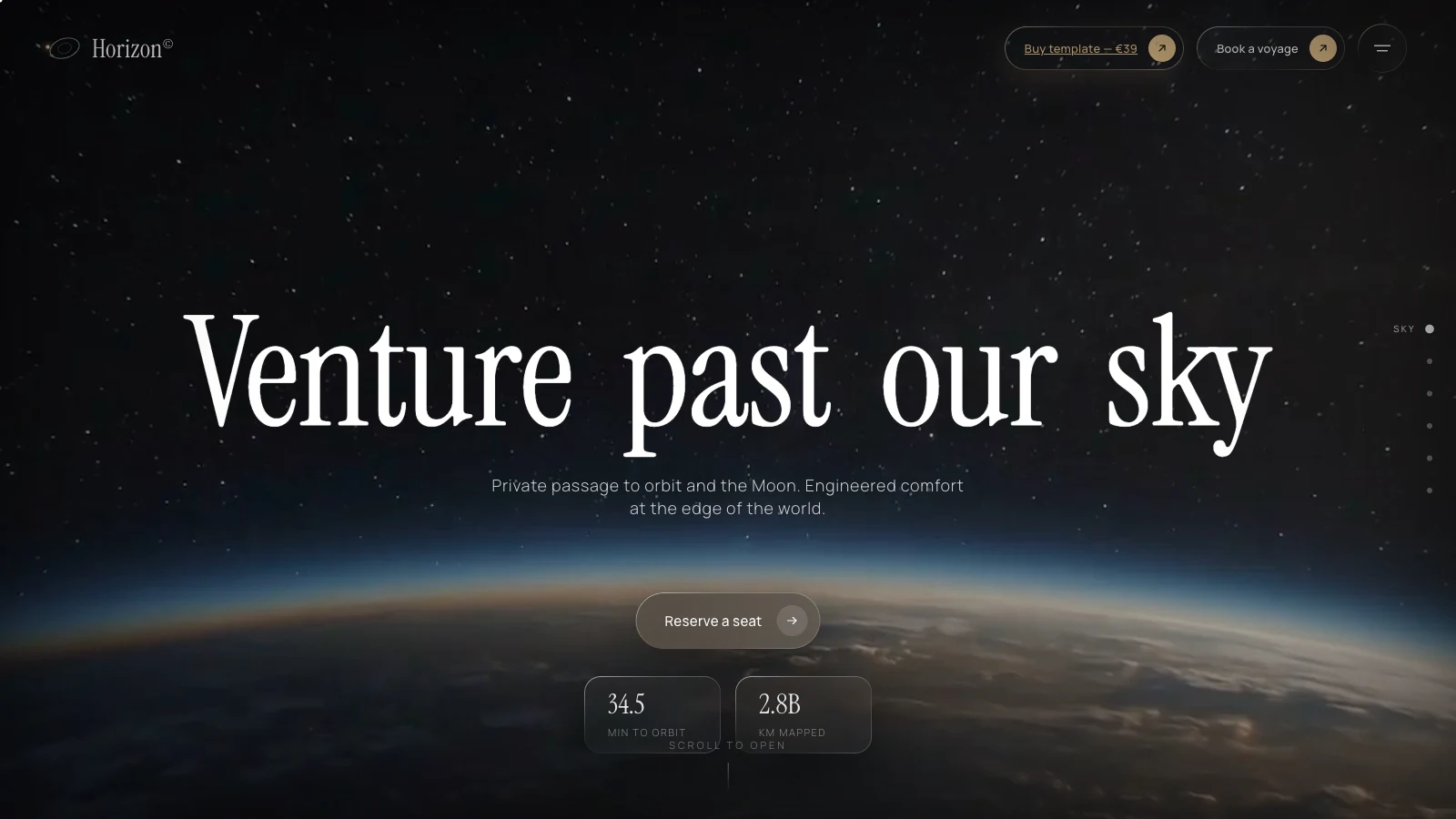
If you're weighing a space tourism website template, or you want to build a scroll-driven one-page site for a product that deserves a cinematic first screen, this is a close read of Horizon, one of my web templates. Open the live demo, scroll slowly once, then view the page source while you read. Everything below was checked against the deployed files on 2026-09-30, and I've corrected a few things an earlier version of this post got wrong.
One label up front: the prices, statistics, testimonials and dates inside Horizon are invented placeholder copy for a demo. Nothing on it describes a real spaceflight operator, a real booking or a real customer.
What does a space tourism website template include?
A space tourism website template like Horizon is a single-page brochure: a video hero, six destination cards with spec panels, a membership band, a flight log, a partners marquee and a booking request form, all filled with fictional content. The job of the page is to make a visitor want to click "Reserve a seat".
The hero carries the headline "Venture past our sky", a one-line subtitle about private passage to orbit and the Moon, that call to action, and two stat tiles counting up to 34.5 minutes to orbit and 2.8B km mapped. Both numbers are placeholders. A section rail on the side tracks scroll progress.
The destinations are the core of the page. Each of the six has a name, a coordinate band, a demo price, a duration, an altitude, a gravity figure, a seat count and a one-sentence description, and the gallery lets the visitor pick one to open its panel. The demo values:
| Destination | Coordinates (demo) | Price (demo) | Duration (demo) |
|---|---|---|---|
| Low Orbit | LEO · 420 KM | $280,000 | 6 hours |
| Aurora Station | POLAR · 540 KM | $640,000 | 3 nights |
| Deep Field | HEO · 35,786 KM | $1,150,000 | 4 nights |
| Lunar Gateway | L2 · 384,400 KM | $2,400,000 | 5 nights |
| Halo Ring | NRHO · 71,000 KM | $3,800,000 | 9 nights |
| Solar Drift | L1 · 1.5M KM | $6,200,000 | 14 nights |
Between the destinations and the form, a header comment in the source lists a hero "portal warp" transition and a spacecraft "explode" section built from a component called ExplodeCube. I haven't described those in detail because the scroll tint and the video are the parts worth copying first. Below that sit three membership tiers (Orbit, Lunar and Charter, the last priced "On request") and three flight-log quotes that are placeholder text. The page ends with a form headed "Request your manifest" that asks for name, email, destination, preferred window and number of travelers.
That form does nothing on the server. Its submit handler only flips a flag in the browser so a "Manifest received." message appears. If you reuse the template, wiring the form to a real backend is your first job, and it is deliberately a brochure rather than a checkout.
How is the Horizon template built?
Horizon is a static site: one HTML file loads React 18.3.1 and @babel/standalone 7.29.0 from unpkg, then compiles six JSX files in the visitor's browser, and styles everything with one hand-written stylesheet of about 54 KB uncompressed. There's no build step and no Tailwind.
The six files split the work in a readable way. helpers.jsx holds the interpolation function, a shared animation loop and the reduced-motion flag. premium.jsx holds the custom cursor, the preloader, the section rail and the scroll progress bar. sections.jsx holds the stats band, the membership tiers, the flight log and the background tint. App.jsx assembles the header, hero, destinations and booking form, with OrbitImages.jsx and ExplodeCube.jsx supplying the two special components. If you fork the template, that split tells you where to look for each behaviour.
Plain CSS suits a page that leans on a few bespoke gradients, a scroll-driven background and a circular destination gallery, which are awkward to express as utility classes. A real stylesheet can cost less to maintain than a thousand class strings, though that's a judgment call, not a rule.
The trade-off is in the script tags. The page loads the development builds of React, and compiling JSX in the browser is something the Babel docs discourage for shipping sites: they say that if you're using Babel in production you should normally not use @babel/standalone, and they point to a build system instead. Babel's @babel/standalone page frames it as a tool for prototyping and demos. That fits a template demo well. For a customer site, my recommendation is to precompile the JSX and switch to production builds of React before launch.
The source isn't fully clean for reuse either. Comments in the code flag a "demo storefront link" that should be removed before you deploy your own instance, and the menu overlay carries placeholder contact and location lines. Treat those as a checklist.
How does the scroll-driven background colour work?
A component called BackgroundTint turns scroll progress into an RGB value and writes it to the body's background colour, blending between five stops. The effect is deliberately faint: every channel stays between 4 and 14 out of 255, so the page drifts between near-blacks with a slight blue lean.
An earlier version of this post described a warm beige and a slate, and that was wrong for the source deployed today. These are the actual stops:
| Scroll progress | Red | Green | Blue |
|---|---|---|---|
| 0 (top) | 5 | 5 | 5 |
| 0.22 | 8 | 6 | 7 |
| 0.46 | 4 | 6 | 12 |
| 0.70 | 8 | 5 | 14 |
| 1 (bottom) | 5 | 5 | 6 |
Progress is scrollY divided by the scrollable height, clamped between 0 and 1, and a small piecewise-linear interpolation helper blends the channels. The write itself is a single line:
document.body.style.backgroundColor = `rgb(${r},${g},${b})`;
To adapt it to your own brand, edit the three arrays and keep the stops in the same order. Keep the values close together if you want the background to read as atmosphere rather than as a visible colour change; widen them and the shift becomes a feature visitors notice.
Does the scroll handler need throttling?
Probably not for one style write, but two details are worth knowing. The listener is registered as passive and runs on every scroll event, and it reads scrollHeight each time, which can force layout. Caching that value and refreshing it on resize would be cheaper. That is my suggestion and I haven't profiled it.
An earlier version of this post suggested moving the update into requestAnimationFrame. MDN's scroll event page says scroll events can fire at a high rate and handlers shouldn't run computationally expensive DOM work, but it also calls rAF-based throttling of scroll handlers useless, because animation frame callbacks fire at the same rate as scroll events. MDN's requestAnimationFrame reference confirms the callbacks usually match the display refresh rate. So if you need to throttle, measure a timeout yourself, and otherwise keep the handler cheap.
How heavy is the hero video, and what about reduced motion?
The hero clip is 655,884 bytes, about 641 KiB, while the two other background clips are 989,512 and 4,279,338 bytes, measured with HTTP HEAD requests on 2026-09-30. The heavy one is the third clip, so that's the file to recompress first.
Each background video uses autoplay, muted, loop and playsinline. web.dev's guide on replacing GIFs with video recommends exactly that attribute set so a video behaves like an animated GIF. A video hero is still unusual: the HTTP Archive Web Almanac 2024 media chapter reports that 6.7% of mobile pages and 7.7% of desktop pages include at least one <video> element, and that autoplay appears on 23% of video elements. That's a statistic about video in general, not about heroes, so read it as context rather than a benchmark.
Motion is where a cinematic template can go wrong. MDN describes prefers-reduced-motion as the way to detect that a user wants less non-essential motion, and notes that scaling or panning large objects can trigger vestibular discomfort. Horizon reacts in two ways: a script checks the media query and sets the background video's opacity to 0 when reduce is on, and the stylesheet shortens animation and transition durations to almost nothing. One limit follows from the code: the script reads the query once when the page loads, so changing the operating-system setting mid-visit needs a reload.
How can you verify all this yourself?
- Open the demo and reload with the Network tab filtered to media, then compare the three file sizes with the numbers above.
- Scroll the page with the Elements panel open and watch the
styleattribute onbodychange. - Turn on reduced motion in your operating system or emulate it in DevTools, reload, and check that the hero video is hidden.
- Read the six JSX files linked from the page source and compare them with this description.
- Check the stylesheet size in the Network tab against the 54 KB figure, and treat any difference as a sign the template has changed since I measured it.
If you want the wider story of how I package templates, start with Building Web Templates: Design, Engineering, and Selling. For a sibling build with a different design problem, see Echo, the musician portfolio template. Your next step: pick one of the six destination panels and rewrite it for your own product, then see whether the page still holds together without the space theme.