If you're looking for a musician website template, or you're an artist who wants the record itself on the page instead of a row of streaming badges, this is a close read of Echo, one of my web templates. Open the live demo, move the mouse across the first screen, then keep the page source open while you read. I checked everything below against the deployed files on 2026-09-30, and where the deployed code disagrees with what an earlier version of this post said, the code wins.
One label up front: the album, track titles, tour cities, dates, statuses, artist bio and newsletter copy in Echo are placeholder text for a demo. There is no real artist, no real release and no real tour behind any of it.
What should a musician website template include?
A musician website template should put the music, a few dates and a way to reach the artist on one scrollable page, and Echo does that with a hero, a nine-track player, an about section, a tour list and a footer.
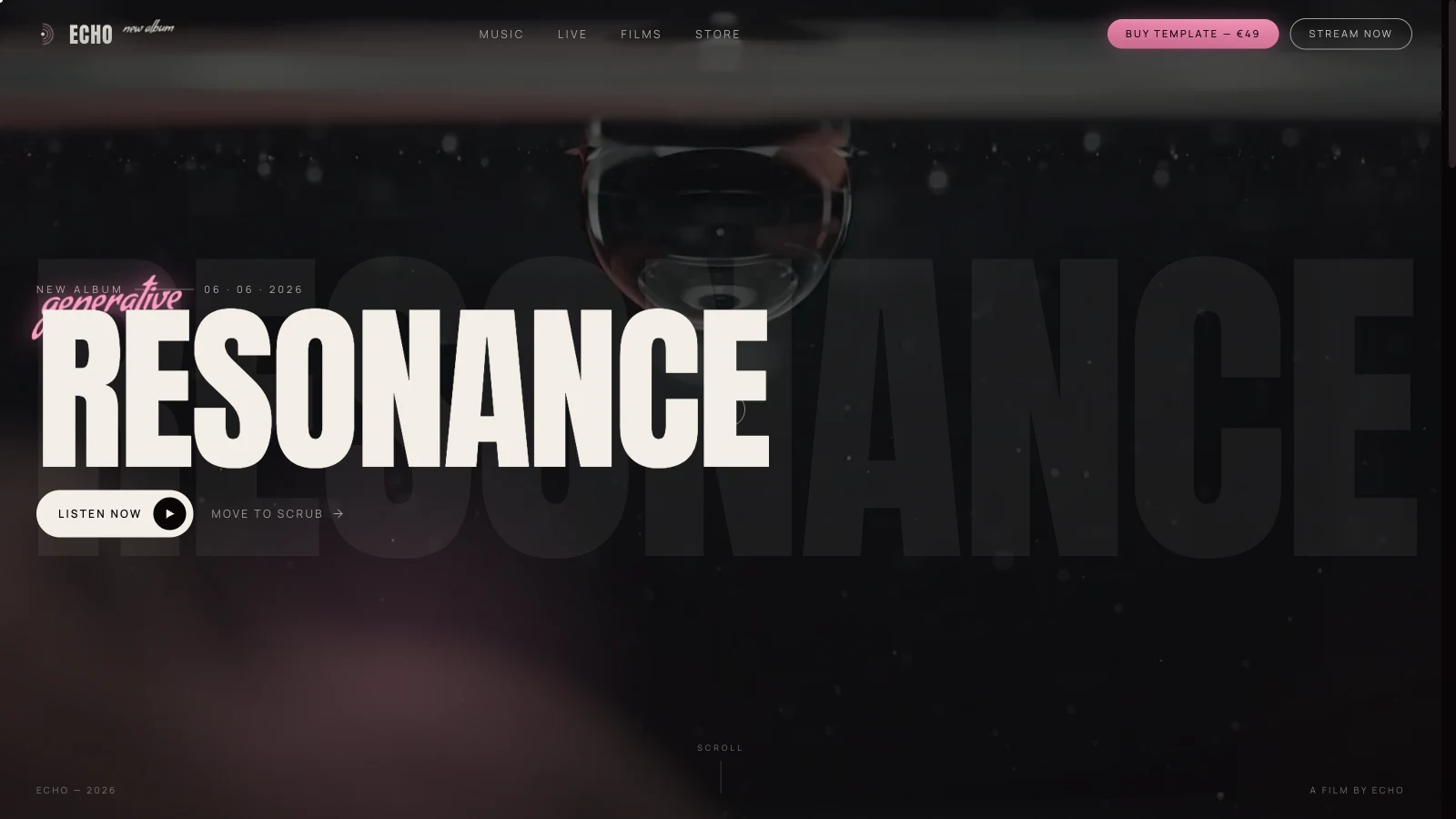
Echo is a single page with five blocks. The hero carries the album name "RESONANCE", a "New album" line, a placeholder release date and a "Listen now" button. The tracklist is a player with an arc of nine cards. The about section holds a portrait that reacts to the cursor. The live section is a list of six placeholder shows. The footer has a newsletter field, five streaming links and four social links, all of which point at "#" until you replace them.
| Block | What the deployed code does | Placeholder? |
|---|---|---|
| Hero | Muted video that you scrub by moving the pointer sideways | Album name, date and tagline |
| Tracklist | Nine cards on an arc, one shared audio element, a 56-bar click-to-seek waveform | Titles, BPM, keys, 24-second demo audio |
| About | Canvas spotlight that reveals a second portrait | Artist text |
| Live | Six rows with a date, city, venue, country and status | All of it |
| Footer | Email field with a format check, streaming and social links | Links point at "#" |
The older copy of this post was wrong about the newsletter: it said there was no newsletter form. The deployed footer has one: it checks the address against a simple pattern and then shows "You're on the list", and it sends nothing anywhere. If you keep it, wire it to your own mailing tool before launch.
The same goes for the tracks. A comment in the source says the demo audio is 24-second ambient beds, and each card's dur value has to match the real length of the file you swap in through TRACKS[i].audio. The two files I measured with HEAD requests are 195,020 bytes each, so your full masters will be far heavier. Decide early whether you ship 30-second previews, which keeps the page light, or full tracks.
How is the Echo template built, and is it ready for production?
Echo is a static site: one small HTML file loads Tailwind from its Play CDN, React 18.3.1 production builds and @babel/standalone 7.29.0, then compiles five JSX files in the visitor's browser. It is a demo-grade template, not a production build.
The HTML file is 9,319 bytes. The five scripts are icons.jsx, SandImage.jsx, ArcSlider.jsx, Spotlight.jsx and app.jsx, and there is no bundler and no animation library. Motion comes from CSS keyframes, transitions and a few requestAnimationFrame loops. Four Google fonts carry the look: Anton for the display type, Condiment for the pink script accent, Manrope for body text and Newsreader for the serif paragraphs, on a near-black ink background with a bone-coloured foreground.
Two choices deserve a hard look before you reuse it. First, the Tailwind docs say that the Play CDN is designed for development purposes only and is not intended for production, so the real fix is to compile your CSS. If you want the background on that, my Tailwind CSS glossary entry and the Tailwind v4 production migration post cover it. Second, compiling JSX in the browser costs startup time on every visit. Precompiling the five files is a mechanical job, and it is the first thing I would do for a paying client.
An earlier version of this post claimed the hero video was a generated clip, re-encoded from 12 MB to 1.4 MB with a blurred watermark. I can't verify any of that from the deployed source, so I removed it. What I can verify is the file on the server: ink-bloom.mp4 is 544,390 bytes. For scale, the HTTP Archive Web Almanac 2024 page weight chapter reports video response sizes with a median of 194 KB on desktop and 299 KB on mobile, and a 75th percentile of 875 KB and 1,169 KB. That places Echo's hero between the median and the 75th percentile, which is reasonable for a full-screen clip and still worth recompressing for a real site.
The Web Almanac's media chapter adds that 48.9% of mobile video elements use exactly one source element, and that another 42.5% have none. Echo belongs to the second group, since the video tag has a plain src attribute. That's fine for MP4, but it means there's no WebM fallback and no poster image.
How do the hero scrub, the arc slider and the spotlight work?
All three are pointer-driven, and each one is short enough to read in one sitting: the hero moves video time with horizontal pointer movement, the arc slider turns with page scroll, and the spotlight paints a short cursor trail onto a canvas.
Why does the hero video follow your mouse?
The hero video has no autoplay or loop. It is muted, inline and preloaded, and a pointer handler converts horizontal movement into a new currentTime: the distance moved, divided by the window width, times a sensitivity of 0.8, times the clip duration. The script tracks whether a seek is in flight and waits for the seeked event, which MDN says fires when a seek operation has completed, before it applies the newest target time. Touch movement goes through the same function. The "move to scrub" hint in the hero is literal.
That design has a cost. Scrubbing makes the browser seek constantly, and smoothness depends on how the clip was encoded, so test on a mid-range phone before you pick your own footage. It also means nothing plays for a visitor who never moves the pointer.
How does the arc slider turn?
Nine cards sit on a circle segment. A function called getArcConfig picks the card size, radius and angular spacing from the viewport width, with breakpoints at 640, 1024 and 1440 pixels, and each card is placed with trigonometry and then rotated about a point far below it. The earlier post said the cards rotate on click or drag. In the deployed code the rotation comes from scroll position, through a passive scroll listener on the tracklist section, and a click on a card selects that track and starts playback. There is no drag handler.
The active card lifts 22 pixels, and its pastel tint comes from a nine-colour PASTELS array. Choose your own tints, because the defaults are demo choices tuned for a dark page.
What does the spotlight actually draw?
The About section stacks a dimmed, greyscale portrait under a canvas. A second portrait is painted onto that canvas, and then the script sets globalCompositeOperation to destination-in, which MDN defines as keeping existing canvas content only where the new shape overlaps it and making everything else transparent. The new shapes are radial gradients along a trail of the last six pointer positions, with radii growing from 120 to 230 pixels and stronger alpha for newer points. When the pointer leaves, the trail is trimmed at random until it disappears. So the old description of one circular hole was close, but the real effect is a soft comet tail, and it handles touch moves too.
What happens with reduced motion?
Partly covered. The stylesheet has prefers-reduced-motion rules that switch off the word-by-word headline fade and the scroll reveals, and MDN notes that scaling or panning large objects can trigger vestibular discomfort. The stylesheet has no rule for the film-grain overlay, the preloader counter or the equalizer bars, so those still move. If your audience includes people who asked their device for less motion, add those three to the media query.
Can you verify this yourself?
- Open the demo with the Network tab filtered to media, and compare
ink-bloom.mp4with the 544,390-byte figure above. - Move the pointer sideways across the hero and watch
currentTimechange on the video element in the console. - Scroll past the tracklist and watch the card rotation change without any click.
- Click the waveform to seek, then click a different card and check that the waveform pattern changes with it. The seed is the active track index, so the same track always draws the same bars.
- Read the five JSX files linked from the page source and compare them with this description.
For the bigger picture of how I package these, read Building Web Templates: Design, Engineering, and Selling. A sibling build with a different design problem is Horizon, the space tourism template.
Your next step: replace the nine TRACKS entries with your own titles and a 30-second preview each, then check whether the arc still reads well with six tracks instead of nine.